Kimi K3 completely broken multimodal capabilities

Where does the bug appear (feature/product)?

Cursor IDE

Describe the Bug

Multimodal capabilities of Kimi K3 are obviously not working. It can’t recognise what is on an attached image/screenshot at all. Can’t read text on screen and hallucinates instead.

Steps to Reproduce

  1. Open fresh chat
  2. attach image to prompt, ask it what’s in the image
  3. Read Kimi’s surreal hallucinations, mostly based on filename and containing directory

Expected Behavior

Kimi is supposed to be able to use it’s multimodal capabilities

Screenshots / Screen Recordings

Operating System

Windows 10

Version Information

3.14.7 (user setup)

For AI issues: which model did you use?

Kimi K3

Additional Information

It’s not mentioned anywhere that multimodal capabilities for Kimi K3 are disabled. Grok 4.5 can properly analyse actual image contents.

Does this stop you from using Cursor

Sometimes - I can sometimes use Cursor

Hey, thanks for the detailed report. I can see the screenshot. It’s the KCD Global Map with small legend text and marker labels. This isn’t a broken feature, it’s expected behavior, and here’s why.

Kimi K3 in Cursor isn’t a natively multimodal model, so it doesn’t receive the image itself. When you attach an image to a non-vision model, Cursor runs it through a separate helper model that writes a text description, and only that description is sent to Kimi. So the model gets the general scene, but it can’t reliably read small text like marker labels or the top panel. It only has the description plus the file name, not the pixels. That’s why it can look like hallucinations.

For screenshot tasks like reading UI text, labels, or error dialogs, use a natively multimodal model like Grok 4.5, Claude, GPT, or Gemini. You already noticed Grok 4.5 can read the content well, and that’s because it gets the image directly.

About it not being clearly stated anywhere that Kimi K3 isn’t natively multimodal, that’s a fair point. I’ll pass it to the team so it’s clearer in the UI and docs.

Let me know if a multimodal model still can’t read something correctly, then we can dig deeper.

Actually it’s clear that there is no helper model either, or at least it’s not working. It genuinely can’t find out anything about the contents of the image, not directly nor through a helper model. It literally just goes off filename, directory and chat context, I’ve checked. It can’t see anything at all in the contained image. This should definitely be well communicated because of how confidently the model hallucinates and pretends that it does see something.

The helper model is actually running. On our side we can see that each attached image goes through a separate vision model, and Kimi gets a text description from it. The issue is the fidelity of that description, not that the pipeline is missing.

Two things hurt quality. First, the image gets downscaled before sending, roughly to 1024 px on the longer side, so small text like legends, marker labels, the top bar gets lost before the caption model even reads it. Second, the filename is included in context, and the model partly relies on it. Together, on screenshot heavy tasks it can look like the model is just guessing from the filename, even though there is a description, it is just rough.

The practical takeaway is the same. For reading text in screenshots like UI, labels, error dialogs, use a natively multimodal model like Grok 4.5, Claude, GPT, or Gemini. They get the actual image, not a description.

On the point that it is not stated clearly anywhere that Kimi K3 does not read images natively, I agree. That is a fair point. I passed it to the team so it is clearer in the UI and docs.

Hey @Tarek98 on the technical side, yes, it is the same in Cursor CLI. Kimi K3 is served as text only, so images go through the same caption pipeline, and there is no native image reading there. This is a serving endpoint limitation that is the same in the IDE and CLI, not something intentional.

A couple factual clarifications so there is no confusion. Grok is an xAI model, not something Cursor built on top of Kimi. Composer is also not built on Kimi. And we are not intentionally downgrading Kimi K3. Text only serving is how the model is currently available from the provider. As soon as a natively multimodal version is available, we will add it.

Let’s keep the thread focused on the image issue. That makes it easier for us to help and faster to fix in the product.

Where does the bug appear (feature/product)?

Somewhere else…

Describe the Bug

Long-standing multimodal hallucination bug with Kimi K3 inside Cursor Chat/Agent.

When I attach a screenshot to the chat and ask the model to describe it, Cursor’s Kimi K3 frequently invents content that is not in the image at all (fabricated UI text, wrong apps, wrong websites).

The same model on the official Kimi/Moonshot product describes the same images correctly. So this appears to be a Cursor-side issue (image preprocessing / prompt wrapping / vision pipeline), not a base-model capability problem.

Steps to Reproduce

  1. Open Cursor Chat/Agent and select model: Kimi K3.
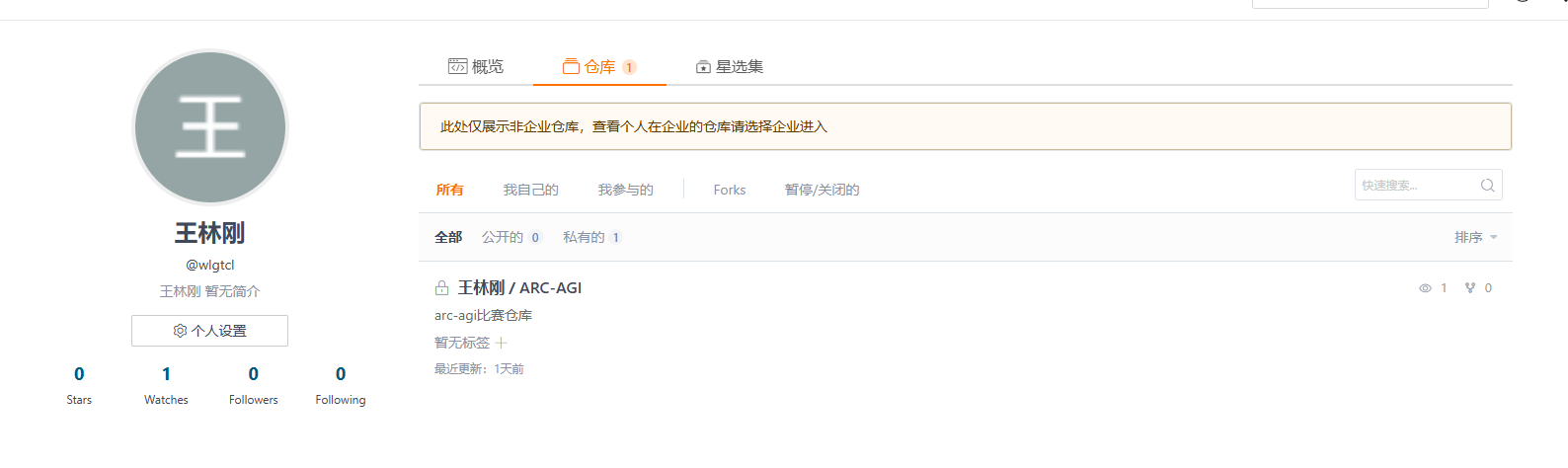
  2. Attach a clear screenshot (example: a Gitee profile page showing username @wlgtcl and a private repo “ARC-AGI”).
  3. Ask: “Describe this image accurately. Only report what is visible.”
  4. Observe the response.

Actual result (examples from the same Gitee screenshot):

  • First response hallucinated a Windows CMD window running ping www.google.com -t with IPv6 and “General failure”.
  • After asking to re-identify, it hallucinated a Kaggle ARC Prize 2026 leaderboard with specific fake scores/usernames.
  • Neither Google, CMD, nor Kaggle appears anywhere in the image.
  1. Upload the same screenshot to the official Kimi K3 web product and ask the same question → description is correct (Gitee profile / repo page).

Expected Behavior

The model should only describe content that is actually visible in the attached image.
If uncertain, it should say so, instead of inventing detailed fake UI, text, or brand names.
Cursor’s Kimi K3 vision path should match the official Kimi K3 behavior on the same image.

Screenshots / Screen Recordings

Operating System

Windows 10/11

Version Information

Version: 3.13.21 (user setup)
VS Code Extension API: 1.128.0
Commit: 55434bd8062ece6fee083b82beed2aee42d253f0
Date: 2026-07-27T03:26:14.573Z
Layout: IDE
Build Type: Stable
Release Track: Default
Electron: 40.10.3
Chromium: 144.0.7559.236
Node.js: 24.15.0
V8: 14.4.258.32-electron.0
xterm.js: 6.1.0-beta.256
OS: Windows_NT x64 10.0.26100

For AI issues: which model did you use?

Kimi K3

For AI issues: add Request ID with privacy disabled

e42cfd98-245e-4f4f-9f69-9ba5f5da153e

Additional Information

This has been happening for a long time with Kimi K3 vision in Cursor.
Official Kimi K3 web app describes the same images correctly.
Example: a Gitee profile screenshot was misread as CMD ping Google, then as a Kaggle leaderboard.

Important comparison: the official Kimi K3 product does NOT have this problem.

I tested the exact same screenshots on the official Kimi website / app. Image recognition there was correct and stable.

Only inside Cursor Chat/Agent (with Kimi K3 selected) does the model hallucinate image content that is not present in the screenshot.

This strongly suggests a Cursor-side multimodal/vision pipeline issue (image preprocessing, prompt wrapping, or request formatting), not a base-model failure of Kimi K3 itself.

Does this stop you from using Cursor

No - Cursor works, but with this issue

I’ll stop here so I can respect your desire to fix the Kimi K3 issue, appreciate your help @Dean. Just hope your company can listen to my concerns & act more ethically as well some day.

It’s easily apparent that the helper model does not function. This issue cannot be understood by a support desk AI agent and requires human attention. The confidence of the hallucinations will easily confuse and misguide uncareful users. FYI the name of the file before attaching it to the prompt was just “screenshot.jpg”.

If there is no helper model at all, I imagine this could be an issue with Fireworks’ Kimi K3 API…?

However, I do not have any screenshot remotely similar to the one the agent is describing in detail here on my hard drive, so if these are not hallucinations, then your vision helper routing is wrong and the agent is analysing some other user’s uploaded image, which sounds like a very major issue.

Looking forward to further updates on this after human review of the thread.

Regards

Hi @mina_wailin Thanks for the post - I moved it here because @deanrie provided a great explanation here already!

I’ve sent the Firefox logo as a test to Kimi K3 Max. This is egregious.

It’s weirdly specific, innit…?

Switching to a native vision model moves the cap, it does not remove it. Those models resize too. On a tall or dense capture you land back in the same place.

Numbers from my own testing: a full page shot at 2540x18410 comes out 216x1568 at the old cap, 355x2576 at the new one. At 216px wide a legend is a smear. The model still answers, and answers confidently, because nothing in the payload says the pixels were destroyed.

So resolution is the wrong knob to turn. Send the text and the element positions as text alongside the image and the resize stops mattering.

Hey, thanks for the new examples, especially the Firefox logo case. It’s a good one.

Confirming what I said earlier: Kimi K3 (and K3 Max) in Cursor is handled as text-only, so the model doesn’t receive the actual image. The attached image is processed by a separate helper model that writes a text description, and that description is what gets sent to Kimi. With simple or clean images, the description can still be rough, and the model presents those guesses as if it’s directly seeing the image. That’s why you get confident but wrong answers.

On the important question from the thread: this is not someone else’s image and it’s not a data leak between users. The model isn’t seeing any other user images. It’s filling in details from a low quality description of your own attachment, and it may also pick up the filename from context. It looks weirdly specific because the model fills the gaps with plausible details.

It’s a fair complaint that the UI and docs don’t clearly say Kimi K3 can’t read images natively, and the behavior looks like confident hallucinations. I’ve shared this with the team so it’s more transparent and so the model doesn’t present guesses as observations. I can’t share a timeline yet, but I’ll reply in the thread if there’s an update.

Practical tip for now: for image tasks like reading text from screenshots, UI, logos, or error dialogs, use a natively multimodal model like Grok 4.5, Claude, GPT, or Gemini. They receive the actual image, not a description.

From my experience so far on Cursor Agent CLI, GLM 5.2’s image reading capabilities work very well with Cursor’s Image Reading tool even though GLM 5.2 does NOT have multi-modal image-reading capabilities on its own. Kimi K3 on the other hand DOES have multi-modal image-reading capabilities by default, but the version provided on Cursor is text-only and it CANNOT even use Cursor’s image-reading tool without making tons of mistakes. Therefore, it feels like Kimi K3 is just plain unusable on Cursor because it makes huge mistakes on image reading and misguides us into believing it’s doing the right thing. I BELIEVE this is because Kimi K3 is designed to read images with it’s native multi-modal image-reading functionality so it gets confused when using an image-reading tool instead of using its native image-reading functionality and Cursor’s version of Kimi K3 does NOT allow that (IDK why this happens but I feel this should be addressed by the Cursor Team because the text-only version is very misleading)…

Also would love to see GLM 5.3 soon on Cursor if y’all plan to support that…

@deanrie

Here’s an example showing Kimi K3 correctly responding to an image inquiry on kimi.ai:

The Kimi platform documentation specifies that kimi-k3 can understand visual content. Image content can be provided through a standard, OpenAI API compatible endpoint.

https://platform.kimi.ai/docs/guide/use-kimi-vision-model

I don’t understand why Cursor claims that:

  • Kimi K3 does not read images natively
  • Kimi K3 in Cursor isn’t a natively multimodal model

Testing this model outside of Cursor, it appears to be a perfectly functional multimodal model. So why are we getting a different, less visually capable version of it in Cursor?

Thanks for the examples and the link to the Kimi docs, that’s a good, specific request. I also see the screenshot where kimi.ai reads the image correctly.

You’re right: the base Kimi K3 model is multimodal, and the official Moonshot/kimi.ai endpoint serves that version. There’s no contradiction here. The difference isn’t the model architecture, it’s how Kimi K3 is currently available in Cursor. The serving deployment we have right now is text-only. So it’s the same model, but the specific deployment Cursor connects to can’t accept images natively.

Because of that, when you attach an image it goes through a separate helper model that writes a text description, and only that description gets sent to Kimi, not the actual pixels. That’s why you can get confident but inaccurate answers, especially for screenshots with small text.

This isn’t an intentional downgrade, it’s just what’s available to us right now. As soon as we have a natively multimodal Kimi K3 option, we’ll hook it up.

Your point that the UI and docs don’t say this clearly (and that the model presents guesses as real observations) is fair. I’ve shared this with the team so we can make it clearer.

Practical tip for now: for image tasks (reading text from screenshots, UI, logos, error dialogs), use a natively multimodal model like Grok 4.5, Claude, GPT, or Gemini. They receive the actual image, not a description.

Add information to the model’s tooltip in the model selector. Currently, there is no tooltip at all.