For me, I noticed that this error occurs when I open Cursor while files with Git changes are still open. Closing everything, then pressing Cmd/Ctrl + Shift + P → Reload Window, fixes it.
@Quang_Hoang_Dinh thanks, that’s a useful data point. Closing the files that had pending Git changes before Reload Window matches what we’ve been seeing, where stale workspace state stops the extension host from finishing startup. I added it to our notes.
@vibe-qa your report looks like a different issue. You’re on Linux 3.3.28 Nightly, and the symptoms “loads slow, no history” don’t match “No source control providers registered” that this thread is tracking for macOS. Could you open a new bug report so it doesn’t get mixed up with the macOS extension host case? When you do, please include:
- Whether Source Control is totally empty and broken, or just slow to show up
- Output of
Developer: Export Logsmain.log,renderer.log,exthost/ - Whether
cursor --disable-extensionschanges anything - If you recently updated from Stable to Nightly, when the issue started
For everyone still hitting the original macOS issue, there’s no ETA on the fix yet, but the logs and workarounds you’ve shared are directly helping the investigation. I’ll post here when I have something concrete to share.
The issue has resolved itself sometime later, it appears git is very sluggish and is blocked by some Cursor internals (for example error popups when clicking Commit while waiting for auto generated commit message).
It probably has to do with the encrypted home folder on a 10 year old laptop, especially on larger projects.
@deanrie here are my logs when I’m hitting this issue on macOS. The issue resolved after I disabled and then re-enabled extensions.


main.log
2026-05-22 08:40:25.633 [info] updateURL https://api2.cursor.sh/updates/api/update/darwin-arm64/cursor/3.4.20/1e0a9bda1e2f67580c440395f83263981213898a27a28784a546addd0e1a8e1d/stable
2026-05-22 08:40:25.634 [info] update#setState idle
2026-05-22 08:40:27.016 [info] [Tray] getMacOSIconPath: hasNotifications: false
renderer.log
2026-05-22 08:40:26.861 [info] [CursorExtensionIsolationService] Extension isolation gate is enabled, effective isolation is enabled
2026-05-22 08:40:26.861 [warning] Via 'product.json#extensionEnabledApiProposals' extension 'ms-toolsai.datawrangler' wants API proposal 'debugFocus' but that proposal DOES NOT EXIST. Likely, the proposal has been finalized (check 'vscode.d.ts') or was abandoned.
2026-05-22 08:40:26.861 [warning] Via 'product.json#extensionEnabledApiProposals' extension 'ms-vscode.vscode-copilot-data-analysis' wants API proposal 'chatVariableResolver' but that proposal DOES NOT EXIST. Likely, the proposal has been finalized (check 'vscode.d.ts') or was abandoned.
2026-05-22 08:40:26.861 [warning] Via 'product.json#extensionEnabledApiProposals' extension 'ms-python.python' wants API proposal 'terminalShellType' but that proposal DOES NOT EXIST. Likely, the proposal has been finalized (check 'vscode.d.ts') or was abandoned.
2026-05-22 08:40:26.861 [warning] Via 'product.json#extensionEnabledApiProposals' extension 'ms-python.vscode-python-envs' wants API proposal 'terminalShellType' but that proposal DOES NOT EXIST. Likely, the proposal has been finalized (check 'vscode.d.ts') or was abandoned.
2026-05-22 08:40:26.861 [warning] Via 'product.json#extensionEnabledApiProposals' extension 'github.copilot-chat' wants API proposal 'chatReadonlyPromptReference' but that proposal DOES NOT EXIST. Likely, the proposal has been finalized (check 'vscode.d.ts') or was abandoned.
2026-05-22 08:40:26.861 [warning] Via 'product.json#extensionEnabledApiProposals' extension 'ms-azuretools.vscode-azure-github-copilot' wants API proposal 'lmTools' but that proposal DOES NOT EXIST. Likely, the proposal has been finalized (check 'vscode.d.ts') or was abandoned.
2026-05-22 08:40:26.861 [warning] Via 'product.json#extensionEnabledApiProposals' extension 'vscjava.vscode-java-pack' wants API proposal 'lmTools' but that proposal DOES NOT EXIST. Likely, the proposal has been finalized (check 'vscode.d.ts') or was abandoned.
2026-05-22 08:40:26.862 [warning] Via 'product.json#extensionEnabledApiProposals' extension 'apidev.azure-api-center' wants API proposal 'chatParticipant' but that proposal DOES NOT EXIST. Likely, the proposal has been finalized (check 'vscode.d.ts') or was abandoned.
2026-05-22 08:40:26.862 [warning] Via 'product.json#extensionEnabledApiProposals' extension 'apidev.azure-api-center' wants API proposal 'languageModels' but that proposal DOES NOT EXIST. Likely, the proposal has been finalized (check 'vscode.d.ts') or was abandoned.
2026-05-22 08:40:26.880 [warning] Missing property "rpcFileLoggerFolder" in oldValue. Filling with value from initValue. Please add a migration if necessary.
2026-05-22 08:40:26.891 [info] [PushRequestContextService] push request context is enabled (killswitchActive=false, instantGrepEnabled=true, indexingGrepEnabled=true)
2026-05-22 08:40:27.134 [info] Started local extension host with pid 72907.
2026-05-22 08:40:27.275 [error] Extension 'anysphere.remote-ssh' appears in product.json but enables LESS API proposals than the extension wants.
package.json (LOSES): resolvers, tunnels, contribViewsRemote, terminalDataWriteEvent, cursorTracing, cursorNoDeps
product.json (WINS): resolvers, tunnels, terminalDataWriteEvent, contribRemoteHelp, contribViewsRemote, telemetry, cursorTracing
2026-05-22 08:40:27.276 [info] Placing extension(s) anysphere.cursor-retrieval on a separate extension host.
2026-05-22 08:40:27.276 [info] Placing extension(s) anysphere.cursor-always-local, anysphere.cursor-resolver, anysphere.cursor-socket on a separate extension host.
2026-05-22 08:40:27.276 [info] Placing extension(s) anysphere.cursor-agent-exec, anysphere.cursor-agent-worker, anysphere.cursor-checkout on a separate extension host.
2026-05-22 08:40:27.299 [warning] [Anthropic.claude-code]: View container 'claude-sidebar-secondary' does not exist and all views registered to it will be added to 'Explorer'.
2026-05-22 08:40:27.369 [info] Started local extension host with pid 72908.
2026-05-22 08:40:27.369 [info] Started local extension host with pid 72909.
2026-05-22 08:40:27.369 [info] Started local extension host with pid 72910.
2026-05-22 08:40:27.380 [warning] No search provider registered for scheme: file, waiting
Hey @Alex_Fox, thanks for the logs and for the new workaround.
Your renderer.log shows the same signature we’ve seen from other reporters in this thread: the extension host starts (Started local extension host with pid 72907), but then it gets stuck on No search provider registered for scheme: file, waiting, and vscode.git never activates. So the process is alive, but the bootstrap doesn’t finish. It’s the same pattern we’re tracking.
Disable + re-enable extensions hasn’t come up in previous reports. If it works reliably for you more often than close-all-windows or clear cache, let me know. That would help narrow down where exactly the extension host is looping.
A couple quick questions if you have a minute:
- Before it breaks, how many Cursor windows do you usually have open, and are any of them a workspace (multi-root), or is it single-folder only?
- When you do disable + enable extensions, does it help if you only toggle built-in ones, or do you need to disable everything including user extensions?
I can’t share an ETA for a fix yet, but the logs are very relevant. I’ll attach them to our ticket. If it happens again and you can grab the exthost/ folder from ~/Library/Application Support/Cursor/logs/<latest>/window<N>/ for the stuck window, please post it here. It would help a lot.
It would be great to prioritize fixing this bug, as I encounter it in cursor/cursor nightly at least 3-4 times a day! I even had to write a watcher that fixes this bug and restarts the IDE, it’s really very annoying!
I’ve been experiencing the same bug for the last few weeks. Every 2 or 3 times I open the Cursor app version 3.4.20 on Windows 10. No source control providers registered and no agents will work. I solve it by deleting the C:\Users\user\AppData\Roaming\Cursor\User\workspaceStorage folder.
This fixes it, but it’s getting a bit boring having to do this every other time I open Cursor.
@ivnmood, I get it, 3 to 4 times a day is already getting in the way of work. The watcher idea is interesting. What exactly does it detect as a trigger: missing exthost/ folder, a specific error string in renderer.log, or something else? And what does it do: just restart Cursor, or does it rebuild anything too? If you can share the logic, it’ll help us speed up detection on our side.
@Boris_Makewater, thanks for the report. This is the first signal that the symptom also shows up on Windows. Until now this thread was mostly about macOS. A few questions:
- Deleting the entire
workspaceStoragefolder resets the state for all projects at once. Next time, try a narrower option: find the subfolder that matches the broken project. Each one has aworkspace.jsonwith the project path. Then delete only itsstate.vscdb*. If that’s enough, it strongly supports the same root cause hypothesis as on macOS: corrupted per-workspace SQLite. - What exact Windows 10 version build are you on, and did you update Cursor shortly before this started?
- If it happens again, before deleting workspaceStorage, run
Cmd/Ctrl+Shift+PthenDeveloper: Export Logsand attachmain.log,renderer.log, andexthost/for the broken window. On Windows, logs are in%APPDATA%\Cursor\logs\<timestamp>\.
For everyone still on macOS: there’s no ETA for a fix yet, but the logs and workaround options you’re sharing are really helping narrow down the cause.
The most annoying bug, been an issue for months and I can’t wait for Zed git diffing tool to catch up so I can move to it full time.
Anyway, in case it helps anyone, here is my flow on Mac (using Raycast).
Create a script:
#!/usr/bin/env bash

# Required parameters:
# @raycast.schemaVersion 1
# @raycast.title Restart Cursor
# @raycast.mode silent

# Optional parameters:
# @raycast.icon 🤖

# Documentation:
# @raycast.author Author
# @raycast.authorURL https://raycast.com/Author

set -euo pipefail

APP_NAME="Cursor"
STORAGE_DIR="$HOME/Library/Application Support/Cursor/User/workspaceStorage"

osascript -e "tell application \"$APP_NAME\" to quit" >/dev/null 2>&1 || true

# Wait briefly for Cursor to quit cleanly, then force-kill if needed.
for _ in {1..20}; do
  if ! pgrep -x "$APP_NAME" >/dev/null 2>&1; then
    break
  fi
  sleep 0.25
done

if pgrep -x "$APP_NAME" >/dev/null 2>&1; then
  pkill -x "$APP_NAME" || true
fi

rm -rf "$STORAGE_DIR"
open -a "$APP_NAME"
Every time Cursor is started (this bug happens to me every single time…), use Raycast to ‘Restart Cursor’. Curse for the few unnecessary seconds it takes to get back to work..
Hey, I get it. Having to drag this bug around for months is really exhausting, and the frustration is fair.
One note about your script: running rm -rf on the whole workspaceStorage on every startup resets local UI state for all projects, like open tabs, terminal history, layout, search history. That’s the real cost behind those few seconds, but in practice you lose a lot more.
You can narrow it down to the problematic workspace. Delete only the state.vscdb* for that specific folder, not the whole directory. @ivnmood explained above in post #23 how to find the right workspaceStorage/<id>/ via workspace.json and remove only its DB. That’s enough to unblock the extension host, and it keeps other projects’ state intact.
Also, if you can, before the script runs again next time, could you grab logs from the broken window? We need main.log, renderer.log, and the exthost/ folder if it exists from:
~/Library/Application Support/Cursor/logs/<latest-timestamp>/window<N>/
We already have similar logs from other reporters with the same signature, like No search provider registered for scheme: file, waiting and vscode.git not activating, and each new case helps narrow down the root cause. I’m especially curious if this always happens on the first window, or specifically when restoring a workspace with pending Git changes, like @Quang_Hoang_Dinh mentioned in #28.
I can’t share an ETA for a fix yet, but the issue is being actively tracked. I’ll post an update in the thread as soon as we have one.
Thanks, 90% of my work is on one repository, but I’ll implement that more focused fix if I notice it is not happening in any other projects.
I haven’t noticed any pattern with git - the error comes up even when there are no pending git changes (in fact that’s more common in my case as I don’t generally close my editor/allow cursor to install any updates while I have any pending git changes - I commit them first).
Hey @hekima, thanks for clarifying. “Every time on launch” plus no pending git changes is a useful signal. For most other users the bug is intermittent, but for you it’s a stable repro case, which is usually more valuable for debugging.
Since it happens on every start, you’re in a great position to collect clean logs. If you have a minute, try skipping the script once and do this:
- Open Cursor as usual (in the broken state)
- Without reloading, copy this folder:
We need~/Library/Application Support/Cursor/logs/<latest-timestamp>/main.log,renderer.log, and theexthost/folder for the stuck window (window<N>/). Ifexthost/is missing, that’s a diagnostic signal by itself, please mention it. - Attach it here
A couple more questions to narrow it down:
- If you run
cursor --disable-extensionsbefore the script, does the bug still reproduce with extensions disabled? - If you open Cursor on an empty folder first, then manually open your repo via File > Open, does the bug still happen?
We’re tracking the bug and don’t have a concrete ETA yet, but your stable repro case could really help the team reproduce it locally. Let me know if you can grab the logs.
Happened again for me on just 1 window out of 6 (it was window6 in the logs). No exthost folder in window6 (all other windows have one and all others were working). I’s pretty similar to my earlier logs. Attaching main.log from main logs dir and renderer.log from window6.
main.log.txt (2.8 KB)
renderer.log.txt (27.8 KB)
Version: 3.5.33
VSCode Version: 1.105.1
Commit: aac81804b986d739acab348ed96b8bea6e83cc50
Date: 2026-05-22T06:47:48.039Z
Layout: editor
Build Type: Stable
Release Track: Default
Electron: 39.8.1
Chromium: 142.0.7444.265
Node.js: 22.22.1
V8: 14.2.231.22-electron.0
OS: Darwin arm64 25.5.0
Hey @gregfunky, thanks for the logs. There are a couple of interesting new signals in them that we didn’t see in earlier cases.
What I see in renderer.log for window6:
- Right at startup, there are about 20 warnings in a row:
Unexpected error checking unified sidebar visibility: Index out of bounds. We didn’t see this in other reporters’ logs with similar scenarios. It might be a coincidence, but I’m noting it. - WorktreeManager in this window gets only partway:
Using worktrees root /Users/gfunk/.cursor/worktreesshows up 200 ms after exthost starts, so bootstrap begins. But 30 seconds later we getTimed out waiting for git context provider, skipping worktree discovery, meaning the provider never connects. After that it falls into the familiar loop:No Connect transport provider registeredevery 5 minutes until the end of the session.
What I see in main.log, this is the useful part:
- At 13:26:22, the main process grants the
startup-catchup-worktree-cleanuplease to window:3 and rejects requests from window:1, window:2, window:4, window:5. window:6 never requests this lease at all. The other 5 windows reach this startup point, but the broken one doesn’t. This suggests window:6 is getting stuck in the main process before exthost can connect the git context provider.
To help us confirm this new signal for window:6, was it opened from the restore session when Cursor launched, or did you open it manually later via File > Open or by dropping a folder? Also, what was in it: a single folder, a multi-root workspace, or Remote-SSH?
One more thing for main-side signals: right at the start of the renderer we see a burst of Index out of bounds. Next time you hit the bug, can you share a screenshot of the broken window sidebar, or tell me which view containers are shown? I want to test a hypothesis that a broken sidebar state in state.vscdb is blocking the rest of initialization.
I’ll attach these logs and notes to our issue. I still can’t share an ETA for a fix, but these two signals, the cleanup-lease gap and the sidebar errors, are really helpful. Thanks.
>> To help us confirm this new signal for window:6, was it opened from the restore session when Cursor launched, or did you open it manually later via File > Open or by dropping a folder?
It was launched from a restore with all 6 windows open. I am also fairly certain it was the only one with uncommitted changes in git.
Also, what was in it: a single folder, a multi-root workspace, or Remote-SSH?
Single folder.
>> One more thing for main-side signals: right at the start of the renderer we see a burst of Index out of bounds. Next time you hit the bug, can you share a screenshot of the broken window sidebar, or tell me which view containers are shown?
Sure. If/when I see it I will screenshot.
Also I have a bit of skepticism about the DataWrangler extension since it isn’t really supported. Not sure if related.
@gregfunky, thanks, this is an important confirmation. Restore session plus a single window with uncommitted git changes is exactly the pattern @Quang_Hoang_Dinh described in post #28. Two independent reporters with the same trigger is no longer a coincidence, I added it to the ticket.
If you can, please try one workaround next time. Before you close Cursor with session restore, commit or run git stash in the window that has pending changes. Our hypothesis is that exthost gets stuck while reading the workspace state when there is a dirty git state at restore time. If after a commit or stash the window comes back normally on the next restart, that will be a very strong signal.
About DataWrangler. I saw warnings in @Alex_Fox logs with the same extension, but it is only API proposal requests that do not exist debugFocus and similar. The extension itself should not affect activation of other extensions. Still, if you want to rule it out, run cursor --disable-extensions once. If the restore session with pending git changes still breaks the window, then extensions are definitely not the cause.
If you can grab a screenshot of the sidebar in the broken window when it happens, it would be super helpful. I am especially interested in what shows up or does not show up in the explorer or SCM area, and which view containers are visible on the left. The Index out of bounds hypothesis is still open.
I cannot share an ETA for a fix yet, but the issue is being actively worked on.
Hey @Joshua_Truscott can you share it on [email protected]
I hit the bug again after installing a periodic cursor update. I tried a some of what you requested @deanrie
My state prior to the update was: 6 windows open, 3 of which with uncommitted changes (and of those 2 with 1+ of those changed files in view in the editor, more on that later). I took screenshots of the window states after the update and when it failed (see below). Inside the failed window none of the terminal CLIs were active and new ones wouldn’t become active either so I couldn’t git stash within Cursor but I did so in an iTerm window outside Cursor and it didn’t affect anything inside Cursor – no change after stashing (visible in one of the screenshots). I then quit and restarted Cursor after that and no change either. When this happened it was window-specific: 2 of the 6 windows had this same trouble (and both had uncommitted changes), and of the 4 that did not there were uncommitted changes in 1 of those 4. One thing I noticed was that in both of the 2 cases where it was failing with uncommitted changes there were ALSO open files in the viewer/editor vs… in the 1 case where it was not failing and with uncommitted changes NONE of the files was open in the viewer/editor. To my recollection that definitely feels like a common variable: BOTH uncommitted changes AND those changes being open and visible in the viewer/editor as well.
Hope this helps!
–Greg
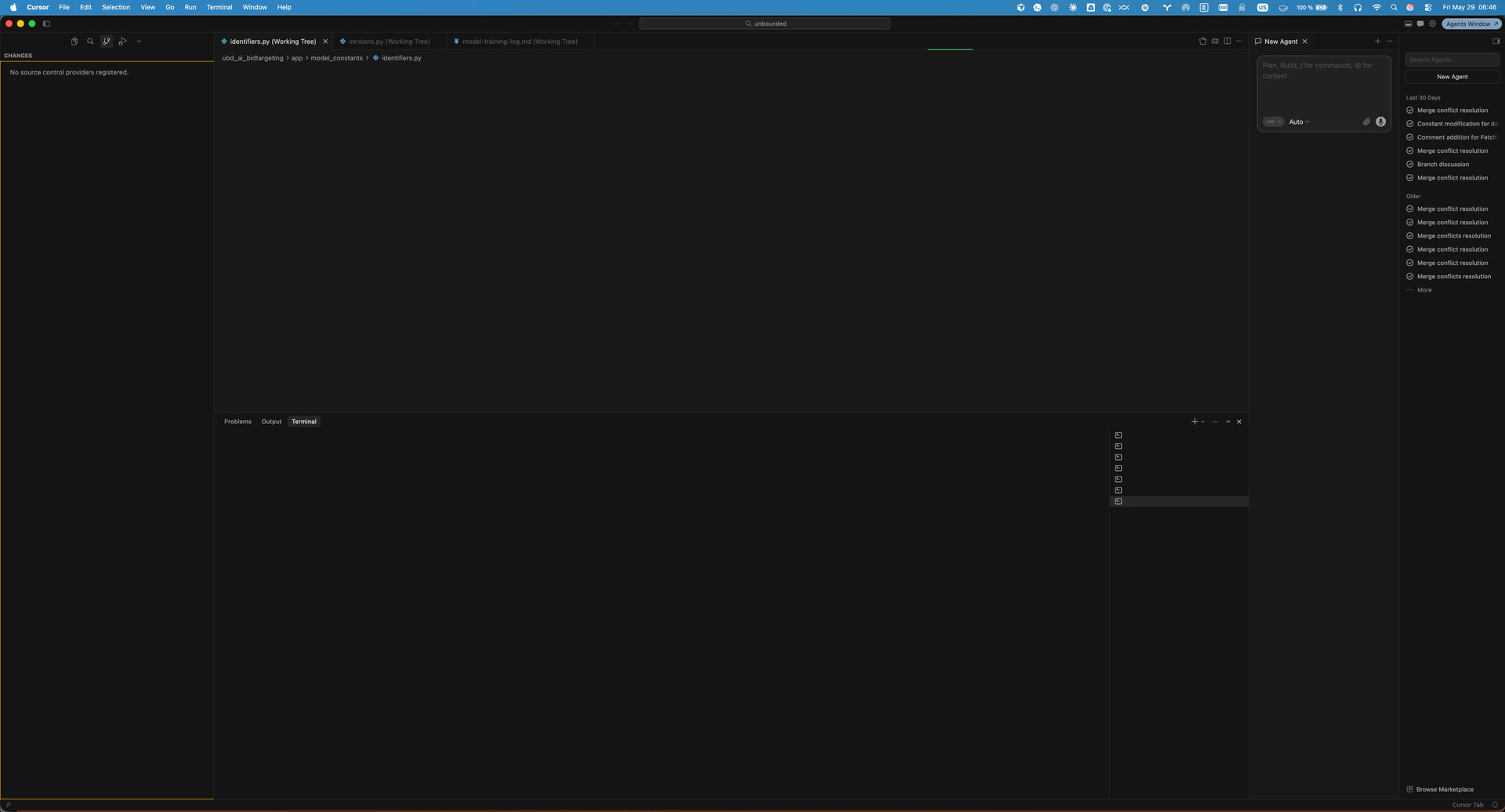


@deanrie One more thing to add (and this also seems important). I just tried a test where I closed all files that were open and in view in the editor in those failing windows. Then I quit and restart Cursor. And lo and behold all windows are operational. I saved off of a copy of my logs folders from right after that if needed (though I would guess they show a happy path).
I would definitely consider both uncommitted changes AND those changes open in the editor as ingredients (at least for the bug I am seeing).
I am seeing this same error since i upgraded Version: 3.6.21 couple of days back. And i must say this is a very bad bug. Is there a way for me to switch back to older version? This has been happening 3-4 times a day and i don’t know what make it work. Just few restart and switching mode but after try many thing for many minutes. Super frustrating and I am almost thinking of swithcing to some other tool. I just saw and I have used many hundred $s alone in my company and i cannot believe there is no real support.