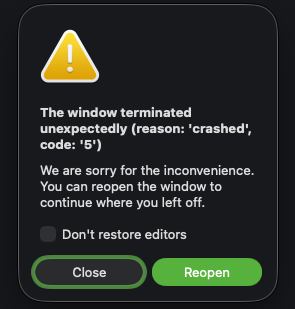
Cursor IDE
after run a agent task with a few minutes, the IDE window terminated
Just run a agent task
MacOS
Version: 2.0.38
Yes - Cursor is unusable
Now after cursor 2.0.40
deanrie
October 30, 2025, 12:32pm
5
Hey, thanks for the report. We’re seeing similar Agent tab crashes on Windows and macOS in recent 2.0.x versions.
Please try these workarounds:
Check settings.json (known crash trigger):
Open Command Palette Cmd+Shift+P → Preferences: Open User Settings (JSON)
Look for ”workbench.editor.showTabs": "single"
If present, change it to ”multiple" or remove the line
Test in Safe Mode:
Run: cursor --disable-extensions
This will rule out extension conflicts
Clear chat history:
Long Agent conversations can cause memory issues
Also, could you share:
When exactly the window becomes unresponsive (file size, task type, duration)?
Memory usage in Activity Monitor when it crashes?
Does this happen in all projects or only specific ones?
These details will help us decide if we need to escalate to the team.
deanrie
October 31, 2025, 12:28pm
7
Thanks for the detailed follow-up with the CPU spike info and multi-root workspace context, that’s very helpful!
Quick question: have you tried the workarounds I suggested?
If not, please test:
In settings.json, find ”workbench.editor.showTabs": "single" and change it to "multiple”
Try a single-root workspace (not multi-root) to see if the issue persists
Run in safe mode: cursor --disable-extensions
If none of these help, let me know, I’ll escalate to the team. The CPU spike + multi-root workspace pattern is useful for debugging.
Please share what you find!
Yes,single root workspace is work well
system
November 22, 2025, 12:46pm
9
This topic was automatically closed 22 days after the last reply. New replies are no longer allowed.