Any updates on that? As @gemyagouatc wrote, with this issue Cursor is not usable at all for me. And it seems this issue also regards the Cursor CLI.
Disappointing…
Any updates on that? As @gemyagouatc wrote, with this issue Cursor is not usable at all for me. And it seems this issue also regards the Cursor CLI.
Disappointing…
Just installed the Codex plugin for the time being 
kilo-code is my old new friend
Interesting, now I can run commands again, but the shell is running bash, not zsh, which is my default shell on Mac, and therefore there’s no configs loaded that I would normally have so commands like ruby go back to the system default…
Issue:
Cursor’s integrated terminal launches **bash instead of zsh**, despite zsh being the system default shell. This causes issues with shell-specific configurations like rbenv.
Evidence:
# System default shell
$ echo $SHELL
/bin/zsh
# But actual running shell in Cursor terminal
$ ps -p $$
PID TTY TIME CMD
67799 ttys051 0:00.03 /bin/bash --init-file /Applications/Cursor.app/Contents/Resources/app/out/vs/workbench/contrib/terminal/common/scripts/shellIntegration-bash.sh
Is that known/intended?
Interestingly when I manually switch my default integrated terminal in the vscode settings back to zsh, I am seeing the issue again:
This is the full command being ran by cursor:
$ ps -p $$ -o command= | cat
/bin/zsh -c snap=$(cat <&3); unsetopt aliases 2>/dev/null; unalias -m '*' 2>/dev/null || true; eval "$snap" && { export PWD="$(pwd)"; setopt aliases 2>/dev/null; eval "$1" < /dev/null; }; COMMAND_EXIT_CODE=$?; dump_zsh_state >&4; exit $COMMAND_EXIT_CODE -- ps -p $$ -o command= | cat zsh:1: command not found: dump_zsh_state
It looks like Cursor released an untested version to users
Cursor IDE
Bug Description: Cursor IDE Zsh Terminal State Bug (macOS)
This issue appears to be highly disruptive issue in the Cursor IDE, specifically affecting users on macOS who use Zsh as their default shell. The core problem is a failure in the AI agent’s mechanism for maintaining the terminal’s state across commands.
Here are the specific, detailed symptoms and their root causes:
The working directory reverts to the root directory (/).
Environment variables that were set are lost.
Any aliases or functions defined during the session are wiped out.
This makes it impossible to perform multi-step workflows (e.g., cd my-project followed by ls), as the second command will not be aware of the directory change.
command not found: dump_zsh_state Error: This is the most visible symptom. The AI agent relies on an internal, undocumented helper function named dump_zsh_state to serialize and restore the shell’s state. For unknown reasons, this function is not being loaded or defined correctly, causing the shell to throw a “command not found” error after every AI-executed command.
parse error near ‘cursor_snap_ENV_VARS…’: This is a related issue. The AI agent’s state-saving script contains syntax errors that cause the Zsh interpreter to fail during the parsing stage. This is why the shell initialization process is interrupted, leading to the terminal state reset.
This bug fundamentally breaks the “agentic” nature of Cursor’s AI. A core feature is the ability for the AI to run multiple commands in a consistent, stateful terminal environment. With this bug, every command is an isolated action, severely limiting the agent’s utility for tasks like:
Navigating file systems.
Running scripts that rely on a specific working directory.
Working with temporary environment variables.
Using version control (git) or build tools (npm, pnpm, make) in a project.
The issue persists even after clean removal and reinstallation, as the problem lies within the IDE’s internal scripting and its flawed integration with the Zsh shell, not with the user’s base system configuration.
This issue is not seen on all our development machines, but appears to be consistently reproducible on one particular machine. macOS 14.8, Apple M2 Pro with 16 GB RAM.
Open a project in Cursor after a fresh install.
Go to AI chat assistant (Agent Mode). Ask it to perform simple terminal commands like “ls”, “pwd”. Everything works fine.
Open a folder (doesn’t matter which folder). The previous AI chat assistant at the right bar disappears and a new AI chat assistant appears. The history is gone from the first AI chat agent.
Ask the agent to execute “pwd”. This is seen
(eval):3: parse error near `cursor_snap_ENV_VARS…’
zsh:1: command not found: dump_zsh_state
Ask the AI to run two sequential terminal commands. For example, ask it to “change the directory to /tmp and then show me the current directory.”
Observe the result.
The first command will run (cd /tmp).
The terminal will immediately show a command not found: dump_zsh_state error.
The second command (pwd) will execute, but it will show the root directory (/), not /tmp.
This shows that the terminal’s state was lost due to the dump_zsh_state error, breaking the ability to run sequential, context-aware commands.
Expected Behavior
AI Command Execution (Agent): When you ask the AI to run a sequence of commands, the AI agent seamlessly executes them in a single, persistent shell session.
Command 1 (cd /tmp): The terminal’s current working directory is successfully changed to /tmp. The AI agent’s state-management system works silently in the background, updating the session’s context.
No Errors: There are no errors, no command not found, and no parse error. The dump_zsh_state function is correctly defined and runs without issue.
Command 2 (pwd): The AI agent executes the second command. Since the session state was successfully preserved, the terminal is still in the /tmp directory.
Correct Output: The pwd command’s output correctly shows the current directory as /tmp.
Summary: The key expectation is that the terminal session maintains its state, allowing multi-step commands and workflows to function as intended, without any unexpected errors or directory resets.
Windows 10/11
MacOS
Linux
Version: 1.6.26
VSCode Version: 1.99.3
Commit: 6af2d906e8ca91654dd7c4224a73ef17900ad730
Date: 2025-09-16T17:12:31.697Z
Electron: 34.5.8
Chromium: 132.0.6834.210
Node.js: 20.19.1
V8: 13.2.152.41-electron.0
OS: Darwin arm64 23.6.0
claude-4-sonnet
It seems to be a warning, not an error. I have the line “dump_zsh_state: command not found” appear in the terminal, but this does not block the Cursor agent from executing commands.
Cursor IDE
What’s happening?
After updating to the latest version of Cursor IDE, my terminal starts showing the error “dump_zsh_state: command not found” on every command. This breaks terminal state persistence and prevents commands like npm run dev from running properly.
How can we reproduce it?
Use Cursor IDE on macOS with default zsh shell
Run any terminal command in the built-in AI assistant terminal
Observe that each command triggers the dump_zsh_state error, losing working directory and environment context
What did you expect to happen instead?
Terminal commands should run without the dump_zsh_state error, maintaining shell state and allowing workflows like npm run dev to function normally.
Cursor setup (optional but helpful):
Running Cursor on macOS 14.8 with zsh as terminal shell
Using latest Cursor IDE version as of September 19, 2025
Issue started immediately after latest update
Additional info:
Workarounds like switching to bash or running commands in external terminal work around the issue
This bug impacts productivity and current development workflows inside Cursor IDE
Please prioritize a fix or patch for this issue.
Install or update to the latest Cursor IDE on macOS.
Set the terminal shell in Cursor to zsh (default).
Open Cursor’s built-in AI assistant terminal.
Run any command, e.g., ls or npm run dev.
Observe the error: zsh:1: command not found: dump_zsh_state.
Notice command sessions lose directory and environment state.
Confirm this does not happen in an external terminal.
MacOS
Version: 1.6.27 (Universal)
VSCode Version: 1.99.3
Commit: d750e54bba5cffada6d7b3d18e5688ba5e944ad0
Date: 2025-09-17T20:21:17.042Z
Electron: 34.5.8
Chromium: 132.0.6834.210
Node.js: 20.19.1
V8: 13.2.152.41-electron.0
OS: Darwin arm64 23.6.0
Yes - Cursor is unusable
same problem for me on version 1.6.27, also lots of devcontainer problems on this version. I think i’ll downgrade for now.
Version: 1.6.27
VSCode Version: 1.99.3
Commit: d750e54bba5cffada6d7b3d18e5688ba5e944ad0
Date: 2025-09-17T20:21:17.042Z
Electron: 34.5.8
Chromium: 132.0.6834.210
Node.js: 20.19.1
V8: 13.2.152.41-electron.0
OS: Darwin arm64 23.5.0
Fixed for me in latest version
Thanks 
This is still happening.
Version: 1.6.42
VSCode Version: 1.99.3
Commit: 5911e9593196a000b1c00553aaf03b0b32042b90
Date: 2025-09-20T17:16:56.346Z
Electron: 34.5.8
Chromium: 132.0.6834.210
Node.js: 20.19.1
V8: 13.2.152.41-electron.0
OS: Darwin arm64 25.0.0
Error on every command the agent runs:
(eval):3: parse error near `cursor_snap_ENV_VARS...'
zsh:1: command not found: dump_zsh_state
Have the same issue with:
Version: 1.6.45
VSCode Version: 1.99.3
Commit: 3ccce8f55d8cca49f6d28b491a844c699b8719a0
Date: 2025-09-22T18:22:38.013Z
Electron: 34.5.8
Chromium: 132.0.6834.210
Node.js: 20.19.1
V8: 13.2.152.41-electron.0
OS: Darwin arm64 24.6.0
It looks like a mkdir -p -m 700 “$TMPPREFIX” in my .zprofile right after the variable definition fixes the issue.
This Issue Remains Unresolved and Is Seriously Impacting Productivity
I can confirm that this dump_zsh_state: command not found error is still a major problem as of September 25th, 2025, despite the suggested workarounds in this thread.
What I’ve Tried:
export TMPPREFIX=${TMPDIR%/}/zsh and mkdir -p -m 700 "$TMPPREFIX" to .zprofile.zshrc.zshenvThe Problem Persists:
Every terminal command from the AI agent still fails with:
(eval):11653: parse error near `()'
zsh:1: command not found: dump_zsh_state
Impact on Productivity:
This bug makes the AI agent essentially useless for any workflow that requires terminal interaction. When you’re trying to:
…and every single command fails, it completely breaks the development flow. The agent can’t maintain state between commands, can’t see command output, and can’t provide meaningful assistance with terminal-based tasks.
Root Cause Analysis:
The issue appears to be that Cursor’s agent is trying to call internal state management functions (dump_zsh_state, dump_bash_state) that either:
Request for Official Fix:
This needs to be addressed at the Cursor application level, not through user shell configuration workarounds. The current “solutions” don’t work reliably across different environments and configurations.
Could the Cursor team please:
This is a critical productivity blocker that’s been ongoing for days now. A proper fix would significantly improve the user experience for anyone using Cursor’s AI agent features.
Reference:
Linux users using zsh also encountered problems after upgrading to 1.6.
Cursor IDE
The Cursor fails when executing any command.
(eval):16277: parse error near `()'
zsh:1: command not found: dump_zsh_state
Just like MacOS, let Curser execute shell commands.
Linux
版本: 1.6.45
提交: 1.99.3
日期: 3ccce8f55d8cca49f6d28b491a844c699b8719a0
Electron: 2025-09-22T18:22:38.013Z
ElectronBuildId: 34.5.8
Chromium: undefined
Node.js: 132.0.6834.210
V8: 20.19.1
OS: 13.2.152.41-electron.0
OS: OpenSUSE LEAP 15.6
Desktop: KDE 6 with Wayland
Shell: zsh 5.8.1 (x86_64-suse-linux-gnu)
Sometimes - I can sometimes use Cursor
Cursor IDE
All commands that agent is trying to run end up with error:
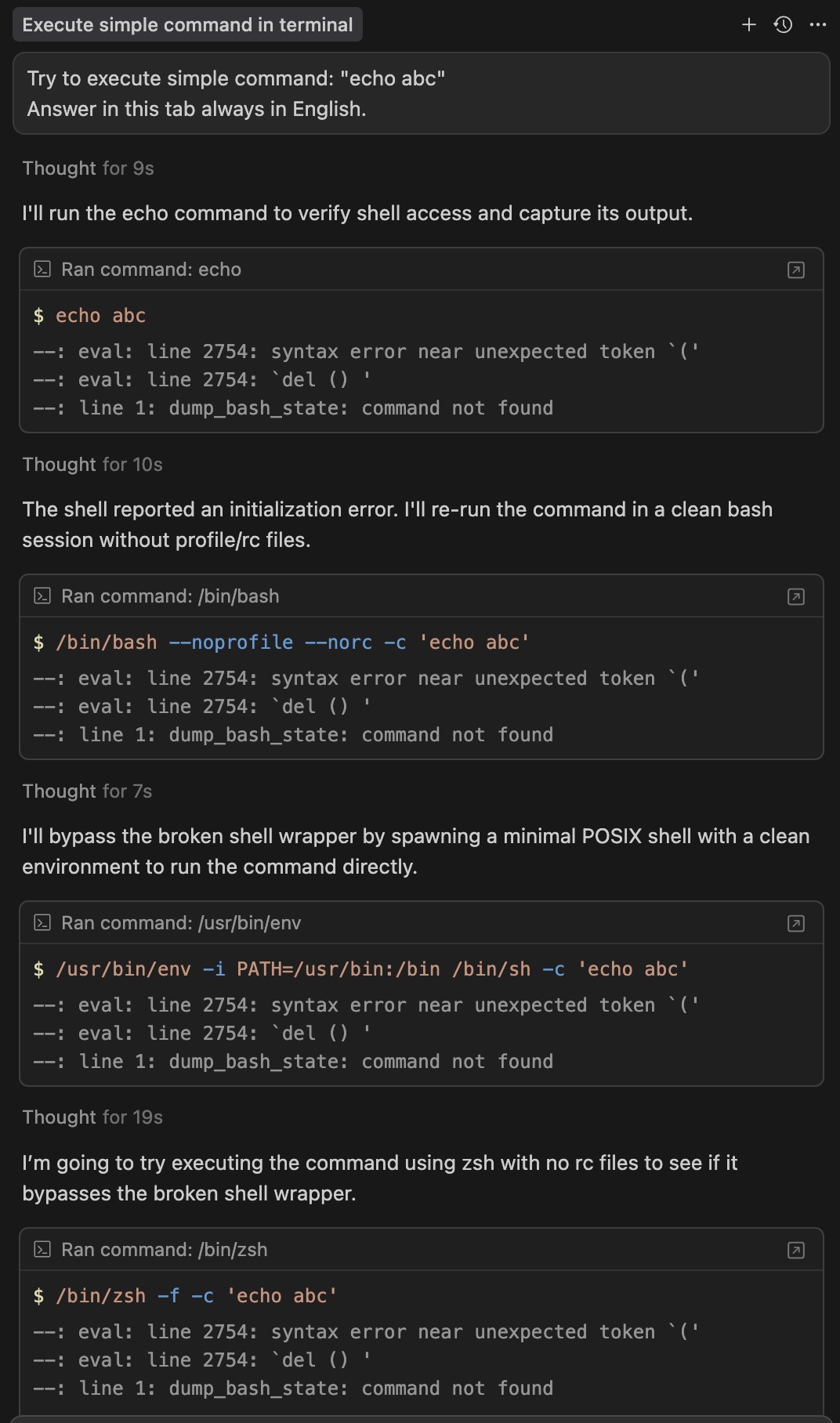
--: eval: line 2754: syntax error near unexpected token `('
--: eval: line 2754: `del () '
--: line 1: dump_bash_state: command not found
Ask agent to run any command.
Agent execute commands without errors
MacOS
Version: 1.6.45 (Universal)
VSCode Version: 1.99.3
Commit: 3ccce8f55d8cca49f6d28b491a844c699b8719a0
Date: 2025-09-22T18:22:38.013Z
Electron: 34.5.8
Chromium: 132.0.6834.210
Node.js: 20.19.1
V8: 13.2.152.41-electron.0
OS: Darwin arm64 24.3.0
gpt-5
Yes - Cursor is unusable
Hey all! Version 1.7.28 should have helped this a lot. Could you try upgrading and let us know? Download · Cursor
SOLUTION FOUND - Working Fix for dump_zsh_state Error
I found a working solution for this issue. The problem is that Cursor IDE is trying to call dump_zsh_state as a command, but it doesn’t exist. Here’s what worked for me:
Create an executable script:
echo '#!/bin/bash
# No-op script for dump_zsh_state
exit 0' > /usr/local/bin/dump_zsh_state && chmod +x /usr/local/bin/dump_zsh_state
This creates a dummy executable that does nothing and exits successfully, which silences the error completely.
Why this works:
dump_zsh_state as a command (not a function)/usr/local/bin/dump_zsh_state satisfies the command lookupResult: No more “command not found: dump_zsh_state” errors after every terminal command.
Hope this helps others experiencing the same issue!
Hi, I think I am facing this issue after update to 1.7.28. I never face issue like this before but it just appear today after updating to 1.7.28.
Version: 1.7.28
VSCode Version: 1.99.3
Commit: adb0f9e3e4f184bba7f3fa6dbfd72ad0ebb8cfd0
Date: 2025-10-01T02:45:21.769Z
Electron: 34.5.8
Chromium: 132.0.6834.210
Node.js: 20.19.1
V8: 13.2.152.41-electron.0
OS: Darwin arm64 24.6.0