Artemonim
(Artemonim)
September 27, 2025, 7:05pm
1
Where does the bug appear (feature/product)?
Cursor IDE
Describe the Bug
When debugging a web application by an Agent using Vite, I had to manually interrupt the process in the console via “Cancel” in the Agent’s Chat because of https://forum.cursor.com/t/1-7-11-the-agents-terminal-stopped-accepting-keyboard-interrupt/135103 .
After that, I killed the console in the console list. After that, the web application server remained alive.
Steps to Reproduce
See the description
Operating System
Windows 10/11
Current Cursor Version (Menu → About Cursor → Copy)
Version: 1.7.11 (user setup)
VSCode Version: 1.99.3
Commit: 867f14c797c14c23a187097ea179bc97d215a7c0
Date: 2025-09-26T16:55:04.318Z
Electron: 34.5.8
Chromium: 132.0.6834.210
Node.js: 20.19.1
V8: 13.2.152.41-electron.0
OS: Windows_NT x64 10.0.22631
Additional Information
How the ■■■■ did you manage to have five bugs in one place in one update?
Does this stop you from using Cursor
No - Cursor works, but with this issue
condor
(Condor (Tee))
September 29, 2025, 3:40pm
3
@Artemonim thank you for the report. I forwarded details to the team.
condor
(Condor (Tee))
September 29, 2025, 7:01pm
4
@Artemonim could you share more info as we are unable to reproduce it:
Did that occur while connected by ssh into another machine?
Are you by any chance using devcontainers?
Which shell are you using?
Could you post a Request ID with privacy disabled so we can look into the details? Getting a Request ID | Cursor Docs
Artemonim
(Artemonim)
September 29, 2025, 7:24pm
6
In version 1.6.x, I had almost no problems with the console. Except that it was sometimes arbitrarily closed when there was some kind of lengthy debugging process.
Please return the switch to the settings that enables automatic interruption of the Agent console.
It interrupts console execution at wrong moments when the console is performing testing, some of the steps of which may last several minutes.
Artemonim
(Artemonim)
September 30, 2025, 10:26am
7
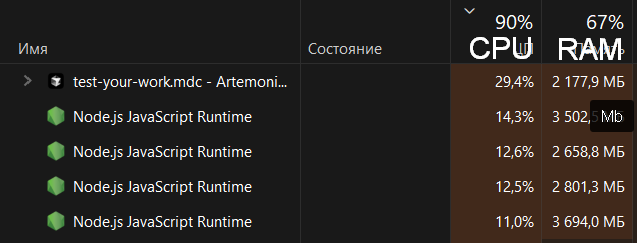
nice
And it doesn’t die even if you close the Cursor IDE that launch them.
Artemonim
(Artemonim)
September 30, 2025, 10:28am
8
^^^
Version: 1.7.23 (user setup)
VSCode Version: 1.99.3
Commit: 5069385c5a69db511722405ab5aeadc01579afd0
Date: 2025-09-30T02:52:09.100Z
Electron: 34.5.8
Chromium: 132.0.6834.210
Node.js: 20.19.1
V8: 13.2.152.41-electron.0
OS: Windows_NT x64 10.0.22631
Last RID in chat: 184fc6e5-859f-449f-a201-8eaf4e62c79e
1 Like
Artemonim
(Artemonim)
October 3, 2025, 11:29pm
9
After 4 days problem isn’t fixed.
Version: 1.7.33 (user setup)
VSCode Version: 1.99.3
Commit: a84f941711ad680a635c8a3456002833186c4840
Date: 2025-10-03T03:28:06.574Z
Electron: 34.5.8
Chromium: 132.0.6834.210
Node.js: 20.19.1
V8: 13.2.152.41-electron.0
OS: Windows_NT x64 10.0.22631
0965f069-cd63-445b-a273-b67970e8f21e
The problem was also reproduced with the usual PowerShell script: Agent ran the command, I stopped Agent, Agent’s terminal interface says “Cancelled”, but in fact the script continued to work untraceably until it stopped on its own.
I believe that the problem that leads to the inability to stop Agent should have the highest priority, and should not remain in the Early Preview for 22 patches.
Artemonim
(Artemonim)
October 3, 2025, 11:31pm
10
This is a debugging script for a real physical device, so I could indirectly track the process by CPU usage during assembly and by the screen of the connected device.
Artemonim
(Artemonim)
October 5, 2025, 11:01am
11
@condor I had to roll back to 1.6.46 to keep using Cursor. I’d appreciate it if you could let me know once my bug report and whole read-only terminal is fixed
system
(system)
Closed
October 27, 2025, 11:02am
12
This topic was automatically closed 22 days after the last reply. New replies are no longer allowed.