I used to be able to /add open files to context and /add active files to context. This seems to have been removed in a previous update. Was this intentional or something wrong in my end?
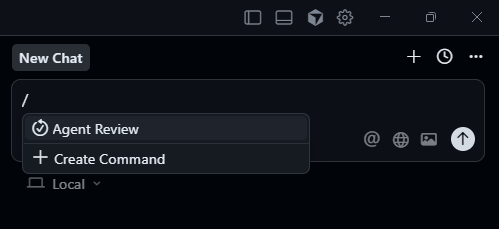

I use this quite a bit. Does anyone know where this command moved to?
This is the way that I used to give Cursor the appropriate context, by opening all the files I knew it would need. Also, after each “#” to bring a file into context, the focus is lost in the text box, so I need to click in there again!
Does anybody know the keyboard shortcut that this was mapped to? Maybe that still works
I, too, heavily relied on this feature. Having to # mention each file individually is a downgrade. Please like this issue if it affects you!
I just found out that you can simply shift select the files, and drag them into the chat. That’s good enough for me, I guess.
definitely feels like a downgrade… I hate it
It is very hard to imagine that this could have been a conscious decision. Please add this feature back in? Using Shift-Click on a the opened files might work for half a dozen files, but it breaks down if a plan to add 20 or 30 files to a context.
What a terrible mistake to ship.