Where does the bug appear (feature/product)?
Cursor IDE
Describe the Bug
Describe the Bug, Steps to Reproduce, Expected Behavior.
Describe the Bug
After the latest Cursor update, I can see my existing Agent chats in the sidebar, but when I click on them they never open or load.
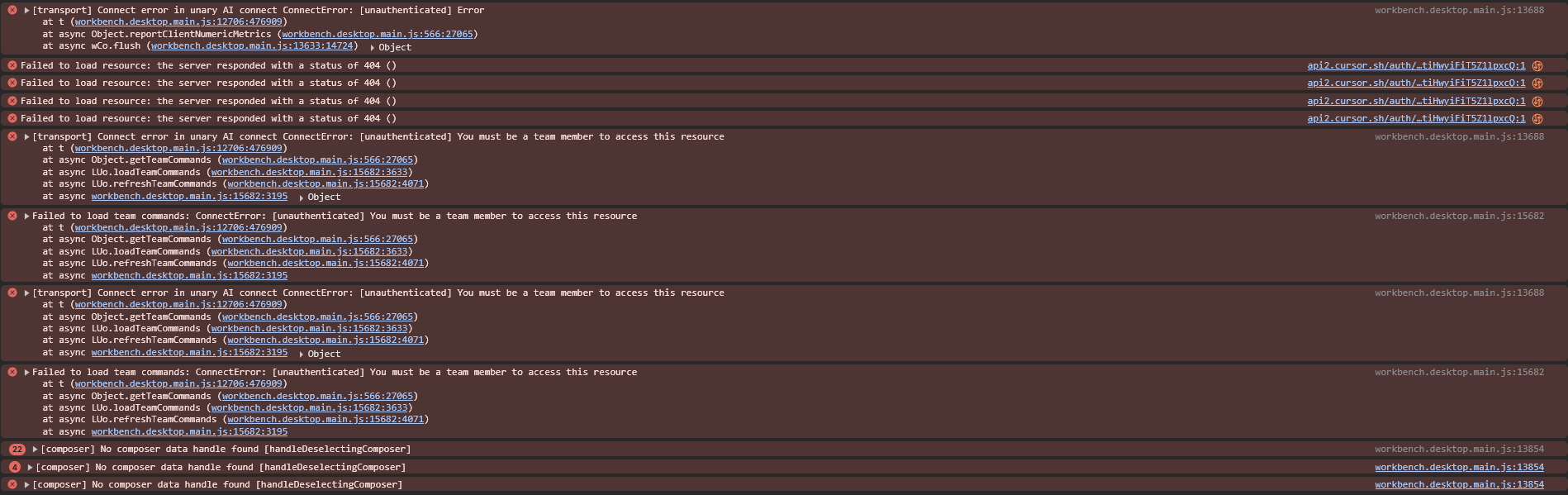
In the Developer Tools console I continuously get errors such as:
ConnectError: [unauthenticated] Error
Repeated requests to https://api2.cursor.sh/auth/full_stripe_profile returning 401
https://api2.cursor.sh/auth/poll?… returning 404
ConnectError: [unauthenticated] You must be a team member to access this resource when calling getTeamCommands / availableModels.
Because of this, Agent chat history does not load and Agent mode is basically unusable.
Steps to Reproduce
Open Cursor IDE on Windows.
Open the Agent chats panel.
Click on any existing Agent chat in the list.
Observe that the chat never loads and no messages are rendered.
Open Help → Toggle Developer Tools and check the Console and Network tabs.
Notice the repeated ConnectError: [unauthenticated] plus 401 and 404 responses from api2.cursor.sh auth endpoints (full_stripe_profile, auth/poll, team commands, etc.).
Expected Behavior
Agent chats should open normally and display their full message history.
If my authentication/session or team access is invalid, Cursor should show a clear error message or re-auth flow instead of leaving Agent chats stuck on loading and spamming unauthenticated errors in the console.
Operating System
Windows 10/11
Current Cursor Version (Menu → About Cursor → Copy)
Version: 2.3.34 (user setup)
VSCode Version: 1.105.1
Commit: 643ba67cd252e2888e296dd0cf34a0c5d7625b90
Date: 2026-01-10T21:17:10.428Z
Electron: 37.7.0
Chromium: 138.0.7204.251
Node.js: 22.20.0
V8: 13.8.258.32-electron.0
OS: Windows_NT x64 10.0.26100
Does this stop you from using Cursor
Yes - Cursor is unusable