Agents terminal hang in

Where does the bug appear (feature/product)?

Cursor IDE

Describe the Bug

Good afternoon.

I’m still having the issue with the agent terminal freezing. I’m sure this is the case for many. But I’d like to point out that the freezing is related to the allowlist: if it’s large enough, the issue occurs, but if you clear it, it goes away. I hope this helps you solve this problem.

Steps to Reproduce

fill allowlist with a lot of allowed commands
give agent a task to do something in terminal
issue occures randomly

Expected Behavior

agent is waiting for terminal command finish continious

Operating System

Windows 10/11

Current Cursor Version (Menu → About Cursor → Copy)

Version: 2.1.39 (user setup)
VSCode Version: 1.105.1
Commit: 60d42bed27e5775c43ec0428d8c653c49e58e260
Date: 2025-11-27T02:30:49.286Z
Electron: 37.7.0
Chromium: 138.0.7204.251
Node.js: 22.20.0
V8: 13.8.258.32-electron.0
OS: Windows_NT x64 10.0.26200

For AI issues: which model did you use?

Sonnet 4.5

Does this stop you from using Cursor

Sometimes - I can sometimes use Cursor

Hey, thanks for the report.

This seems related to a known issue with command completion detection in Windows, where the agent doesn’t recognize that commands have finished. Your note about the allowlist size being a factor is new and valuable.

Could you please share:

  • Request ID with privacy disabled: Getting a Request ID | Cursor Docs
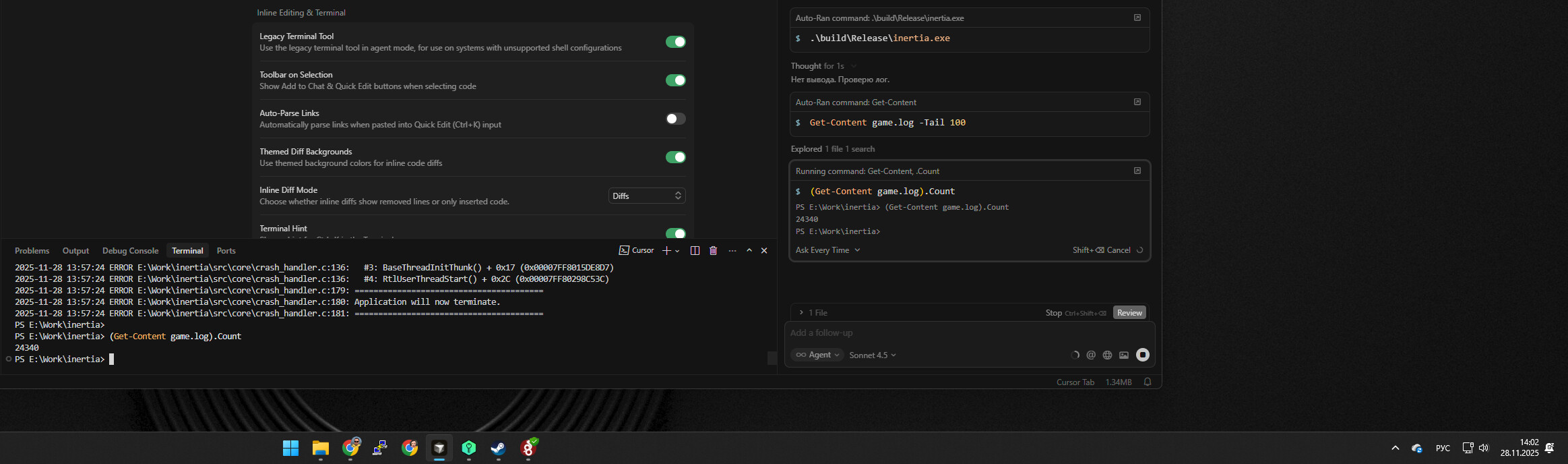
  • Screenshot showing the frozen state
  • Which shell you’re using (PowerShell, CMD, Git Bash, etc.)
  • Approximate number of commands in your allowlist

Potential workaround:

  • Open Cursor Settings Ctrl+, → Agents → Inline Editing & Terminal
  • Toggle “Legacy Terminal Tool” (try both enabled and disabled)
  • Press Ctrl+Shift+P → “Terminal: Kill All Terminals”
  • Fully restart Cursor and test

This workaround has helped other Windows users with similar hanging issues. Let me know if toggling the Legacy Terminal Tool setting helps.

97550048-7f87-4d49-9bda-bff02732d335

Im using PowerShell.

It seems I was a bit hasty in linking the allowlist to these freezes. Clearing the allowlist fixed the issue for a while, but now it’s back, even with an empty list.

toggling the Legacy Terminal Tool setting doesn’t helps.
1 Like

This topic was automatically closed 22 days after the last reply. New replies are no longer allowed.