⌥ + arrow no longer works

Where does the bug appear (feature/product)?

Cursor IDE

Describe the Bug

Before the recent update (1.5.5), I was able to use ⌥ + ← and ⌥ + → to skip over words in terminal. ⌥ + DEL also worked. Now, I get ;3D inserted when I do this.

Steps to Reproduce

Type a couple words, then type ⌥ + ← (option + left arrow) in cursor terminal

Expected Behavior

The cursor moves back one word

Operating System

MacOS

Current Cursor Version (Menu → About Cursor → Copy)

Version: 1.5.5
VSCode Version: 1.99.3
Commit: 823f58d4f60b795a6aefb9955933f3a2f0331d70
Date: 2025-08-25T17:40:25.290Z
Electron: 34.5.8
Chromium: 132.0.6834.210
Node.js: 20.19.1
V8: 13.2.152.41-electron.0
OS: Darwin arm64 24.6.0

Does this stop you from using Cursor

Yes - Cursor is unusable

19 Likes

Hey, thanks for the report. We’ll try to fix it.

Where does the bug appear (feature/product)?

Cursor IDE

Describe the Bug

After the new update, in the terminal, the move-by-one-word shortcut keys are no longer working. alt+leftArrow or alt+rightArrow

I have checked my keyboard shortcuts and don’t think that they conflict…

Steps to Reproduce

  1. Update to latest software on a Mac.
  2. Open the in-IDE terminal and try alt+leftArrow or alt+rightArrow
  3. Observe that ‘C’ and ‘D’ are produced instead of moving the cursor by a word.

Expected Behavior

alt+leftArrow moves cursor by 1 word to the left
vice versa for alt+rightArrow

Screenshots / Screen Recordings

Operating System

MacOS

Current Cursor Version (Menu → About Cursor → Copy)

Version: 1.5.5 (Universal)
VSCode Version: 1.99.3
Commit: 823f58d4f60b795a6aefb9955933f3a2f0331d70
Date: 2025-08-25T17:40:25.290Z
Electron: 34.5.8
Chromium: 132.0.6834.210
Node.js: 20.19.1
V8: 13.2.152.41-electron.0
OS: Darwin arm64 24.6.0

Does this stop you from using Cursor

No - Cursor works, but with this issue

same problem

Will have this fixed in the next 24 hours; apologies. Will be on 1.5.6.

6 Likes

Where does the bug appear (feature/product)?

Cursor IDE

Describe the Bug

On mac:

option + left and option + right don’t jump words and instead type ‘C’ and ‘D’

Steps to Reproduce

Open terminal

press option + right or option + left

Expected Behavior

option left should jump to the beginning of the previous word, option right should jump to the beginning of the next word

Operating System

MacOS

Current Cursor Version (Menu → About Cursor → Copy)

Version: 1.5.5 (Universal)
VSCode Version: 1.99.3
Commit: 823f58d4f60b795a6aefb9955933f3a2f0331d70
Date: 2025-08-25T17:40:25.290Z
Electron: 34.5.8
Chromium: 132.0.6834.210
Node.js: 20.19.1
V8: 13.2.152.41-electron.0
OS: Darwin arm64 24.5.0

Does this stop you from using Cursor

No - Cursor works, but with this issue

2 Likes

same problem

Glad to see this isn’t just me, I thought I was losing my marbles for 10 minutes :sweat_smile: Thanks for the update, I’ll look out for it.

3 Likes

Same here. Quite painful when you are used to it and that it works globally except in cursor terminal.

I updated to version 1.5.5 today

When I use terminal, option+left/right arrow is a shortcut to get to the front or back of a string.

In my cursor terminal only (not my osx terminal) option+ left produces “;3D” and option+right produces “;3C”

This keyboard shortcut is critical to me. Is there a setting to change this behavior back to the system default? This is a major part of my workflow I need to keep.

I also met the same problem:
option+left/right arrow → D/C
But the behavior in terminal/vscode is normal.

Where does the bug appear (feature/product)?

Cursor IDE

Describe the Bug

The latest cursor update broke use of option-arrowkeys to move between words within the terminal.

Still works fine in VSC, so this seems to be cursor specific.

Seems to be the latest Cursor update, since it worked fine this morning until I clicked the “update” button pop-up.

 cursor --version
1.5.5
823f58d4f60b795a6aefb9955933f3a2f0331d70
arm64

Previously if you had a long command string like:

command with lots of args

you could move between args with option-left-arrow and option-right-arrow (standard keybindings on mac).

Now those type “D” and “C” into the terminal instead.

I’m using ohmyzsh, but that’s the same between my VSC install and my cursor install, so again as far as I can tell it’s something changed about cursors keyboard handling within the terminal

Steps to Reproduce

  1. Open the terminal within cursor on Mac.
  2. Type a long command with multiple args (or pull one up from your history).
  3. Use option-left-arrow or option-right-arrow to move around.

Expected Behavior

Should move between words, but instead now types “C” or “D”.

Operating System

MacOS

Current Cursor Version (Menu → About Cursor → Copy)

Version: 1.5.5 (Universal)
VSCode Version: 1.99.3
Commit: 823f58d4f60b795a6aefb9955933f3a2f0331d70
Date: 2025-08-25T17:40:25.290Z
Electron: 34.5.8
Chromium: 132.0.6834.210
Node.js: 20.19.1
V8: 13.2.152.41-electron.0
OS: Darwin arm64 24.6.0

Does this stop you from using Cursor

Sometimes - I can sometimes use Cursor

4 Likes

This is the same as ⌥ + arrow no longer works.

Apple released an IarrowThatWorks, haven’t you see ? the keyboard only costs USD 1299 on apple store, what a bargain :slight_smile:

Where does the bug appear (feature/product)?

Cursor IDE

Describe the Bug

is been a few internal release that in the terminal the ALT+LEFT or ALT+RIGHT which I use a lot for moving from word to word is not working anymore.
instead of moving from word to word it does print C on ALT+RIGHT arrow and D on ALT+LEFT arrow.
This is really anoying.
I am on mac with an Azerty keyboard.

Steps to Reproduce

just press ALT+RIGHT and notice a D that appears

Expected Behavior

movin from one work to another

Operating System

MacOS

Current Cursor Version (Menu → About Cursor → Copy)

Version : 1.5.5 (Universal)
Validation : 1.99.3
Date : 823f58d4f60b795a6aefb9955933f3a2f0331d70
Electron : 2025-08-25T17:40:25.290Z
ElectronBuildId : 34.5.8
Chromium : undefined
Node.js : 132.0.6834.210
V8 : 20.19.1
Système d’exploitation : 13.2.152.41-electron.0

Does this stop you from using Cursor

No - Cursor works, but with this issue

3 Likes

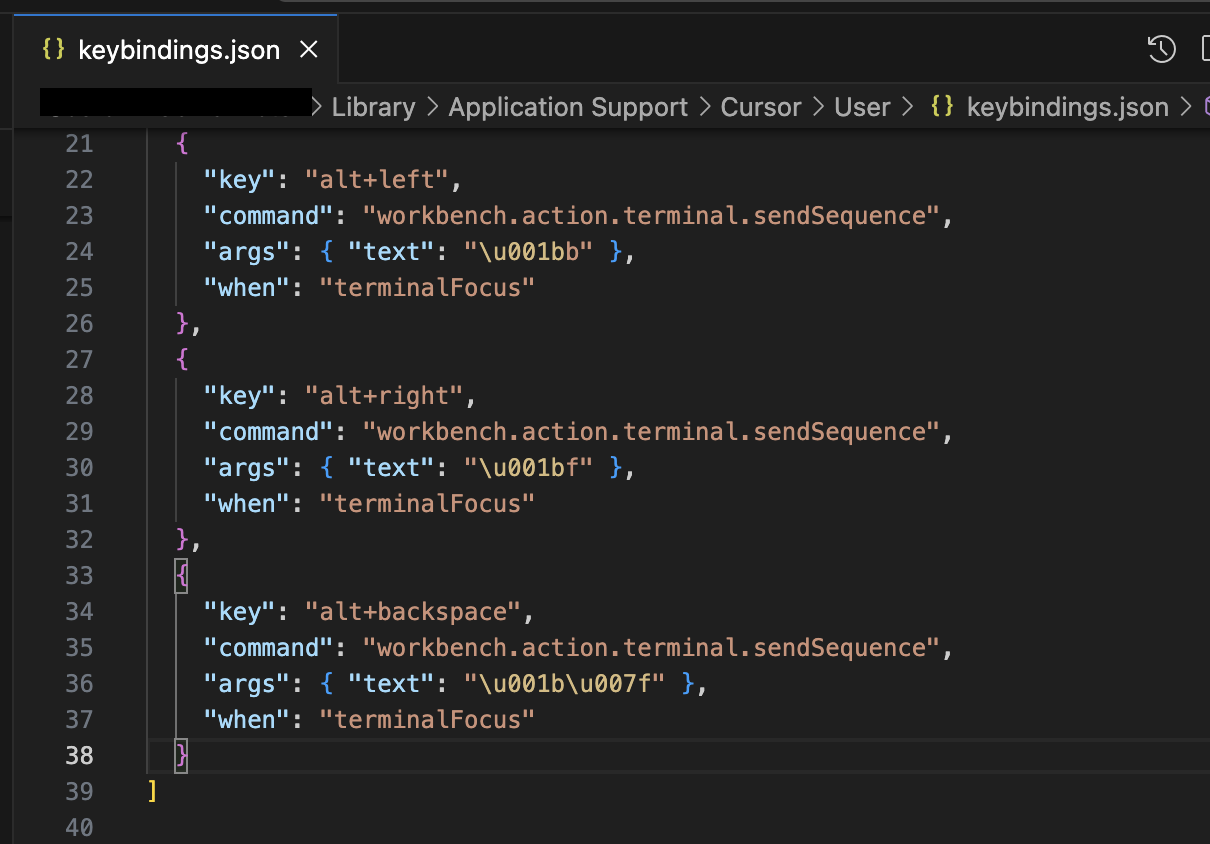
I asked cursor to fix it

and after one more indication

It found a fix

3 Likes

It works for me. Thanks!

Posting the workaround mentioned above but easier to copy-paste
On Mac, open the keybindings file cursor ~/Library/Application\ Support/Cursor/User/keybindings.json

{
    "key": "alt+left",
    "command": "workbench.action.terminal.sendSequence",
    "args": { "text": "\u001bb" },
    "when": "terminalFocus"
  },
  {
    "key": "alt+right",
    "command": "workbench.action.terminal.sendSequence",
    "args": { "text": "\u001bf" },
    "when": "terminalFocus"
  },
6 Likes

same problem

this is problem cursor only.

cuz vscode works

Hey, this is already fixed in version 1.5.7. Please upgrade.

1 Like