Where does the bug appear (feature/product)?
Cursor IDE
Describe the Bug
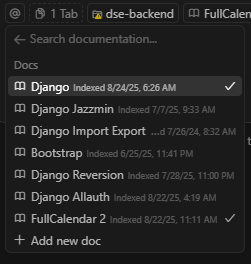
I try to add “Documentation | FullCalendar” as a doc. It says it already exists. It doesn’t show it as a selectable doc in the dropdown though. Cursor seems to sometimes only show the docs I’ve explicitly added, and sometimes it shows what seems like a bunch of docs that are added by default. But 99% of the time it just shows the ones I’ve added.
Steps to Reproduce
See above
Operating System
Windows 10/11
Current Cursor Version (Menu → About Cursor → Copy)
Version: 1.4.5 (user setup)
VSCode Version: 1.99.3
Commit: af58d92614edb1f72bdd756615d131bf8dfa5290
Date: 2025-08-13T02:08:56.371Z
Electron: 34.5.8
Chromium: 132.0.6834.210
Node.js: 20.19.1
V8: 13.2.152.41-electron.0
OS: Windows_NT x64 10.0.19045
Does this stop you from using Cursor
Yes - Cursor is unusable