Composer 2 broken when custom OpenAI API Key is enabled

Where does the bug appear (feature/product)?

Cursor IDE

Describe the Bug

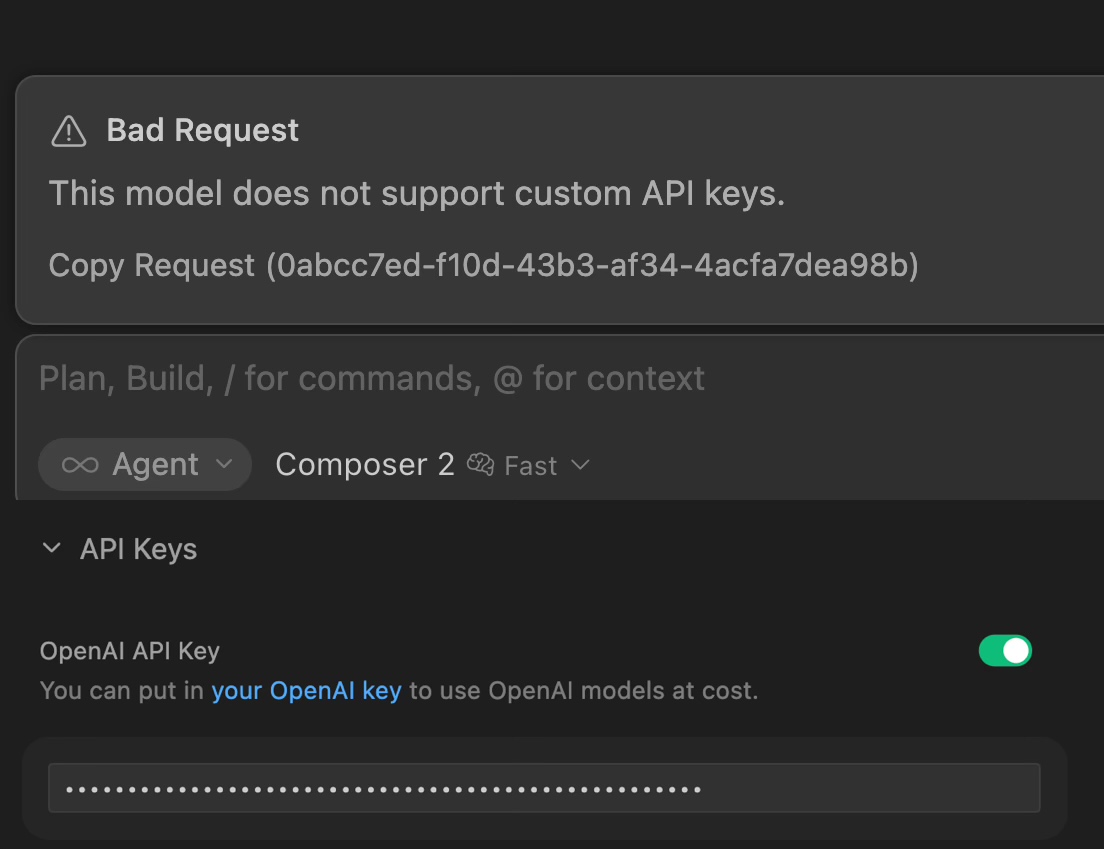
When a custom OpenAI API Key is enabled in settings, selecting Composer 2 returns “Bad Request: This model does not support custom API keys.” Composer 2 is a Cursor-proprietary model and should always route through Cursor’s servers, not through the custom OpenAI key. Auto and Premium modes work fine with the key enabled.

Steps to Reproduce

  1. Go to Settings → API Keys → Enable OpenAI API Key
  2. Select Composer 2 as the active model
  3. Send any message

Expected Behavior

Composer 2 should route through Cursor’s official servers regardless of custom API key settings, just like Auto and Premium already do.

Screenshots / Screen Recordings

Operating System

MacOS

Version Information

Version: 2.7.0-pre.158.patch.0
VSCode Version: 1.105.1
Commit: 11e7a0514e3c19ee0ed19b37725c111fe5fb44f0
Date: 2026-03-28T10:42:16.149Z
Layout: editor
Build Type: Stable
Release Track: Nightly
Electron: 39.8.1
Chromium: 142.0.7444.265
Node.js: 22.22.1
V8: 14.2.231.22-electron.0
OS: Darwin arm64 25.4.0

For AI issues: which model did you use?

Composer 2

Additional Information

Disabling the OpenAI API Key fixes Composer 2, but then I lose access to GPT-5.4 via my own API. These should be independent — custom keys should only affect the corresponding provider’s models.

Does this stop you from using Cursor

Sometimes - I can sometimes use Cursor

Hey, thanks for the report. This is a known issue. When a custom OpenAI API key is enabled, it’s mistakenly applied to all models, including Composer, which should always go through Cursor servers. This affects all Composer versions 1, 1.5, and 2.

Workaround: turn off the OpenAI API key before using Composer 2, then turn it back on for GPT-5.4. You can toggle it quickly with Cmd+Shift+0.

The team is aware, but there’s no ETA yet. I added your report for prioritization. The more users who report it, the more likely it’ll get fixed sooner.

Where does the bug appear (feature/product)?

Cursor IDE

Describe the Bug

I changed open ai model to mine opeai compatible model and strangely composer stopped working

Steps to Reproduce

  1. Set custom api key in settings and override api link
  2. Type somethin in chat

Expected Behavior

Composer works correctly

Operating System

Windows 10/11

Version Information

Version: 3.0.16 (user setup)
VSCode Version: 1.105.1
Commit: 475871d112608994deb2e3065dfb7c6b0baa0c50
Date: 2026-04-09T05:33:51.767Z
Layout: editor
Build Type: Stable
Release Track: Default
Electron: 39.8.1
Chromium: 142.0.7444.265
Node.js: 22.22.1
V8: 14.2.231.22-electron.0
OS: Windows_NT x64 10.0.19045

For AI issues: which model did you use?

Composer 2

Does this stop you from using Cursor

No - Cursor works, but with this issue

Where does the bug appear (feature/product)?

Cursor IDE

Describe the Bug

Can not use Cursor’s proprietary models with activated API keys for other vendors.

I expect the reply to this report may follow the template used on that thread, roughly:

Composer 2 is a Cursor proprietary model, so it won’t work with external API keys. That’s why you get ‘This model does not support custom APIs.’ Turn off your OpenAI API key in Settings and Composer 2 will work. That’s by design.

That response conflates two separate claims:

  1. Composer 2 cannot be served by an OpenAI API key. True and uncontroversial. Composer 2 is not an OpenAI model, so it cannot run on OpenAI’s endpoints. Nobody is asking for that.
  2. Composer 2 must therefore fail when an OpenAI API key is present in the user’s settings. This is the actual reported behaviour, and it does not follow from point 1. Cursor controls the routing layer. There is no technical constraint forcing it to refuse a Cursor-proprietary request just because a third-party key happens to be configured for a different provider entirely. That is a routing choice, not a technical limit.

The suggested workaround (turn off your OpenAI API key) is the bug being reported, not a solution to it. Asking a BYOK user to disable BYOK in order to use Cursor’s proprietary models means BYOK and proprietary models are mutually exclusive in the same session. That is the design flaw.

If the reply is the same template again, please address point 2 specifically: why does the presence of an OpenAI key in Settings need to block Composer 2 from routing through Cursor’s own backend?

Proposed fix. Routing should be per-model, not account-global:

  • OpenAI models: use the OpenAI key if present, otherwise fall back to Cursor’s quota.
  • Anthropic models: same logic with an Anthropic key.
  • Cursor proprietary models (Composer 2, Auto, etc.): always go through Cursor’s backend. Ignore third-party keys entirely.

This is how every other BYOK implementation already works (Continue, Aider, Zed). Cursor’s current behaviour forces users to micromanage settings between every model switch for no clear benefit. Very bad DX

Steps to Reproduce

Reproducible behaviour on a Pro+ subscription:

  1. Configure an OpenAI API key in Cursor Settings → Models and leave it active. Reason for having one configured: I want my own OpenAI quota used for OpenAI models like GPT 5.5, while still using Pro+ allowances for everything else.
  2. Select Composer 2 and send any prompt.
  3. Result: ‘Bad request. This model does not support custom APIs.’

Expected Behavior

Composer 2 is a Cursor proprietary model. It does not run on OpenAI infrastructure. There is no technical reason for the presence of an OpenAI key in my settings to affect routing for a model that has nothing to do with OpenAI. The only workaround right now is to open Settings, disable the OpenAI key, run the Composer 2 task, then re-enable the key for the next GPT 5.5 call. Every time I switch models.

For reference, a related thread (Non-Auto Models Not Working) was closed with the response that the behaviour is ‘by design’. Different user, different OpenAI quota issue, but the routing logic being described is the same one I am hitting here.

Operating System

Windows 10/11

Version Information

Version: 3.1.15 (user setup)
VSCode Version: 1.105.1
Commit: 3a67af7b780e0bfc8d32aefa96b8ff1cb8817f80
Date: 2026-04-15T01:46:06.515Z
Layout: editor
Build Type: Stable
Release Track: Default
Electron: 39.8.1
Chromium: 142.0.7444.265
Node.js: 22.22.1
V8: 14.2.231.22-electron.0
OS: Windows_NT x64 10.0.19045

For AI issues: which model did you use?

Composer 2
GPT 5.5

Does this stop you from using Cursor

No - Cursor works, but with this issue
I’ve got the same issue as OP

Hey, @xblabs, your point is valid, and there’s no reason to argue with it. This is routing design on our side, not a technical limitation. The backend strips custom API keys for Auto, but it doesn’t do that for Composer models and just blocks the request. So BYOK and Cursor proprietary models are currently mutually exclusive within a single session, which is inconvenient.

I passed the reasoning from Post #8 about per-model routing instead of account-global routing to the team along with this thread. It’s exactly the wording we need for prioritization. I can’t share an ETA for a fix yet.

@dominicletz, your report is noted too. The more confirmations we get, the better it is for priority.

If there’s an update, I’ll post it in the thread.

I’m seeing the same issue with Composer 2.5. I would like to use my own OpenAI API key for OpenAI models, but still use Composer 2.5 through my Cursor subscription. For “Auto”, it curiously works. Does “Auto” mainly rely on Composer 2.5? In that case, I would just switch to Auto for those cases. But I assume its a bit more complicated than that. Love your product!

Hey, thanks for confirming. Yep, it’s the same bug, and it affects all Composer versions 1, 1.5, 2, and 2.5.

About Auto, it’s not Composer 2.5. Auto is a separate routing layer that picks a model for the task on its own, and it ignores BYOK keys in settings. That’s why it doesn’t crash when an OpenAI API key is enabled. Named Composer models don’t have that ignore logic yet, so you get the error. You can use Auto as a workaround, but it’s not exactly Composer 2.5. Under the hood it might pick a different model.

I added your report to the others in this thread. No ETA for a fix yet.

@deanrie

Thanks for looking into this. Could the team share why this is taking longer to resolve?

From the outside it looks like Composer 2.5 should simply ignore the custom OpenAI API key and continue routing through the Cursor subscription, while only OpenAI models use BYOK. Since “Auto” still appears to work in this setup, it feels like this might be a model-routing condition or boolean/flag check rather than a deeper model issue.

Is there more complexity here, for example around provider selection, entitlement checks, or how Auto chooses Composer 2.5? A short technical explanation would help users understand the delay and choose the right workaround.

Thanks!

Hey, thanks for the question, and for phrasing it so clearly.

Your understanding is basically correct. This is a routing rule, not some deeper issue with the model itself. Right now, having an active OpenAI BYOK key is applied at the account level, not per model, so requests to the proprietary Composer model get blocked before they ever reach our servers. Auto still works because it has a separate routing layer that ignores BYOK keys in settings. Named Composer models don’t have that logic yet.

On the “why it’s taking longer” part, I honestly can’t share detailed internal reasoning or an ETA. It’s a prioritization call, not some impossible technical blocker. The fact that Auto works shows the routing pattern already exists. It just needs to be extended to the named Composer models. The issue is reported and tracked, but I won’t promise timelines because that wouldn’t be fair to you.

For now, the workaround is the same: toggle the OpenAI API key with Cmd+Shift+0 before using Composer, or use Auto if you’re okay with it potentially picking a different model under the hood.

If there’s an update on the fix, I’ll reply in the thread.

Where does the bug appear (feature/product)?

Cursor IDE

Describe the Bug

When I am using “Override OpenAI Base URL” in settings, it makes agent with selected “Composer 2.5” model throw an error:

This model does not support custom API keys

This does not happen when “Auto” model selection is on.
The override itself, for OpenAI models is working fine.

Steps to Reproduce

  1. Enable in Settings/Models "Override OpenAI Base URL and set any url (not relevant for reproducing bug)
  2. Enable OpenAI API Key and set any key (not relevant for reproducing bug)
  3. Send any message to Composer 2.5 agent (not Auto)

Expected Behavior

OpenAI models and/or manually added model identifiers to be routed to OpenAI Base URL override, while the Composer 2.5 model to work as usual, as with override turned off.

Operating System

MacOS

Version Information

Version: 3.7.36
VS Code Extension API: 1.105.1
Commit: 776d1f9d76df50a4e0aeca61819a88e7c1b861e0
Date: 2026-06-13T00:31:56.287Z
Layout: glass
Build Type: Stable
Release Track: Default
Electron: 39.8.1
Chromium: 142.0.7444.265
Node.js: 22.22.1
V8: 14.2.231.22-electron.0
xterm.js: 6.1.0-beta.256
OS: Darwin arm64 25.5.0

For AI issues: which model did you use?

Composer 2.5

Does this stop you from using Cursor

No - Cursor works, but with this issue