Cursor auto-accepted changes without my review on 2.6.19

Where does the bug appear (feature/product)?

Cursor IDE

Describe the Bug

I asked the agent (opus 4.6) to make changes on my opened workspace of 3 repos. Changes were made in all 3 repos (confirmed with git status), but when navigating via the “Review next file >” feature, only changes in one of the repos is shown. Similarly, the “Review” button doesn’t show all 3 repos’ changes - instead, only the changes in the one repo are visible.

If I manually navigate to the other changed files (in the other 2 repos), I can see the orange squigly on the left hand side indicating that changes were made, and if I click that squigly, I can see the actual diff.

This is the issue that was reported in Only some diffs are shown whhen agent makes changes - #261 by hoerin - and Colin said that “If you face an issue, however similar, on 2.5.26+, please raise a new bug report!” - so I’m doing that.

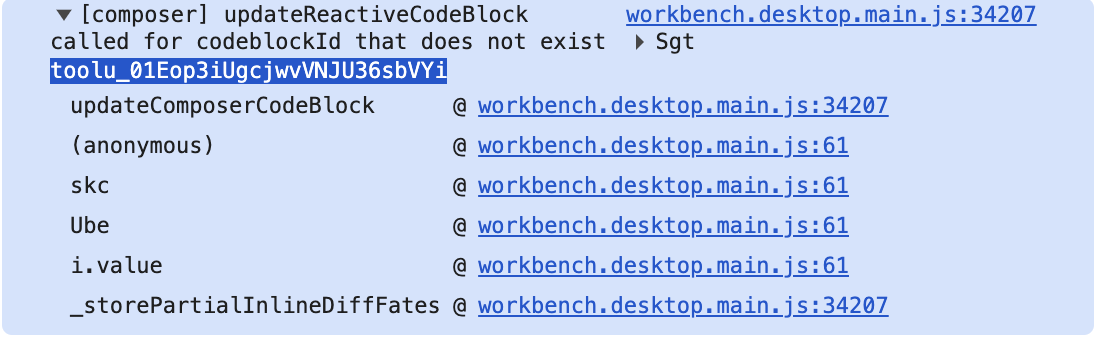
One note: in the Cursor dev console logs, I found a cluster of three error messages like this (each with different toolu values), and given that there are three diff changes that were auto-accepted, it seems like it could be related to the error:

[composer] updateReactiveCodeBlock called for codeblockId that does not exist toolu_01Eop3iUgcjwvVNJU36sbVYi

I attached a screenshot of the stack trace in the images section below.

Steps to Reproduce

(Note: this is the first time I’ve encountered this bug recently, so this is not consistent behavior). But, here’s what happened to me: I asked cursor to make changes across multiple repos. The “Review next file” floating navigation feature then will only let you page through the changes in one repo - the other changes were auto accepted without my input. Git status confirms that the changes actually exist on disk.

Expected Behavior

I don’t want Cursor to auto-accept changes without me having the opportunity to review them. This completely breaks my workflow. This is the core workflow of cursor, and this persistent behavior of auto-accepting changes without my review is so frustrating.

You can see in my screenshot below that cursor erroneously shows only two files changed in the hover navigator - but when checking via git status or the orange highlighted entries in the workspace navigator, there are actually a total of 5 files changed.

Screenshots / Screen Recordings

Screenshot 2026-03-13 at 2.51.34 PM.png

Operating System

MacOS

Version Information

Version: 2.6.19 (Universal)
VSCode Version: 1.105.1
Commit: 224838f96445be37e3db643a163a817c15b36060
Date: 2026-03-12T04:07:27.435Z
Build Type: Stable
Release Track: Default
Electron: 39.4.0
Chromium: 142.0.7444.265
Node.js: 22.22.0
V8: 14.2.231.22-electron.0
OS: Darwin arm64 24.5.0

For AI issues: which model did you use?

Opus 4.6

Does this stop you from using Cursor

Sometimes - I can sometimes use Cursor

Also - here is an opus 4.6 analysis of the cursor console log output from when these errors occurred, in case it’s useful. This was in the same agent session where I initially told the agent about the issue, so it’s speaking about the “tool calls I made”.

AI output below, emphasis mine:


The log reveals two specific bugs. Here’s what happened:

1. Missing reactive code blocks (lines 32, 1051, 1058):

[composer] updateReactiveCodeBlock called for codeblockId that does not exist Sgt toolu_01G9w2iRxvLY2415bmJ4SMwy

[composer] updateReactiveCodeBlock called for codeblockId that does not exist Sgt toolu_014s7vY6QaEEDhLqpZbgwKHU

[composer] updateReactiveCodeBlock called for codeblockId that does not exist Sgt toolu_01SLjsgUfRm1DzSnJyLh3JhK

Each toolu_* ID corresponds to one of the StrReplace tool calls I made. When I batched all 5 edits in a single response, Cursor tried to create inline diff previews (“reactive code blocks”) for each, but 3 of them couldn’t find their corresponding UI element. Those 3 orphaned edits are the ones from the backend and React Native repos – which is exactly why only 2 files show in the review panel.

2. Disposed model error (line 1140):

Model is disposed!: Error: Model is disposed!

at M6.getVersionId

at Brd.\_formatDiffHistoryImpl

A VS Code TextModel (the in-memory representation of an edited file) was garbage-collected before the diff history system could compute the diff for it. So the diff tracking for those cross-repo files was permanently lost for this session.

In short: it’s a Cursor bug with batched edits across multiple git repos in a multi-root workspace. The UI’s diff tracking system failed to create/retain the code block references for files outside the “primary” repo, so only the [edit: primary] edits survived in the review panel. The changes themselves all went through fine – it’s purely a UI tracking issue.


[End of AI analysis]

Hey, thanks for the detailed report, especially the console log analysis with updateReactiveCodeBlock and the stack trace. That’s really helpful.

This is a known issue with inline diffs that affects a few users. The team is aware and tracking it.

For now, try this:

  1. Cursor Settings > Agents > Inline Diffs, turn it off, then turn it back on
  2. Fully close Cursor, not just the window, use Quit or Exit
  3. Open it again

This workaround helped a few users with the same bug: Cursor doesn't show inline diff in main window and auto approves all changes

Also, git diff and the Review panel can be helpful as a backup to review all changes while inline diffs are unstable.

The multi-root workspace detail, where review navigation only sees files from one repo, is valuable. I’ll pass it to the team. Let me know if the workaround helped.

Hey @something_12345!

This issue has been fixed in a recent Cursor update. Updating to the latest version should resolve this. If you’re still experiencing this on the latest version of Cursor, please raise a new thread and we’ll take a look.