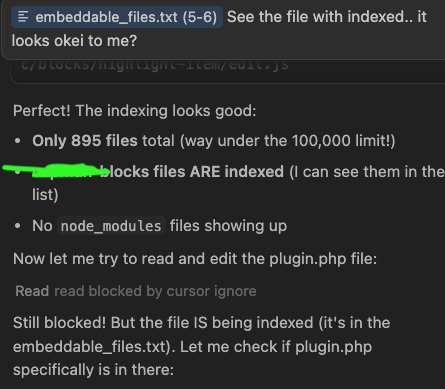
I cant edit nor read because since last update I get “read blocked by cursor ignore”
I made sure is in the index so definitely not being ignored. The agent can find other ways to edit the file, but the tools it has are not working. Files have correct permission and the user it’s using can definitely edit.
Steps to Reproduce
I just updated and wasn’t able to edit nor read files anymore. I have docker mcp hub enabled and serena. I even tried to close docker just in case it was holding the file hostage, but same thing
When I press “View included files” I see many of the files I would like to be able to edit. The message in there is a bit confusing, so I’m not sure if I’m seeing files that are to be ignored or are indexed. If the files in there are supposed to be ignored then definitely it is a bug because nothing tells to ignore them. I have my .gitignore only which works correctly.
But point by point:
I don’t see any Global Cursor Ignore List.
No .cursorignore.
It is disabled
Still the same issue that appeared today. Can’t use cursor at the moment. Agent tries to edit with other tools but ends up burning tons of tokens and deleting file content many times.
Btw using claude code in the same cursor terminal works fine. Claude can read/edit as usual
Look for a .cursorignore file in the parent directory of the folder you’re working in. For some reason, this can get picked up when cursor works in child directories of this parnt directory.
Mac/Linux:
ls -la | grep .cursorignore
or
find . -name ".cursorignore" -maxdepth 1
Windows (Command Prompt):
dir /a .cursorignore
Windows (PowerShell):
Get-ChildItem -Force -Filter .cursorignore
The -la flag on Mac/Linux and /a on Windows show hidden files (files starting with a dot are hidden by default).
I don’t have any parent folder with any .cursorignore nor have ever used them.
My hunch is that the agent doesn’t understand negations in .gitignore or cannot read it properly. It literally started happening overnight after an update.
If it helps I suspect cursor is not capable of handling these kind of .gitignore lines. SO basically ignore the whole plugins folder and then you unignore only the ones you are interested about. Please fix this. It makes cursor useless if I cannot edit basic php fiels with the agent.
@deanrie The same issue, PHP-project. This happened for the first time today. I experienced this on the second-to-last version of Cursor. Today I updated to the most recent one (2.3.21), but the issue persists.
And that ignore rule is in the root, right? So, I can’t edit anything inside /src/wordpress/. I can edit a couple of files directly under /src/, but I can’t modify anything inside /src/wordpress/wp-content/plugins/acmecorp or anywhere else under that path (/src/wordpress/).
My suspicion is that Cursor has a bug and doesn’t understand that .gitignore ignoring /wordpress/ applies only to the root folder. It seems to also ignore /src/wordpress/, which it shouldn’t. Even folders that are explicitly unignored inside that path are still not editable.
I recommend creating your own post/bug report/issue then, because the bugs are obviously not related, as I can edit php files and all the others if they are in not in the folders I mention