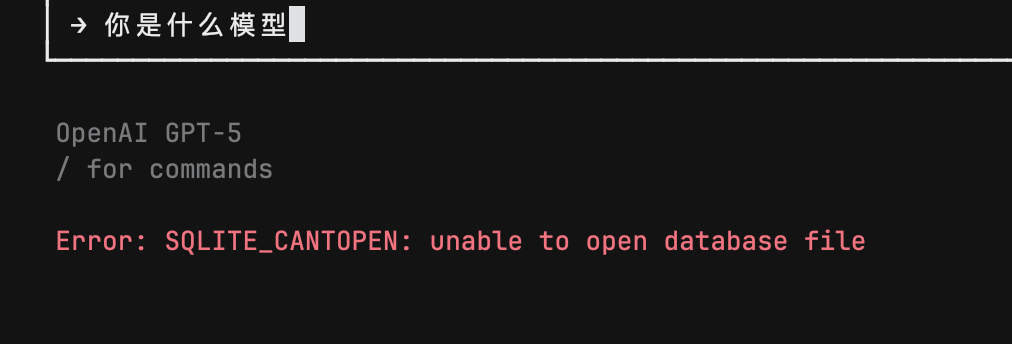
Cursor CLI throwing SQLITE error

Describe the Bug

After installing Cursor CLI and restarting the command line, when trying to run a prompt, it displays the following: Error: SQLITE_CANTOPEN: unable to open database file.

The message appears briefly and then returns to the input to type the prompt.

I’m using WSL Ubuntu 20.04.6 LTS.

Steps to Reproduce

Intall Cursor CLI and try to use it.

Expected Behavior

Run the prompt

Screenshots / Screen Recordings

Operating System

Linux

Current Cursor Version (Menu → About Cursor → Copy)

cursor-agent --version
32c684dc5c8a0e364043db77d4e5b9a5dc1e2d3b

Does this stop you from using Cursor

Yes - Cursor is unusable

5 Likes

I had the exact same issue did the following and it seems to be working now

# Fix permissions recursively
sudo chmod -R 755 .
sudo chown -R $USER:$USER .

# Remove Cursor’s cache directory
rm -rf ~/.cache/cursor
rm -rf ~/.config/cursor

I really think this is the one that solved it, might try it first

# Add to your ~/.bashrc or ~/.zshrc
export TMPDIR=/tmp

NEVERMIND it broke again :sad_but_relieved_face:

Describe the Bug

Any attempt to send a message in Cursor CLI on WSL issues a Error: SQLITE_CANTOPEN: unable to open database file message and nothing happens.

Steps to Reproduce

Install Cursor CLI in WSL via:

curl https://cursor.com/install -fsS | bash

Run Cursor CLI via:

cursor-agent

Type a message, e.g. “Hello” and press enter.

Expected Behavior

The agent should respond to the message.

Screenshots / Screen Recordings

Operating System

Windows 10/11

Current Cursor Version (Menu → About Cursor → Copy)

> cursor-agent --version
2025.08.08-f57cb59

Does this stop you from using Cursor

Yes - Cursor is unusable

I’ve sent this to our team and they are looking into it.

2 Likes

I also ran into this issue on native Ubuntu 20.04. I think it is an issue with libc compatibility with the built in node_sqlite3.node executable. I replaced the one under .local/share/cursor-agent/versions/…/build with one I pulled out of the node_modules of another project and it started working.

2 Likes

Thanks for this, investigating

1 Like

On RHEL8, I had 2 different versions of node_sqlite3.node installed.

  1. ~/.local/share/cursor-agent/versions/{version num}/build/node_sqlite3.node
  2. ~/.local/share/cursor-agent/versions/{version num}/node_modules/sqlite3/build/Release/node_sqlite3.node

I replaced #1 with #2 and it started working.

same problem for me, Ubuntu 20.04 on WSL

Ubuntu 20.04.6 LTS with the same error

Found another workaround at least in WSL on windows that seems to be working

  1. Installed sqlite3 globally via npm
    npm install -g sqlite3
  2. For me it was installed to ~/.nvm/versions/node//lib/node_modules/sqlite3/build/Release
  3. Copied from the global installed location to (overwriting the pre-bundled one) ~/.local/share/cursor/agent/versions//build

Been working great ever since

1 Like

cursor-agent:

use jetbrains remote development, and login in jetbrains cmd, then copy authorize link into local www browser tool and complete login. start cursor-agent in jetbrains, say anything, and it show err above: SQLITE_CANTOPEN.

any idea will be appreciated.

i have the same problem

rwxr-xr-x 1 root  root  2.2M 1月   5  2024 /opt/redisinsight/resources/app.asar.unpacked/node_modules/sqlite3/build/Release/node_sqlite3.node

I copy this node_sqlite3.node to ‘~/.local/share/cursor-agent/versions/2025.08.08-f57cb59/build/node_sqlite3.node’, and then start cursor-agent, it works !

1 Like

Thank you,It works!
I also build sqite3 node by
npm install sqlite3 --build-from-source
and then
cp node_modules/sqlite3/build/Release/node_sqlite3.node ~/.local/share/cursor-agent/versions/2025.08.08-f57cb59/build/

3 Likes

Nice, it seems working, thanks so much

This made the trick, thanks!

Also seems to be fixed on official installation, version 2025.08.09-d8191f3 was installed on another machine with the same WSL image and doesn’t have the sqlite error.

This topic was automatically closed 22 days after the last reply. New replies are no longer allowed.