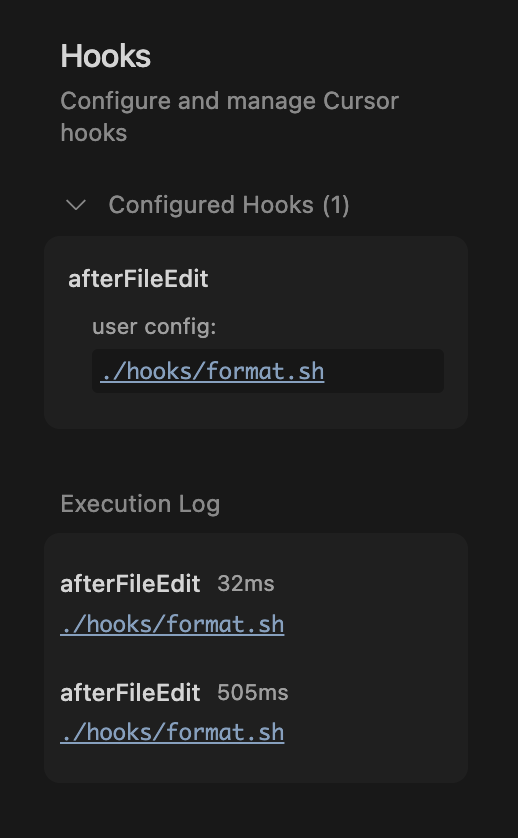
I saw the recently posted Hooks and wanted to give it a try,
I tried to do the quick start example but in the setting->hooks I do not see it configured. my hooks.json is under the home directory and my version is 1.7.40
Steps to Reproduce
create hooks.json and hooks directory and settings->hooks not shows up
Expected Behavior
i do not see the hook configured
Operating System
MacOS
Current Cursor Version (Menu → About Cursor → Copy)
Hey, thanks for the report. You probably didn’t see Hooks in Cursor’s settings earlier because you had an empty window open. Hooks are only available inside projects. Please let me know if that’s not the case.
As you mentioned, you were able to set it up for a specific project, which likely explains the earlier issue when a blank window was open.
In the new window, it’s not working again, do you have a project open there?
Firstly, it seems you need to have Run Everything turned on (Settings > Chat) for the beforeShellExecution hook in ~/.cursor/hooks.json to have any effect. It would be more intuitive if hooks could combine with the different settings - for example, in allow list mode the allow list acts as an immediate allow, but otherwise the hook still runs to give a second opinion on what to do.
My main issue is that hooks don’t activate at all if (A) there isn’t a project open or (B) you connect to a Remote SSH host. This is particularly problematic if you use beforeShellExecution as a guard against running bad commands: users will turn on Run Everything, but when they switch to a production server via SSH, it starts running everything without going through the hook.
You can’t really have this behavior without at least a per-project control over allow everything vs use allow list vs always ask. As it stands, if you switch to a remote host or open a window without a project, the hooks stop working and effectively allow all commands to run - which is especially risky when the remote hosts are production servers.
Is there any intention or challenges to have hooks work system-wide regardless of what project or window is open?
Hey, thanks for your reply - it helped me get my hooks working!
However, I still have a question: is this a long-term and stable feature?
I found that when I run cursor my-project in the CLI, hooks work fine. But
when I run cursor my-project/README.md (opening a single file that is
still within the project directory), the hooks don’t show up in settings and
don’t work at all.
It seems like Cursor hooks only work when opening a directory, not when
opening individual files - even if those files are part of the same project.
Is this the intended behavior, or is it a bug?
Yes, this is likely expected behavior. Hooks are scoped to user/team/project levels and require a workspace context. Opening a single file (cursor my-project/README.md) doesn’t start a project workspace, so hooks don’t load. For now, to use hooks, open the directory (cursor my-project).
Both situations come down to hooks being workspace/project-scoped. The feature is still evolving (project-level hooks are still experimental), so your feedback will help guide next steps.