Cursor is not loading chats and screen might as well be pure black

Where does the bug appear (feature/product)?

Cursor CLI

Describe the Bug

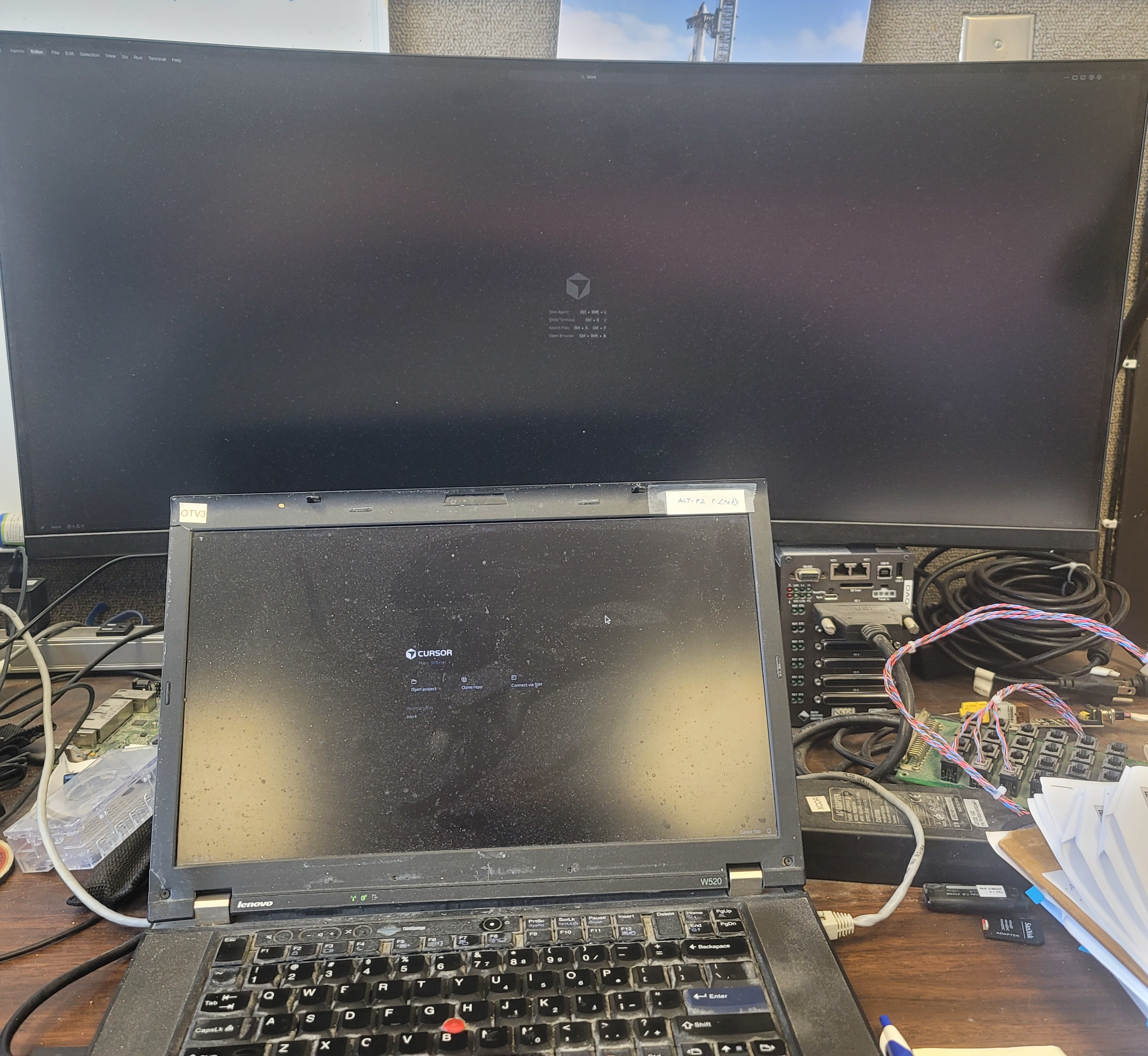
I cannot seem to get back to my work (~/,config/Cursor) and to make it worse, I can barely see the screen as the GUI mode seems to be ‘black cat on a black blanket on a moonless night’.

I am updating via debian dselect / apt-get. One day I had a working system… I did an update and it showed my former chat as an agent and gave me a wait cursor that ran for many hours before I killed it. This situation persisted until yesterday’s update when everything failed.

I do not know if it has trashed months of work or not.

Steps to Reproduce

Start up Cursor.
It gives a nearly pure black screen with invisible darkgrey print.
It does not use my previous ~/.config/Cursor state and chat

Expected Behavior

It should start up into my previous chat (or agent under new structure) without going into a wait forever loop.

Operating System

Linux

Current Cursor Version (Menu → About Cursor → Copy)

Debian package Version: 2.1.36-1764129366

For AI issues: which model did you use?

Claude

Does this stop you from using Cursor

Yes - Cursor is unusable

1 Like

Hey, thanks for the report. The black screen issue is likely related to the GPU or graphics rendering. Let’s try some fixes:

First, address the display issue:

  1. Launch with the GPU disabled:
    cursor --disable-gpu

  2. If that helps, make it permanent by creating ~/.config/Cursor/User/argv.json:

{
    "disable-hardware-acceleration": true
}
  1. Try launching with a clean slate:
    cursor --new-window --disable-extensions

About your chat history:

Your data should still be in ~/.config/Cursor/ - could you check if that directory exists and contains files? Chats are typically stored there and shouldn’t be lost unless the directory was wiped.

Diagnostics needed:

If the above doesn’t resolve the issue, please share:

  • Log files from ~/.config/Cursor/logs/ (most recent ones)
  • Your GPU/graphics card info
  • A screenshot of what you see (even if it’s mostly black)

Let me know if the --disable-gpu flag helps with the display issue first.

Didn’t make a lot of difference. You can see the two Cursor windows in the above photo. Better than a screen shot because it shows what I actually see in a day lit room in the Southwest.

Any ones in particular? There are a bunch of them.

/home/amon/.config/Cursor/logs/20251125T105640:
editSessions.log main.2.log network-shared.log sharedprocess.log terminal.log window1
main.1.log main.log remoteTunnelService.log telemetry.log userDataSync.log window2

/home/amon/.config/Cursor/logs/20251126T105621:
editSessions.log network-shared.log remoteTunnelService.log telemetry.log userDataSync.log window2
main.log ptyhost.log sharedprocess.log terminal.log window1

/home/amon/.config/Cursor/logs/20251127T205113:
editSessions.log network-shared.log remoteTunnelService.log telemetry.log userDataSync.log window2
main.log ptyhost.log sharedprocess.log terminal.log window1

(attachments)

Thanks for the photo - it helps show the severity of the rendering issue. Let’s gather more information to diagnose this:

Please share:

  1. The latest main.log file from ~/.config/Cursor/logs/20251127T205113/
  2. GPU information: lspci | grep -i vga or glxinfo | grep "OpenGL renderer"
  3. Desktop environment and display server: echo $XDG_SESSION_TYPE (tells us if you’re using Wayland or X11)

Additional actions:

  1. Force software rendering:

    cursor --disable-gpu --disable-gpu-compositing --enable-features=UseSkiaRenderer

  2. Try resetting your theme/UI settings by temporarily moving the User directory:

   mv ~/.config/Cursor/User ~/.config/Cursor/User.backup
   cursor
  1. Check if your chat data still exists:

    ls -lh ~/.config/Cursor/User.backup/workspaceStorage/

About your chat history: If you can find chat-related files in these directories, your data should be recoverable even if the display issue persists.

Let me know what you find, especially the system info and log contents.

I’ve got the deadline under control, so I can spend a few hours today and tomorrow on this.

  1. ~/.config/Cursor/logs/20251127T205113/main.log

$ cat ~/.config/Cursor/logs/20251127T205113/main.log
2025-11-27 20:51:13.503 [info] [CursorProclistService] Native module loaded successfully
2025-11-27 20:51:13.951 [info] updateURL https://api2.cursor.sh/updates/api/update/linux-x64/cursor/2.1.39/56ce6e76103f8b98acec21dc8bd344a96ad14■■■91aadd92b09804b9845d152f/stable
2025-11-27 20:51:13.951 [info] update#setState idle
2025-11-27 20:51:22.488 [info] [CursorProclistService] Config enabled feature (subsample every 10s)
2025-11-27 20:51:22.546 [info] [CursorProclistService] Config enabled feature (subsample every 10s)
2025-11-27 20:51:25.862 [warning] [BrowserViewMainService] Cannot execute JavaScript: browser view not created for window 2
2025-11-27 20:51:26.036 [warning] [BrowserViewMainService] Cannot execute JavaScript: browser view not created for window 1
2025-11-27 20:51:43.823 [warning] [BrowserViewMainService] Cannot flush storage data: browser view not created for window 1
2025-11-27 20:51:43.839 [warning] [BrowserViewMainService] Cannot flush storage data: browser view not created for window 2
2025-11-27 20:51:43.844 [warning] [BrowserViewMainService] Cannot set visibility: browser view not created for window 1
2025-11-27 20:51:43.846 [warning] [BrowserViewMainService] Cannot set visibility: browser view not created for window 2
2025-11-27 20:51:43.871 [info] Extension host with pid 2426004 exited with code: 0, signal: unknown.
2025-11-27 20:51:43.873 [info] Extension host with pid 2426018 exited with code: 0, signal: unknown.
2025-11-27 20:51:43.957 [info] update#setState checking for updates
2025-11-27 20:51:44.008 [error] [UtilityProcess id: 1, type: fileWatcher, pid: 2425986]: crashed with code 15 and reason ‘killed’

  1. They show nothing.
    amon@otv3:~$ lspci | grep -i vga | grep “OpenGL renderer”
    amon@otv3:~$ lspci | grep -i glxinfo | grep “OpenGL renderer”

  2. I use x11 intentionally: Wayland and GNUStep do not play nice together and all of our code is in ObjC.

$ echo $XDG_SESSION_TYPE
x11

No change:

$ cursor --disable-gpu --disable-gpu-compositing --enable-features=UseSkiaRenderer
Warning: ‘disable-gpu-compositing’ is not in the list of known options, but still passed to Electron/Chromium.
Warning: ‘enable-features’ is not in the list of known options, but still passed to Electron/Chromium.

mv ~/.config/Cursor/User ~/.config/Cursor/User.backup

It forced me to login to Cursor and prove I am human… and I ended up with the same interface.

amon@otv3:~$ ls -Rlh ~/.config/Cursor/User.backup/workspaceStorage/
/home/amon/.config/Cursor/User.backup/workspaceStorage/:
total 8.0K
drwxrwxr-x 2 amon amon 4.0K Dec 3 15:18 1749395105236
drwxrwxr-x 4 amon amon 4.0K Dec 3 15:18 4b6796d279de060bbc36f2d4f4003262

/home/amon/.config/Cursor/User.backup/workspaceStorage/1749395105236:
total 84K
-rw-r–r-- 1 amon amon 40K Dec 3 15:18 state.vscdb
-rw-r–r-- 1 amon amon 40K Dec 3 15:18 state.vscdb.backup

/home/amon/.config/Cursor/User.backup/workspaceStorage/4b6796d279de060bbc36f2d4f4003262:
total 92K
drwxrwxr-x 2 amon amon 4.0K Nov 24 15:07 anysphere.cursor-retrieval
drwxrwxr-x 2 amon amon 4.0K Nov 25 10:56 ms-vscode.makefile-tools
-rw-r–r-- 1 amon amon 40K Dec 3 15:18 state.vscdb
-rw-r–r-- 1 amon amon 40K Dec 3 15:18 state.vscdb.backup

/home/amon/.config/Cursor/User.backup/workspaceStorage/4b6796d279de060bbc36f2d4f4003262/anysphere.cursor-retrieval:
total 1.6M
-rw-rw-r-- 1 amon amon 1.6M Dec 3 15:17 embeddable_files.txt
-rw-rw-r-- 1 amon amon 5.3K Dec 3 15:17 high_level_folder_description.txt

/home/amon/.config/Cursor/User.backup/workspaceStorage/4b6796d279de060bbc36f2d4f4003262/ms-vscode.makefile-tools:
total 0

There should be about 8 months of chats, some very long and some including images, so those numbers look small.

(Attachment main.log is missing)

(Attachment main.log is missing)
I’ve got the deadline under control, so I can spend a few hours today and tomorrow on this.

  1. ~/.config/Cursor/logs/20251127T205113/main.log

$ cat ~/.config/Cursor/logs/20251127T205113/main.log
2025-11-27 20:51:13.503 [info] [CursorProclistService] Native module loaded successfully
2025-11-27 20:51:13.951 [info] updateURL https://api2.cursor.sh/updates/api/update/linux-x64/cursor/2.1.39/56ce6e76103f8b98acec21dc8bd344a96ad14■■■91aadd92b09804b9845d152f/stable
2025-11-27 20:51:13.951 [info] update#setState idle
2025-11-27 20:51:22.488 [info] [CursorProclistService] Config enabled feature (subsample every 10s)
2025-11-27 20:51:22.546 [info] [CursorProclistService] Config enabled feature (subsample every 10s)
2025-11-27 20:51:25.862 [warning] [BrowserViewMainService] Cannot execute JavaScript: browser view not created for window 2
2025-11-27 20:51:26.036 [warning] [BrowserViewMainService] Cannot execute JavaScript: browser view not created for window 1
2025-11-27 20:51:43.823 [warning] [BrowserViewMainService] Cannot flush storage data: browser view not created for window 1
2025-11-27 20:51:43.839 [warning] [BrowserViewMainService] Cannot flush storage data: browser view not created for window 2
2025-11-27 20:51:43.844 [warning] [BrowserViewMainService] Cannot set visibility: browser view not created for window 1
2025-11-27 20:51:43.846 [warning] [BrowserViewMainService] Cannot set visibility: browser view not created for window 2
2025-11-27 20:51:43.871 [info] Extension host with pid 2426004 exited with code: 0, signal: unknown.
2025-11-27 20:51:43.873 [info] Extension host with pid 2426018 exited with code: 0, signal: unknown.
2025-11-27 20:51:43.957 [info] update#setState checking for updates
2025-11-27 20:51:44.008 [error] [UtilityProcess id: 1, type: fileWatcher, pid: 2425986]: crashed with code 15 and reason ‘killed’

  1. They show nothing.
    amon@otv3:~$ lspci | grep -i vga | grep “OpenGL renderer”
    amon@otv3:~$ lspci | grep -i glxinfo | grep “OpenGL renderer”

  2. I use x11 intentionally: Wayland and GNUStep do not play nice together and all of our code is in ObjC.

$ echo $XDG_SESSION_TYPE
x11

No change:

$ cursor --disable-gpu --disable-gpu-compositing --enable-features=UseSkiaRenderer
Warning: ‘disable-gpu-compositing’ is not in the list of known options, but still passed to Electron/Chromium.
Warning: ‘enable-features’ is not in the list of known options, but still passed to Electron/Chromium.

mv ~/.config/Cursor/User ~/.config/Cursor/User.backup

It forced me to login to Cursor and prove I am human… and I ended up with the same interface.

amon@otv3:~$ ls -Rlh ~/.config/Cursor/User.backup/workspaceStorage/
/home/amon/.config/Cursor/User.backup/workspaceStorage/:
total 8.0K
drwxrwxr-x 2 amon amon 4.0K Dec 3 15:18 1749395105236
drwxrwxr-x 4 amon amon 4.0K Dec 3 15:18 4b6796d279de060bbc36f2d4f4003262

/home/amon/.config/Cursor/User.backup/workspaceStorage/1749395105236:
total 84K
-rw-r–r-- 1 amon amon 40K Dec 3 15:18 state.vscdb
-rw-r–r-- 1 amon amon 40K Dec 3 15:18 state.vscdb.backup

/home/amon/.config/Cursor/User.backup/workspaceStorage/4b6796d279de060bbc36f2d4f4003262:
total 92K
drwxrwxr-x 2 amon amon 4.0K Nov 24 15:07 anysphere.cursor-retrieval
drwxrwxr-x 2 amon amon 4.0K Nov 25 10:56 ms-vscode.makefile-tools
-rw-r–r-- 1 amon amon 40K Dec 3 15:18 state.vscdb
-rw-r–r-- 1 amon amon 40K Dec 3 15:18 state.vscdb.backup

/home/amon/.config/Cursor/User.backup/workspaceStorage/4b6796d279de060bbc36f2d4f4003262/anysphere.cursor-retrieval:
total 1.6M
-rw-rw-r-- 1 amon amon 1.6M Dec 3 15:17 embeddable_files.txt
-rw-rw-r-- 1 amon amon 5.3K Dec 3 15:17 high_level_folder_description.txt

/home/amon/.config/Cursor/User.backup/workspaceStorage/4b6796d279de060bbc36f2d4f4003262/ms-vscode.makefile-tools:
total 0

There should be about 8 months of chats, some very long and some including images, so those numbers look small.

This topic was automatically closed 22 days after the last reply. New replies are no longer allowed.