Cursor + Jupyter is an unstable hot mess that keeps becoming unresponsive for the past few months. The forum is full of such reports with no followups.
Steps to Reproduce
Connect to a working directory on a remote machine (linux 6.8.0-84-generic) with SSH
Open notebook and connect to a Jupyter server running on that machine
Run cells using [shift]+[enter]
Eventually (like < 1 min), cells won’t be responsive, and entire IDE will be unresponsive until [Developer Reload Window] is selected from the command pallet
Go back to step 3 and repeat FOREVER
Expected Behavior
TO SIMPLY WORK
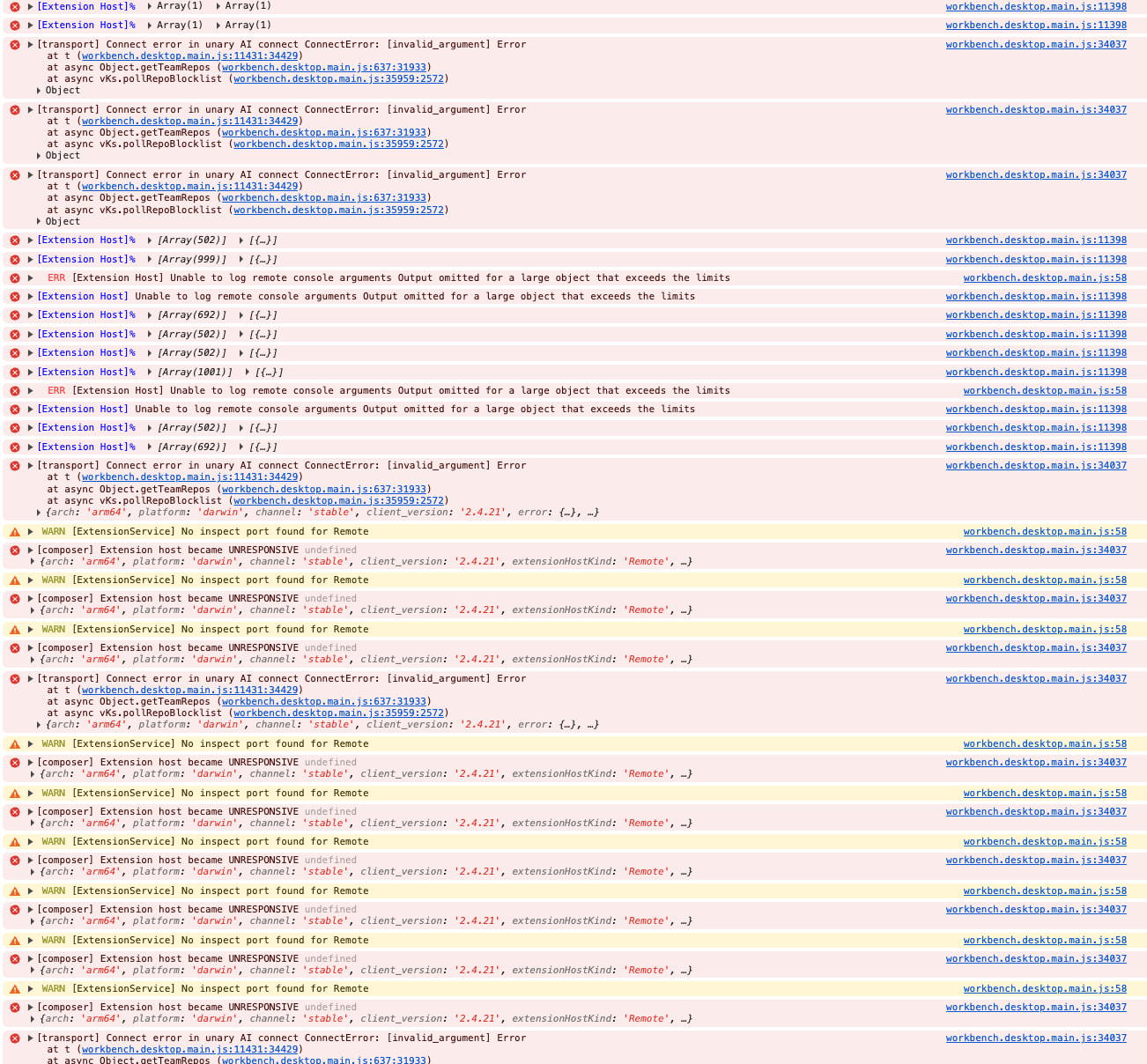
I added the log roll from the Output tab below, suggesting that the IDE is losing connection to the machine. But I have several connections to this machine, and only the Cursor window that I am working with should be failing?
I even have other Cursor windows open to this machine since I work on several projects simultaneously, and those windows maintain their connection in the background while they are processing their code.
Only the window/notebook I am actively working with halts eventually.
Hey, thanks for the report. Jupyter over SSH freezes after about a minute, with proxy connection timeouts. The logs show the SSH connection stalls, but only in the active window.
Based on the timeouts in the logs (30 seconds per ping), this might be related to the extension host. We should check a few things:
Extension Monitor CMD+Shift+P > “Developer: Open Extension Monitor”
Please take a screenshot when the IDE starts slowing down. Jupyter/Python extensions often cause issues in Remote SSH.
Developer Tools
When the IDE freezes, open Developer Tools > Console tab. Send what you see there during the freeze.
Quick test without extensions
Try running this from the terminal:
cursor --disable-extensions
Then connect over SSH and open the same notebook. If it works fine, it’s very likely an extension issue.
Let me know the results, especially the Extension Monitor screenshot and the no-extensions test. If it confirms an extension issue, we can dig deeper or escalate.
Cannot disable extensions as this is required to run a Jupyter Notebook…
There is no slowing down or freezing, simply halting - I can navigate cells, I can right click and select things, I can type into cells, and I can select to run a cell, but there is no response back.
I also noticed that while I am writing/editing code and Cursor is aggressively offering edits, after this the IDE halts.
I don’t have “Developer: Open Extension Monitor”, I have the below options
Interesting that the aggressive Tab suggestions happen right before it stops. The logs show a proxy timeout every 30 seconds, which looks like congestion in the SSH tunnel from network traffic.
Try this test:
Turn off Cursor Tab
Settings > Tab > Cursor Tab: disable it. Restart Cursor, connect over SSH. If the issue goes away, that confirms Tab suggestions are overloading the SSH connection.
Developer Tools
CMD+Shift+P > “Developer: Toggle Developer Tools” > Console tab. Run the cell, wait for it to stop, then share what shows up there.
Extension Monitor (if needed)
First enable: Settings > Application > Experimental > Extension Monitor: Enabled. After restarting, you’ll see CMD+Shift+P > “Developer: Open Extension Monitor”.
SSH extension version
Check in Extensions. If you’re using Microsoft “Remote - SSH”, switch to “Anysphere Remote SSH”.
Start with step 1 since it’s a quick test. Let me know if turning off Tab helped.
I am using Anysphere for SSH, but I still have two MS extensions for SSH that I don’t believe cause conflict, but if their functionalities is covered by the Anysphere extension then I would be happy to remove them.
I think this is the relevant section where the halt begins. Don’t remember what I was doing at this point, just noticed it after some time passed and I wanted to run a cell. It halted long before trying to run the cell.
And again, and this time I noticed it happened exactly when a tab completion popped up, which I clicked away from (meaning, I clicked elsewhere why the completion suggested)
I’m seeing the errors Extension host became UNRESPONSIVE and ConnectError: [invalid_argument]. This looks like your SSH tunnel is getting overloaded, and Tab suggestions seem to trigger it.
Two steps:
Disable Cursor Tab (priority). You already noticed the correlation with tab completions. Go to Settings > Tab > Cursor Tab and disable it. Restart Cursor and work with the notebook. If the issue goes away, that’s the cause.
Remove the MS Remote SSH extensions. You asked about this. Yes, remove them. Anysphere Remote SSH fully replaces them, and having two SSH extensions can conflict.
Let me know what happens after you disable Tab. That’s the main test right now.
I will turn off the setting and give it a try for a week or so to see if things change.
A suggestion regarding the Tab completion when working on a remote machine, but first a question: why does this operation need to utilize the SSH tunnel? Since I am working/editing code on the local machine, and only need to communicate with the remote machine when saving an edited file, shouldn’t Tab completion need no access to the host to make live recommendations?
Seems that this approach would save a lot of back-and-forth between the local and remote machines.
I can confirm that this was caused by Tab completion. Once turned off I haven’t experienced this problem again after a full day of heavy coding.
Given that this is a feature that I would like to keep, it would be nice to know that I can run it when working via SSH. Note that I only noticed this to be a problem when coding in Jupyter notebooks. I also code in Rust and in regular ‘.py’ files, and never noticed this happening there.
Thanks for confirming and for the detailed feedback.
This is a known issue: Cursor Tab completion in Jupyter over SSH can overload the SSH tunnel. The team is aware and is working on improvements in the extension host, which is what shows the “UNRESPONSIVE” logs.
I’ll pass your architecture request to the team, about why Tab completion uses SSH at all if editing is local. That’s a good point, and optimizing this could reduce the tunnel load.
For now, the workaround is to keep Cursor Tab turned off when working with notebooks over SSH. If we see progress on this, I’ll post an update here.
I’ll pass your architecture request to the team, about why Tab completion uses SSH at all if editing is local. That’s a good point, and optimizing this could reduce the tunnel load.
I constantly run into this issue, which makes it quite difficult to actually use Cursor with Jupyter on remote machines (I am using the Anysphere SSH extension).
Any updates on fixes for this issue besides completely disabling Cursor Tab (then why use Cursor with Jupyter)?