This has happened several times now, and I honestly don’t understand how a well-established company like Cursor keeps failing with updates.
One of the most fundamental rules of SaaS is never to break access to customer data or workflows. After today’s update and restart, all my recent projects disappeared from the startup project list, forcing me to manually locate them again.
I can see my previous chats listed under Agents, but when I click on them nothing opens and nothing happens. I currently have no way to read or access my earlier conversations.
On top of that, the left-side chat panel is now forced open every time Cursor starts.
I’m spending $1,000–$2,000 per month on Cursor, and I’m exhausted by updates that prioritize new features while breaking core functionality.
Please tell me how I can open and read my previous chats. If this isn’t possible, I’ll be moving to Claude.
Hey, thanks for the report. This is a known issue in versions 2.3.34+ and 2.4.x. Chats stay in the list but won’t open due to DB issues during the update.
Your data is most likely not lost. The DB just can’t read it. Here’s what to try:
Option 1: Check for corrupted files
Close Cursor completely (also check Task Manager).
Open %APPDATA%\Cursor\User\globalStorage
Look for files like state.vscdb.corrupted.1767... (the number will be different)
If you find one, rename it to state.vscdb (first move the old state.vscdb to a separate folder)
Option 2: If there are no corrupted files
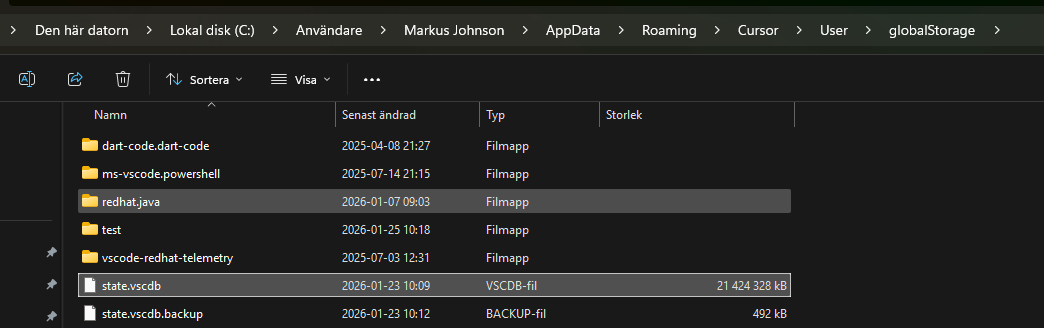
Can you share a screenshot of what’s inside globalStorage and workspaceStorage\[your-project]\? Sometimes the data is stored there. In a similar case, we helped recover it via DM: Can't load or click on chats
About recurrence
This usually happens when there’s low free disk space during the update, so the DB migration can’t finish properly. Please check you have enough free space before the next updates.
If these workarounds don’t help, let me know and we’ll dig deeper.
I regret upgrading cursor to latest version. I had avoided since last one month given my past experience is with cursor upgrades but then this time I thought let me do it.
Perfect. All chats gone. Wsl issues where the front end is not talking to back end again. And many more yet to discover.
Regret it. its almost like a bunch of rookies are at the helm at cursor. Or they are also vibe coding and don’t know how to test code.
I tried option 1, there was a corrupted one. I dont have any low disk space. I got the first start of cursor with guide after doing this and it seems my layout was reseted.
After doing option 1 and starting cursor the problem is still there, I can see the old chats, but i cant open them, nothing happens when i click on them.
Now after checking the files the corrupted that i renamed to none corrupted was 21gb is now 55mb so i gues now this try to fix it made sure i lost all data..
Hey, thanks for the screenshot. I can see the issue. Your state.vscdb is 21 GB, which is abnormally large. A normal Cursor database is usually a few hundred MB, not gigabytes. That’s a clear sign of corruption.
The main thing I don’t see is files like state.vscdb.corrupted.*. Cursor usually creates that kind of backup when it detects a problem, but you don’t have it. That makes the standard recovery harder.
Let’s try this plan:
First attempt, restore from backup (low chance, but worth trying):
Close Cursor completely (double-check in Task Manager)
Create an OLD folder in globalStorage
Move state.vscdb into the OLD folder
Rename state.vscdb.backup to state.vscdb
Launch Cursor
If nothing helps:
What Cursor version are you on? (Help > About)
How much free space is on drive C:?
What did you do right before the error started? Was there an update?
Let me know the result of the first attempt, and we’ll go from there.
this happen to me before and i’m scared it will happen again. Has this bug been resolved? is there a way to check which updates have been tested with enough people? (testing on 32, 100, maybe even 1000 is not enough sample size to catch this cardinal sin) Please be transparent about your releases.