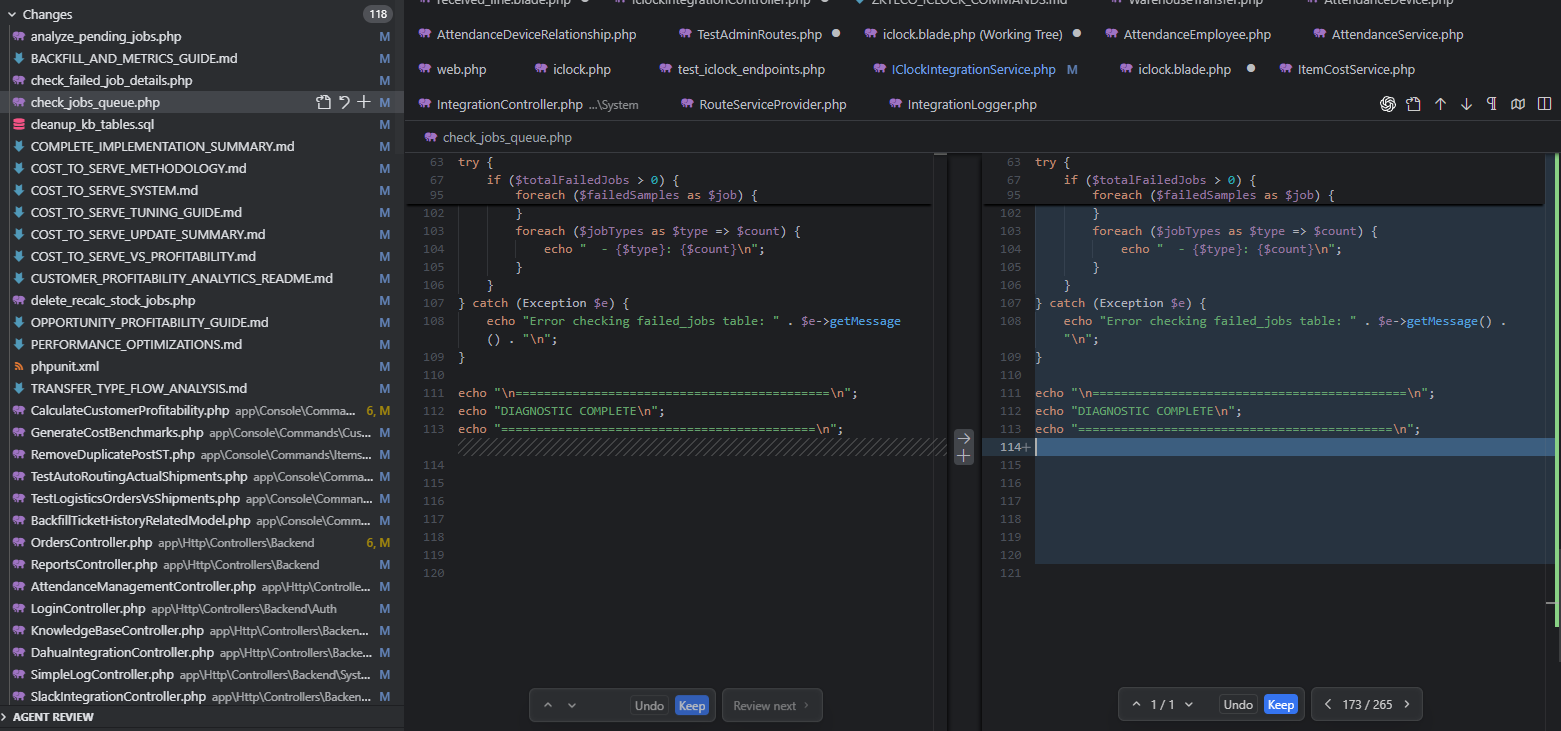
Cursor is triggering git changes to files on startup. Seems to be from old chats.
Steps to Reproduce
On windows. Commit all changes to branch (note I’m doing this outside of cursor). Close Cursor IDE and reopen. A bunch of prior files are edited as GIT changes. Most of the time there doesn’t seem to be any changes to the files. Maybe hidden chars? Sometimes its old changes though. I’ve tried archiving all previous Agent Chats and it still does it. Anyone else seen this? I’m on 2.0.54, but its been happening for a while.
Expected Behavior
I shouldn’t have any GIT change tracking changes on startup of the Cursor IDE.
Operating System
Windows 10/11
Current Cursor Version (Menu → About Cursor → Copy)
After a Cursor update or sometimes opening a project - Git changes lists a bunch of files that have Changed but there are no code changes just white spaces here and there?
It looks like I was able to resolve the issue by reviewing all the prior agent changes and accepting the changes. I have tried reproducing by making additional agent changes, not accepting, and reverting the git changes outside of cursor, but it has no longer produced additional changes on startup. I’ll follow up if it happens again.
Ok it happened again and I have a bit more information.
Yes, these are files that were modified in Agent mode from prior chats, but it’s not every file.
I tried to select each chat from the history and click the “review” button and accept all the changes” then undo all changes from git (outside of cursor, if it matters), the reopen cursor with the project loading and it will still re-modify the files. These files don’t seem to have any changes
However, in Editor view, I see the files flagged as modified, and after selecting them I get UI to undo or keep the change. After I select an option here, I can undo the git changes again, reopen the project, and all other files re-show as modified except the one I reviewed.
It seems there is a process that is trying to identify files that need review and is modifying the file in a way that triggers a git change of the file.
If I close my laptop/disconnect, when I later Reload the cursor window, cursor will insert newlines at the end of files the agent had previously changed.
I believe it only happens for changes that I didn’t hit “Keep” on before disconnecting.
This is frustrating since it can happen for very old agents so I will end up with large git diffs of newline changes.
Steps to Reproduce
Connect to remote vscode workspace.
Run an agent on cursor that will edit some existing files. Then do not accept or reject any of the changes.
Ungracefully interrupt the SSH session (i.e. close laptop/turn off wifi)
Hit Reload Window when it pops up in cursor.
Now the remote workspace will have extra newlines at the end of the files that were edited by the agent.
Expected Behavior
No files should be changed when the window reloads.
Operating System
MacOS
Current Cursor Version (Menu → About Cursor → Copy)
Every time Cursor launches, it appends dozens of blank lines to virtually every tracked file in my workspace—Python, Markdown, Vue, etc.—even though the repository is clean when I close it. git status shows hundreds of files touched, and the diffs are nothing but extra trailing newlines (e.g., a single newline becomes ~35). The behavior repeats on every startup and does not occur mid-session.
Steps to Reproduce
Ensure the workspace is clean (git status shows no changes) and all tracked files end with a single newline. .editorconfig either has insert_final_newline = false or is temporarily renamed/removed.
Close all Cursor windows.
Launch Cursor and open the workspace at D:\apps\analytIQ\analytiq5.
Immediately run git status (or inspect any tracked file); hundreds of files show modifications consisting solely of extra trailing blank lines. The issue reappears after every restart.
Expected Behavior
Expected Cursor behavior: when EditorConfig final-newline handling is disabled (or the .editorconfig file is absent), the editor should leave file endings untouched—launching Cursor should not modify a clean working tree or append any newlines automatically. A repo that is clean when you close it should still be clean right after Cursor starts.
Operating System
Windows 10/11
Current Cursor Version (Menu → About Cursor → Copy)
Hi, i’m new here in this Forum.
I want to share a problem.
every time I open cursor in my github Desktop i see many changes with only whitespace. and there are add by cursor every time I open it. there are anyone that have same problem?
I see the option for whitespace only suggestion, but not think it’s working.
Steps to Reproduce
Open Github Desktop and then Open Cursor.
Operating System
Windows 10/11
MacOS
Current Cursor Version (Menu → About Cursor → Copy)
This was happening to me today. I managed to resolve this by opening one of the changed files, clicking the Accept all changes, review next file, accept all changes… and so on until all files are accepted.
Then I closed and reopened the cursor window and it didn’t try to append a new line anymore.
I see that in this case could help but in my case no, also cancel the chat help. it will continue and i have more that 30 files with 1 white line that github see as modify
I just start Cursor, wait a while without any action and Cursor adds blank lines at the end of some PHP files. I used “some” phrase as I have no idea why it picked these files. I attached a screenshot with only 2 files on tab that were opened. I also attached second screenshot with git diff. Now there are 4 files affected.
Steps to Reproduce
For me it is enough to start Cursor. Each time I launch it, it adds new blank lines to the same files. Maybe it is related to some requests made in the past.
The bug is related with files with not accepted changes from previous chats. However I had got more than 15 files with such changes (3x .js, 1x css and at least 11x .php), but Cursor only changed 4 of them (probably the latest ones).