Cursor on Windows, terminal tasks dont always react on command completed

Where does the bug appear (feature/product)?

Cursor IDE

Describe the Bug

I noticed this behavior quite often. I am giving Cursor some tasks, it runs terminal commands but it waits for terminal command to complete even when it is done long time ago

Steps to Reproduce

My thoughts on this are:

  1. have a windows machine
  2. give cursor tasks that require running terminal commands (e.g. switch git branches, update master after PR was merged, etc)

Expected Behavior

Cursor always correctly detects that terminal command completed and goes on with his tasks

Screenshots / Screen Recordings

Operating System

Windows 10/11

Current Cursor Version (Menu → About Cursor → Copy)

Version: 1.5.9 (user setup)
VSCode Version: 1.99.3
Commit: de327274300c6f38ec9f4240d11e82c3b0660b20
Date: 2025-08-30T21:02:27.236Z
Electron: 34.5.8
Chromium: 132.0.6834.210
Node.js: 20.19.1
V8: 13.2.152.41-electron.0
OS: Windows_NT x64 10.0.26100

This has been broken since before v1.

@andrewh tells us it’ll be fixed in the imminent 1.6 release

1 Like

Where does the bug appear (feature/product)?

Cursor IDE

Describe the Bug

Cursor when it try to lunch a command in terminal or in the focus , it is in progress for infinite time , and does not lunch the command .
sometimes it lunch the command but when it finish , it does not detect that it finish .
i am obliged to stop it and say to the prompt that the command finish .

Steps to Reproduce

it happen randomely.

Expected Behavior

that the commands is executed instantly .
that Cursor detect when a command execution is finished

Screenshots / Screen Recordings

Operating System

Windows 10/11

Current Cursor Version (Menu → About Cursor → Copy)

Version: 1.5.9 (user setup)
VSCode Version: 1.99.3
Commit: de327274300c6f38ec9f4240d11e82c3b0660b20
Date: 2025-08-30T21:02:27.236Z
Electron: 34.5.8
Chromium: 132.0.6834.210
Node.js: 20.19.1
V8: 13.2.152.41-electron.0
OS: Windows_NT x64 10.0.22631

Does this stop you from using Cursor

No - Cursor works, but with this issue

@bsf_yassine thank you for the bug report. I sent it to the team for review. We have a new version 1.6 coming soon that fixes that issue.

This happens to me on powershell/pwsh a lot and if i click on the terminal and just hit ‘enter’ to make the prompt show up again, it resumes, but then the agent doesn’t get the output from the terminal (it thinks the command returned nothing)

I’ve always had this kind of problem on Windows 11.

Only with the 1.4.5 release the problem completely disappeared.

Now it’s frankly unusable and I’m considering switching to other solutions like Claude Code!

When 1.6 is expected?

Cursor has had this problem forever… lots of people have reported it (including myself). Super frustrating and ruins the Cursor Agent experience. Must be an incredibly difficult problem.

1 Like

Yup, its time to fix this one, but now some models are immune to this bug, but not all.

Ergonomically this is a sub optimal situation.

We have reworked this part and it will be launched in 1.6 which is now in testing phase but should be out as beta soon.

1 Like

I just tested the last version 1.6

Version: 1.6.27 (user setup)
VSCode Version: 1.99.3
Commit: d750e54bba5cffada6d7b3d18e5688ba5e944ad0
Date: 2025-09-17T20:21:17.042Z
Electron: 34.5.8
Chromium: 132.0.6834.210
Node.js: 20.19.1
V8: 13.2.152.41-electron.0
OS: Windows_NT x64 10.0.22631

i still have the issue as you can see in the screenshot.
the command is executed , but cursor still waiting for it finish like is not aware that is finished already .

The last version seems introduced another regression , the button that allow to copy from terminal to chat is missing , and when i try to the “Cltr +C” to copy it interprete is as “interupt command” and not copy .
i am very struggling with this terminal part .

While some users have seen improvements we are still seeing some edge cases with terminals and continue to work on it.

Note: CTRL C means in many terminals interrupt command, not copy. It is not something we changed.

I will let the team know about the copy button.

1 Like

Please add an automatic mode that forces the AI to run all terminal commands in the background. In many cases, terminal output isn’t needed. This could be implemented as part of the custom mode.

For the mode “waiting” state, simply make it send Enter up to 5 times at different intervals. This works in 99% of cases to resolve terminal hangs after commands in both Linux and PowerShell. To avoid accidental triggers, keep this feature as a separate terminal option rather than the default.

Many users would appreciate it.

1 Like

after highlighing a section of text in terminal I used to be able to Ctrl-C to copy it. Now the Ctrl-C is an interrupt in that context

Just came here to +1 this. I have the exact same issue on Windows 11 for my git commands. Terminal hangs indefinitely after successfully executing. Version 1.6.42.

Describe the Bug

Regardless of the command, Cursor gets stuck waiting in terminal.
Even if the command finished and returned the correct exit codes.

It hangs on:

  • cd directory/

  • npm tests

  • pip installs

  • docker builds

  • git commands

Windows 11, this has been happening for the past >5 released versions.

Steps to Reproduce

Install Cursor IDE on Windows 11.
Ask it to complete any task that would require a command line call → It gets stuck

Expected Behavior

… Don’t get ■■■■?

Operating System

Windows 10/11

Current Cursor Version (Menu → About Cursor → Copy)

Version: 1.7.11 (user setup)
VSCode Version: 1.99.3
Commit: 867f14c797c14c23a187097ea179bc97d215a7c0
Date: 2025-09-26T16:55:04.318Z
Electron: 34.5.8
Chromium: 132.0.6834.210
Node.js: 20.19.1
V8: 13.2.152.41-electron.0
OS: Windows_NT x64 10.0.26100

Does this stop you from using Cursor

Yes - Cursor is unusable

imageyou can chose it when using it, which will enable cltr+c works

Add this to our User or Org settings JSON

"terminal.integrated.shellIntegration.enabled": true,
"terminal.integrated.commandsToSkipShell": [],
"terminal.integrated.sendKeybindingsToShell": false

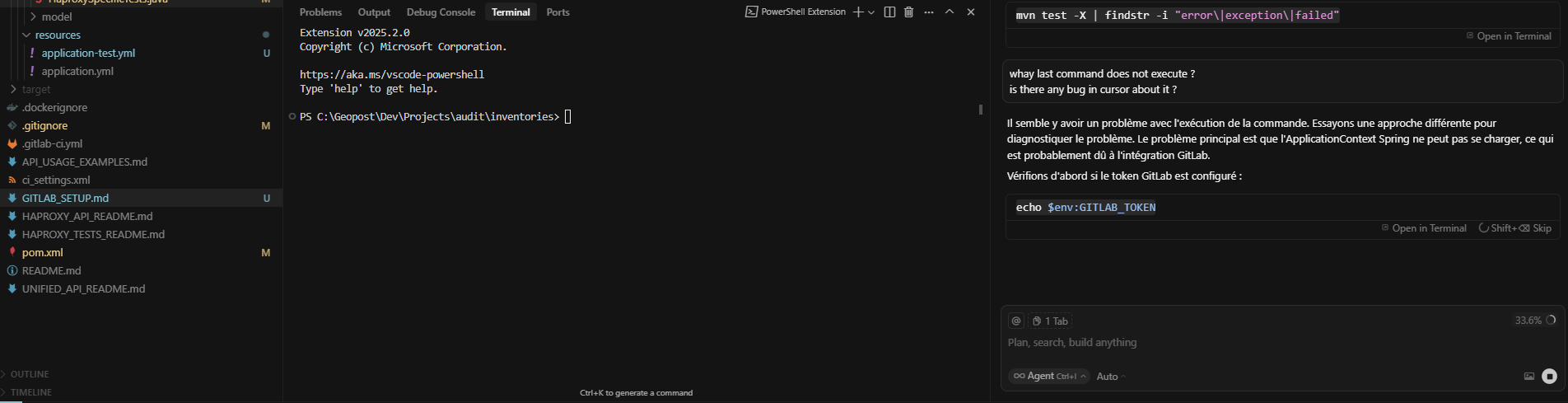
This failure to complete terminal command has come back with 1.7.46 andthe previous version too. What is causing it this time is when there is an error in the syntax of the command and the command fails, then the terminal hangs and does not exit unless I cancel it.

Version: 1.7.46 (user setup)
VSCode Version: 1.99.3
Commit: b9e5948c1ad20443a5cecba6b84a3c9b99d62580
Date: 2025-10-14T01:21:46.830Z
Electron: 34.5.8
Chromium: 132.0.6834.210
Node.js: 20.19.1
V8: 13.2.152.41-electron.0
OS: Windows_NT x64 10.0.26100

This topic was automatically closed 22 days after the last reply. New replies are no longer allowed.