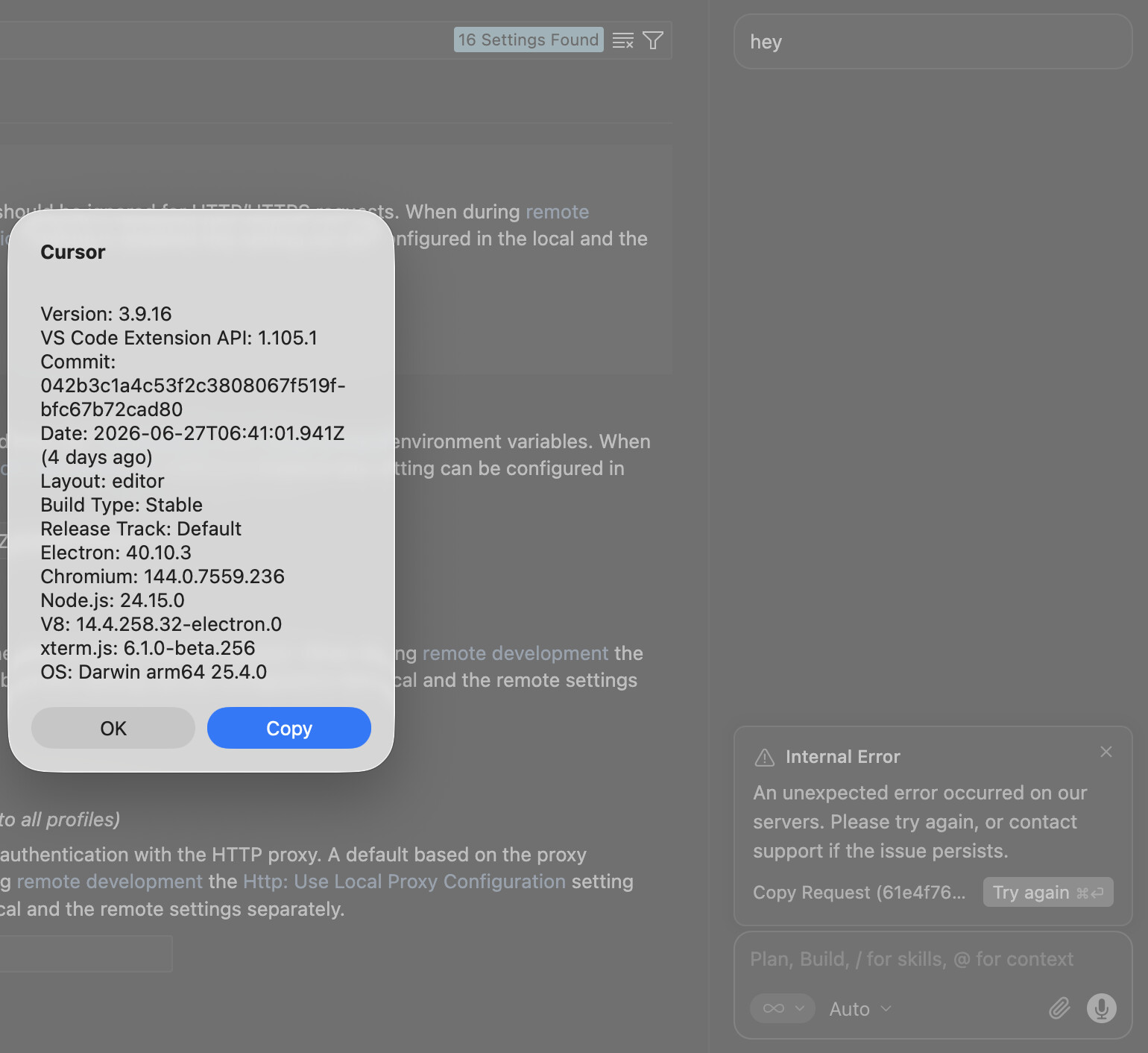
When setting a http proxy via VS Code settings, cursor bypasses the proxy and goes straight to the internet. Before re opening the app, we even got an “internal Error - An unexpected error occurred on our servers. Please try again, or contact support if the issue persists.”
Steps to Reproduce
Enter VS Code settings.
Enter your proxy address under “Http: Proxy”.
Try send any prompt in an agent chat.
Expected Behavior
We expect traffic to go through our proxy and not bypassing it.
For AI issues: add Request ID with privacy disabled
Request ID: 61e4f76c-5edc-4dbf-b0d7-7f3b2e3bc3e6
[internal] Failed to establish a socket connection to proxies: PROXY <proxy_address>
RetriableError: [internal] Failed to establish a socket connection to proxies: PROXY <proxy_address>
at uAS (vscode-file://vscode-app/Applications/Cursor.app/Contents/Resources/app/out/vs/workbench/workbench.desktop.main.js:12056:27795)
at EMc (vscode-file://vscode-app/Applications/Cursor.app/Contents/Resources/app/out/vs/workbench/workbench.desktop.main.js:12056:26530)
at Fny (vscode-file://vscode-app/Applications/Cursor.app/Contents/Resources/app/out/vs/workbench/workbench.desktop.main.js:12057:11929)
at Object.classify (vscode-file://vscode-app/Applications/Cursor.app/Contents/Resources/app/out/vs/workbench/workbench.desktop.main.js:12057:16434)
at hAS (vscode-file://vscode-app/Applications/Cursor.app/Contents/Resources/app/out/vs/workbench/workbench.desktop.main.js:12057:5824)
at async Oqm.runWithSharedTurnRunner (vscode-file://vscode-app/Applications/Cursor.app/Contents/Resources/app/out/vs/workbench/workbench.desktop.main.js:12057:15786)
at async iH.runAgentLoop (vscode-file://vscode-app/Applications/Cursor.app/Contents/Resources/app/out/vs/workbench/workbench.desktop.main.js:24486:3041)
at async Lkh.streamFromAgentBackend (vscode-file://vscode-app/Applications/Cursor.app/Contents/Resources/app/out/vs/workbench/workbench.desktop.main.js:24505:13862)
at async Lkh.getAgentStreamResponse (vscode-file://vscode-app/Applications/Cursor.app/Contents/Resources/app/out/vs/workbench/workbench.desktop.main.js:24505:22888)
at async IRe.submitChatMaybeAbortCurrent (vscode-file://vscode-app/Applications/Cursor.app/Contents/Resources/app/out/vs/workbench/workbench.desktop.main.js:12142:2399)
Hey, thanks for the detailed report with the Request ID and stack trace. This is part of a known cluster of proxy issues in 3.9.16. We’re tracking the issue, but there’s no exact ETA for a fix yet.
In your case, the error Failed to establish a socket connection to proxies: PROXY <addr> means Cursor resolved the address from Http: Proxy, but couldn’t open a connection to the proxy itself. A few things to check or try:
Make sure the proxy host and port are correct and reachable from this machine, and that the proxy allows CONNECT to *.cursor.sh / *.cursor.com on port 443.
If you actually have direct internet access, try setting Http: Proxy Support = off. This bypasses proxy-agent and avoids this specific PacProxyAgent error.
If the proxy is required and it doesn’t support HTTP/2, enable Settings → Network → HTTP Compatibility Mode → HTTP/1.1 (or cursor.general.disableHttp2: true), then fully quit and restart Cursor, not just reload window. The HTTP/1.1 path properly goes through the proxy.
Let me know if that helped, and what type of proxy you’re using corporate, PAC, or local. That’ll help narrow it down.
Same here.
After recent upgrade to 3.10, Cursor ignores all proxy settings. Env variables, system settings, Cursor’s own settings - all of them.
Had to downgrade all the way to 3.7 before anything started working again.
Hey @Vladimir_Romanov, it’s important to separate your case from the original report. That one was on 3.9.16, and you’re on 3.10, where some proxy fixes should already be included. If 3.10 still ignores the settings, that’s a separate signal, and we need details to figure out if this is a regression or a config issue.
Can you share:
The exact 3.10.x version Help > About where it reproduced, and your OS.
Your proxy type, corporate, PAC, or local, and how it’s set up, env HTTP_PROXY/HTTPS_PROXY, system settings, or Http: Proxy in Cursor settings.
A Request ID with Privacy Mode turned off, chat, top-right menu > Copy Request ID.
Whether you tried Settings → Network → HTTP Compatibility Mode → HTTP/1.1 or cursor.general.disableHttp2: true with a full Cursor restart, not just Reload Window, and whether that helps on 3.10.
With that info I can tell if it’s the same baseline issue or something new in 3.10.
Version: 3.10.20
VS Code Extension API: 1.125.0
Commit: 23b9fb205fe595ea2be29da7214e19762d037fc0
Date: 2026-07-07T07:03:33.071Z (1 day ago)
Layout: IDE
Build Type: Stable
Release Track: Default
Electron: 40.10.3
Chromium: 144.0.7559.236
Node.js: 24.15.0
V8: 14.4.258.32-electron.0
xterm.js: 6.1.0-beta.256
OS: Darwin arm64 25.5.0
It’ s a personal local proxy I use for traffic splitting when i connect to customer’s networks. Exposed at localhost:28080 with envoy underneath. I start Cursor with env variables set: http_proxy="``http://127.0.0.1:28080``" https_proxy="``http://127.0.0.1:28080``" HTTPS_PROXY="``http://127.0.0.1:28080``" HTTP_PROXY="``http://127.0.0.1:28080``"
Thanks for the detailed troubleshooting, @Vladimir_Romanov, this is exactly what we needed.
The fact that the proxy is ignored on 3.10.20 even with cursor.general.disableHttp2: true and HTTP/1.1 Compatibility Mode, and that it happens across all channels at once env vars, system settings, and http.proxy in settings.json, is a really useful signal. It shows that the HTTP/1.1 path that should have avoided the issue is not working for you on 3.10.x. This is part of a known cluster of proxy issues, the issue is being tracked, but I can’t share an exact ETA for a fix yet.
For now, your best workaround is to stay on 3.7 since proxy routing works correctly there. If you want to stop updates from being pulled automatically, stick to the Release Track and turn off auto-update so it doesn’t jump back to 3.10.
One quick clarification so we can log this more precisely:
On 3.7, which exact version are you on Help > About that works without issues?
Once there’s an update on the fix, I’ll post it here.
As for 3.7 version currently i use the latest that was available for download.
Details: Version: 3.7.42 VS Code Extension API: 1.105.1 Commit: 5702c9cfca656d8710fad58402fe37f14345e3a0 Date: 2026-06-15T19:39:42.738Z Layout: editor Build Type: Stable Release Track: Default Electron: 39.8.1 Chromium: 142.0.7444.265 Node.js: 22.22.1 V8: 14.2.231.22-electron.0 xterm.js: 6.1.0-beta.256 OS: Darwin arm64 25.5.0
Also an interesting detail, that too might be of use - 3.10 and 3.7 cannot co-exist. When i install 3.10 version, overwriting whatever was before and then install a 3.7 side-by-side (e.g. /Applications/Cursor-3.7.app/` ), the 3.7 starts to show the very same symptoms. And just a wild guess - if done vice-versa this might actually lead to a working 3.10 instance.
The detail about them coexisting is really helpful. Most likely both versions use the same user-data directory ~/Library/Application Support/Cursor and ~/.cursor, so the state and config that 3.10 writes leaks into 3.7. Then 3.7 starts behaving like 3.10 even though the binary is different. Just installing them side by side doesn’t isolate them.
To actually separate them, try launching 3.7 with its own data directory:
This way 3.7 won’t share config with 3.10, and it also tests the theory. If 3.7 is stable under the isolated directory even after installing 3.10, then the issue is the shared state. Let me know how it goes.
To prevent 3.10 from pulling in automatically and overwriting your working setup, turn off auto-update on 3.7 and stay on Release Track Default.
I also logged your diagnostic data for 3.10.20. The proxy is ignored in all channels even with disableHttp2: true and HTTP/1.1 Compatibility Mode. This is part of a known cluster of proxy issues. It’s being tracked, but I can’t share an exact fix date yet. Once there’s an update, I’ll reply in the thread.
Looks like v3.11.13 fixes the problem, Cursor now respects both internal settings and env variables - checked several times just to be sure.
System proxy settings are still ignored, but that’s fine by me.
Hey, great news. Thanks for coming back and double-checking on 3.11.13. That matches what we expected from the proxy changes in this branch, http.proxy in settings.json and env vars should be respected correctly again.
About system proxy settings, the fact they’re still being ignored is separate behavior, I’ll track it separately. Since your setup works via env vars and internal settings, you’re not blocked, but good call flagging it.
If anything starts acting weird with proxy again after the next updates, reply here with the version from Help > About and the Request ID with Privacy Mode off, and I’ll take a look.
Hey @Guy_Blumental, since your report we changed how Cursor works with proxy connections. Can you check on the latest version 3.11.19+? Quick check:
In Settings, set your proxy address under Http: Proxy.
Fully quit and restart Cursor, not just Reload Window.
Send any prompt in agent chat.
Let me know if you can still reproduce the error Failed to establish a socket connection to proxies: PROXY <addr>. If yes, please share your proxy host and port and its type corporate, PAC, or local, and whether it requires HTTP/1.1. That should help us dig deeper.
Hi @deanrie,
I can confirm that the issue has been resolved after updating to the latest version of cursor.
Thanks for your hard work and for the quick response!