Cursor version 2.1.39 has terminal bug

The guidance you provided was not effective in resolving the issue for me.

Cursor version:
Version: 2.1.46 (user setup)
VSCode Version: 1.105.1
Commit: ab326d0767c02fb9847b342c43ea58275c4b1680
Date: 2025-12-02T03:59:29.283Z
Electron: 37.7.0
Chromium: 138.0.7204.251
Node.js: 22.20.0
V8: 13.8.258.32-electron.0
OS: Windows_NT x64 10.0.26200

Request ID: 35905cb6-ef1e-41b8-a9ba-9f3c4aee9103

Thank you in advance for your help!

Same issue, newest cursor version, legacy terminal version or not, it does not work on windows
Version: 2.1.46 (user setup)
VSCode Version: 1.105.1
Commit: ab326d0767c02fb9847b342c43ea58275c4b1680
Date: 2025-12-02T03:59:29.283Z
Electron: 37.7.0
Chromium: 138.0.7204.251
Node.js: 22.20.0
V8: 13.8.258.32-electron.0
OS: Windows_NT x64 10.0.26200

Same issue, reported here on the forum and agent chat. Only way to proceed is to run the commands in the user terminal and copy and paste to the agent chat. This consumes excessive tokens with large blocks of input. I asked cursor for a credit refund on this until they fix the issue.

i had the same issue and it finally is working for some time now by disabling all extensions (especially a shell extension i had).

but sometimes commands dont quit

Hi!
Were you able to identify and fix the issue?
Thanks.

Just want to report the same issue on 2.1.46, currently using Opus 4.5, repeatedly “not seeing the output” or “the command got interrupted” in Powershell - it eventually creates output files and reads them, but the amount of retries obviously eats into your context window significantly. Hope you get it resolved and thanks for all the great work!

Version: 2.1.46 (user setup)
VSCode Version: 1.105.1
Commit: ab326d0767c02fb9847b342c43ea58275c4b1680
Date: 2025-12-02T03:59:29.283Z
Electron: 37.7.0
Chromium: 138.0.7204.251
Node.js: 22.20.0
V8: 13.8.258.32-electron.0
OS: Windows_NT x64 10.0.22631

Where does the bug appear (feature/product)?

Cursor IDE

Describe the Bug

2025-12-04 14:51:39.177 [info] Resolving wsl remote authority ‘wsl+ubuntu-24.04’ (attempt #1)
2025-12-04 14:51:39.177 [error] Failed to patch code.sh launcher: Error: ENOENT: no such file or directory, open ‘c:\Users\sachi\AppData\Local\Programs\cursor\resources\app\bin\code’
2025-12-04 14:51:39.177 [info] Installing cursor-server with options: {“id”:“8d61c78e094f01b38290507e”,“commit”:“2d3ce3499c15efd55b6b8538ea255eb7ba4266b0”,“line”:“production”,“realCommit”:“2d3ce3499c15efd55b6b8538ea255eb7ba4266b2”,“extensionIds”:,“serverApplicationName”:“cursor-server”,“serverDataFolderName”:“.cursor-server”,“forceReinstall”:false,“killRunningServers”:false}
2025-12-04 14:51:45.871 [info] [wsl exec: installServerScript][stderr]: 2025-12-04
2025-12-04 14:51:47.459 [info] [wsl exec: installServerScript][stderr]: your 131072x1 screen size is bogus. expect trouble
2025-12-04 14:51:48.158 [info] Successfully connected to Cursor server at http’‘://127.0.0.1:33625/version from Windows
2025-12-04 14:51:48.159 [info] Returning resolved authority for Cursor server at http’‘’://127.0.0.1:33625/version from Windows. Returning token: c03afaca-c501-4f1e-bbbe-9dd468b7974b
2025-12-04 14:52:20.690 [info] Resolving wsl remote authority ‘wsl+ubuntu-24.04’ (attempt #2)
2025-12-04 14:52:20.702 [warning] Failed to reuse existing connection, attempt 1 of 2 fetch failed
2025-12-04 14:52:20.815 [warning] Failed to reuse existing connection, attempt 2 of 2 fetch failed
2025-12-04 14:52:21.149 [info] Installing cursor-server with options: {“id”:“0f1b8a8ea6c38ae2ec7f7671”,“commit”:“2d3ce3499c15efd55b6b8538ea255eb7ba4266b0”,“line”:“production”,“realCommit”:“2d3ce3499c15efd55b6b8538ea255eb7ba4266b2”,“extensionIds”:,“serverApplicationName”:“cursor-server”,“serverDataFolderName”:“.cursor-server”,“forceReinstall”:false,“killRunningServers”:false}
2025-12-04 14:52:21.420 [error] Error installing Cursor server [wsl exec: installServerScript] Command failed with exit code 4294967295: stdout: Catastrophic failure
Error code: Wsl/Service/E_UNEXPECTED

2025-12-04 14:53:44.070 [info] Resolving wsl remote authority ‘wsl+Ubuntu-24.04’ (attempt #1)
2025-12-04 14:53:44.070 [info] Installing cursor-server with options: {“id”:“4f4508855f865c6f249f5931”,“commit”:“2d3ce3499c15efd55b6b8538ea255eb7ba4266b0”,“line”:“production”,“realCommit”:“2d3ce3499c15efd55b6b8538ea255eb7ba4266b2”,“extensionIds”:,“serverApplicationName”:“cursor-server”,“serverDataFolderName”:“.cursor-server”,“forceReinstall”:false,“killRunningServers”:false}
2025-12-04 14:53:44.070 [error] Failed to patch code.sh launcher: Error: ENOENT: no such file or directory, open ‘c:\Users\sachi\AppData\Local\Programs\cursor\resources\app\bin\code’
2025-12-04 14:53:49.119 [info] [wsl exec: installServerScript][stderr]: your 131072x1 screen size is bogus. expect trouble
2025-12-04 14:53:49.708 [info] Successfully connected to Cursor server at http’‘’://127.0.0.1:43287/version from Windows
2025-12-04 14:53:49.708 [info] Returning resolved authority for Cursor server at http’‘’://127.0.0.1:43287/version from Windows. Returning token: c1937ca3-0709-46ad-a3e9-f8140525f50b
2025-12-04 14:53:58.827 [info] Resolving wsl remote authority ‘wsl+ubuntu-24.04’ (attempt #1)
2025-12-04 14:53:58.827 [info] Installing cursor-server with options: {“id”:“b2c066af049788a867f0ed29”,“commit”:“2d3ce3499c15efd55b6b8538ea255eb7ba4266b0”,“line”:“production”,“realCommit”:“2d3ce3499c15efd55b6b8538ea255eb7ba4266b2”,“extensionIds”:,“serverApplicationName”:“cursor-server”,“serverDataFolderName”:“.cursor-server”,“forceReinstall”:false,“killRunningServers”:false}
2025-12-04 14:53:58.827 [error] Failed to patch code.sh launcher: Error: ENOENT: no such file or directory, open ‘c:\Users\sachi\AppData\Local\Programs\cursor\resources\app\bin\code’
2025-12-04 14:53:59.139 [info] [wsl exec: installServerScript][stderr]: your 131072x1 screen size is bogus. expect trouble
2025-12-04 14:53:59.245 [info] Successfully connected to Cursor server at http’/‘’://127.0.0.1:43287/version from Windows
2025-12-04 14:53:59.245 [info] Returning resolved authority for Cursor server at http’‘’://127.0.0.1:43287/version from Windows. Returning token: c1937ca3-0709-46ad-a3e9-f8140525f50b
2025-12-04 14:55:15.158 [info] Resolving wsl remote authority ‘wsl+ubuntu-24.04’ (attempt #2)
2025-12-04 14:55:15.162 [warning] Failed to reuse existing connection, attempt 1 of 2 fetch failed
2025-12-04 14:55:15.272 [warning] Failed to reuse existing connection, attempt 2 of 2 fetch failed
2025-12-04 14:55:15.724 [info] Installing cursor-server with options: {“id”:“7097b49997e07d1a395f2699”,“commit”:“2d3ce3499c15efd55b6b8538ea255eb7ba4266b0”,“line”:“production”,“realCommit”:“2d3ce3499c15efd55b6b8538ea255eb7ba4266b2”,“extensionIds”:,“serverApplicationName”:“cursor-server”,“serverDataFolderName”:“.cursor-server”,“forceReinstall”:false,“killRunningServers”:false}
2025-12-04 14:55:16.110 [error] Error installing Cursor server [wsl exec: installServerScript] Command failed with exit code 4294967295: stdout: Catastrophic failure
Error code: Wsl/Service/E_UNEXPECTED

2025-12-04 14:55:34.532 [info] Resolving wsl remote authority ‘wsl+ubuntu-24.04’ (attempt #1)
2025-12-04 14:55:34.532 [info] Installing cursor-server with options: {“id”:“f68defca1c0b3068167b0c98”,“commit”:“2d3ce3499c15efd55b6b8538ea255eb7ba4266b0”,“line”:“production”,“realCommit”:“2d3ce3499c15efd55b6b8538ea255eb7ba4266b2”,“extensionIds”:,“serverApplicationName”:“cursor-server”,“serverDataFolderName”:“.cursor-server”,“forceReinstall”:true,“killRunningServers”:false}
2025-12-04 14:55:34.532 [error] Failed to patch code.sh launcher: Error: ENOENT: no such file or directory, open ‘c:\Users\sachi\AppData\Local\Programs\cursor\resources\app\bin\code’
2025-12-04 14:55:39.944 [info] [wsl exec: installServerScript][stderr]: your 131072x1 screen size is bogus. expect trouble
2025-12-04 14:55:46.384 [info] [wsl exec: installServerScript][stderr]: 2025-12-04
2025-12-04 14:55:48.066 [info] [wsl exec: installServerScript][stderr]: your 131072x1 screen size is bogus. expect trouble
2025-12-04 14:55:49.703 [info] Successfully connected to Cursor server at http’‘’://127.0.0.1:43683/version from Windows
2025-12-04 14:55:49.703 [info] Returning resolved authority for Cursor server at http’'://127.0.0.1:43683/version from Windows. Returning token: ac00f0e4-622c-45ad-8b6c-6d8697117751
2025-12-04 14:57:05.732 [info] Resolving wsl remote authority ‘wsl+ubuntu-24.04’ (attempt #2)
2025-12-04 14:57:05.746 [warning] Failed to reuse existing connection, attempt 1 of 2 fetch failed
2025-12-04 14:57:05.861 [warning] Failed to reuse existing connection, attempt 2 of 2 fetch failed
2025-12-04 14:57:06.336 [info] Installing cursor-server with options: {“id”:“dc88e98407eeffa1e2f81cb9”,“commit”:“2d3ce3499c15efd55b6b8538ea255eb7ba4266b0”,“line”:“production”,“realCommit”:“2d3ce3499c15efd55b6b8538ea255eb7ba4266b2”,“extensionIds”:,“serverApplicationName”:“cursor-server”,“serverDataFolderName”:“.cursor-server”,“forceReinstall”:false,“killRunningServers”:false}
2025-12-04 14:57:06.636 [error] Error installing Cursor server [wsl exec: installServerScript] Command failed with exit code 4294967295: stdout: Catastrophic failure
Error code: Wsl/Service/E_UNEXPECTED

2025-12-04 14:57:35.037 [info] Resolving wsl remote authority ‘wsl+ubuntu-24.04’ (attempt #1)
2025-12-04 14:57:35.037 [error] Failed to patch code.sh launcher: Error: ENOENT: no such file or directory, open ‘c:\Users\sachi\AppData\Local\Programs\cursor\resources\app\bin\code’
2025-12-04 14:57:35.037 [info] Installing cursor-server with options: {“id”:“f1ffd855d4c483e30d7844cf”,“commit”:“2d3ce3499c15efd55b6b8538ea255eb7ba4266b0”,“line”:“production”,“realCommit”:“2d3ce3499c15efd55b6b8538ea255eb7ba4266b2”,“extensionIds”:,“serverApplicationName”:“cursor-server”,“serverDataFolderName”:“.cursor-server”,“forceReinstall”:true,“killRunningServers”:false}
2025-12-04 14:57:40.033 [info] [wsl exec: installServerScript][stderr]: your 131072x1 screen size is bogus. expect trouble
2025-12-04 14:57:46.491 [info] [wsl exec: installServerScript][stderr]: 2025-12-04 09:27:46 URL] [68649018/68649018] → “/tmp/tmp.MKth4Hw2To” [1]
2025-12-04 14:57:48.065 [info] [wsl exec: installServerScript][stderr]: your 131072x1 screen size is bogus. expect trouble
2025-12-04 14:57:48.692 [info] Successfully connected to Cursor server at http’‘’://127.0.0.1:38201/version from Windows
2025-12-04 14:57:48.693 [info] Returning resolved authority for Cursor server at http’‘’://127.0.0.1:38201/version from Windows. Returning token: 892d602b-cdc6-4ed5-8693-14be5a504025
2025-12-04 14:59:06.178 [info] Resolving wsl remote authority ‘wsl+ubuntu-24.04’ (attempt #2)
2025-12-04 14:59:06.189 [warning] Failed to reuse existing connection, attempt 1 of 2 fetch failed
2025-12-04 14:59:06.299 [warning] Failed to reuse existing connection, attempt 2 of 2 fetch failed
2025-12-04 14:59:06.835 [info] Installing cursor-server with options: {“id”:“addf871ef815db218fe976ba”,“commit”:“2d3ce3499c15efd55b6b8538ea255eb7ba4266b0”,“line”:“production”,“realCommit”:“2d3ce3499c15efd55b6b8538ea255eb7ba4266b2”,“extensionIds”:,“serverApplicationName”:“cursor-server”,“serverDataFolderName”:“.cursor-server”,“forceReinstall”:false,“killRunningServers”:false}
2025-12-04 14:59:07.100 [error] Error installing Cursor server [wsl exec: installServerScript] Command failed with exit code 4294967295: stdout: Catastrophic failure
Error code: Wsl/Service/E_UNEXPECTED

2025-12-04 14:59:26.633 [info] Resolving wsl remote authority ‘wsl+ubuntu-24.04’ (attempt #1)
2025-12-04 14:59:26.633 [info] Installing cursor-server with options: {“id”:“39025c1104ee71d9189e6674”,“commit”:“2d3ce3499c15efd55b6b8538ea255eb7ba4266b0”,“line”:“production”,“realCommit”:“2d3ce3499c15efd55b6b8538ea255eb7ba4266b2”,“extensionIds”:,“serverApplicationName”:“cursor-server”,“serverDataFolderName”:“.cursor-server”,“forceReinstall”:true,“killRunningServers”:false}
2025-12-04 14:59:26.633 [error] Failed to patch code.sh launcher: Error: ENOENT: no such file or directory, open ‘c:\Users\sachi\AppData\Local\Programs\cursor\resources\app\bin\code’
2025-12-04 14:59:31.926 [info] [wsl exec: installServerScript][stderr]: your 131072x1 screen size is bogus. expect trouble
2025-12-04 14:59:38.403 [info] [wsl exec: installServerScript][stderr]: 2025-12-04 [68649018/68649018] → “/tmp/tmp.tk3PR8JIwP” [1]
2025-12-04 14:59:40.010 [info] [wsl exec: installServerScript][stderr]: your 131072x1 screen size is bogus. expect trouble
2025-12-04 14:59:40.640 [info] Successfully connected to Cursor server at http’‘’://127.0.0.1:39349/version from Windows
2025-12-04 14:59:40.640 [info] Returning resolved authority for Cursor server at http’‘’://127.0.0.1:39349/version from Windows. Returning token: ea5181ba-a8a9-4087-80de-da01e1cc3770
2025-12-04 15:00:57.976 [info] Resolving wsl remote authority ‘wsl+ubuntu-24.04’ (attempt #2)
2025-12-04 15:00:57.987 [warning] Failed to reuse existing connection, attempt 1 of 2 fetch failed
2025-12-04 15:00:58.090 [warning] Failed to reuse existing connection, attempt 2 of 2 fetch failed
2025-12-04 15:00:58.543 [info] Installing cursor-server with options: {“id”:“71758b14aa0e85a15f1ba49e”,“commit”:“2d3ce3499c15efd55b6b8538ea255eb7ba4266b0”,“line”:“production”,“realCommit”:“2d3ce3499c15efd55b6b8538ea255eb7ba4266b2”,“extensionIds”:,“serverApplicationName”:“cursor-server”,“serverDataFolderName”:“.cursor-server”,“forceReinstall”:false,“killRunningServers”:false}
2025-12-04 15:00:58.798 [error] Error installing Cursor server [wsl exec: installServerScript] Command failed with exit code 4294967295: stdout: Catastrophic failure
Error code: Wsl/Service/E_UNEXPECTED

Steps to Reproduce

connectr to a wsl server try chat and after sometime it gets disconnected

Operating System

Windows 10/11

Current Cursor Version (Menu → About Cursor → Copy)

Version: 2.1.47 (user setup)
VSCode Version: 1.105.1
Commit: 2d3ce3499c15efd55b6b8538ea255eb7ba4266b0
Date: 2025-12-04T02:31:50.567Z
Electron: 37.7.0
Chromium: 138.0.7204.251
Node.js: 22.20.0
V8: 13.8.258.32-electron.0
OS: Windows_NT x64 10.0.26200

Does this stop you from using Cursor

Yes - Cursor is unusable

2025-12-04 17:31:12.628 [error] Failed to patch code.sh launcher: Error: ENOENT: no such file or directory, open 'c:\Users\sachi\AppData\Local\Programs\cursor\resources\app\bin\code'
2025-12-04 17:31:12.628 [info] Resolving wsl remote authority 'wsl+ubuntu-24.04' (attempt #1)
2025-12-04 17:31:12.628 [info] Installing cursor-server with options: {"id":"a227bb470acb6f1c1af9eef3","commit":"2d3ce3499c15efd55b6b8538ea255eb7ba4266b0","line":"production","realCommit":"2d3ce3499c15efd55b6b8538ea255eb7ba4266b2","extensionIds":[],"serverApplicationName":"cursor-server","serverDataFolderName":".cursor-server","forceReinstall":false,"killRunningServers":false}
2025-12-04 17:31:12.910 [info] [wsl exec: installServerScript][stderr]: your 131072x1 screen size is bogus. expect trouble
2025-12-04 17:31:13.065 [info] Successfully connected to Cursor server at http://127.0.0.1:43983/version from Windows
2025-12-04 17:31:13.065 [info] Returning resolved authority for Cursor server at http://127.0.0.1:43983/version from Windows. Returning token: fed7cd6e-28da-4ace-9f6d-86c4edee3788

The same error. Cannot use cursor since last update

yep continuosly getting disconnected from wsl server. cant use for more than 2 mins, keeps closing connection and asks for re-connection

2025-12-04 19:53:35.237 [info] Reloading window

2025-12-04 19:53:38.020 [info] Resolving wsl remote authority 'wsl+Ubuntu-24.04' (attempt #1)

2025-12-04 19:53:38.020 [error] Failed to patch code.sh launcher: Error: ENOENT: no such file or directory, open 'c:\Users\alpha\AppData\Local\Programs\cursor\resources\app\bin\code'

2025-12-04 19:53:38.236 [info] Installing cursor-server with options: {"id":"2bc66acf348e3ac7bb81b076","commit":"2d3ce3499c15efd55b6b8538ea255eb7ba4266b0","line":"production","realCommit":"2d3ce3499c15efd55b6b8538ea255eb7ba4266b2","extensionIds":[],"serverApplicationName":"cursor-server","serverDataFolderName":".cursor-server","forceReinstall":true,"killRunningServers":false}

2025-12-04 19:53:38.515 [error] Error installing Cursor server [wsl exec: installServerScript] Command failed with exit code 4294967295: stdout: Catastrophic failure 

Error code: Wsl/Service/E_UNEXPECTED


2025-12-04 19:53:52.954 [info] Resolving wsl remote authority 'wsl+ubuntu-24.04' (attempt #1)

2025-12-04 19:53:52.954 [error] Failed to patch code.sh launcher: Error: ENOENT: no such file or directory, open 'c:\Users\alpha\AppData\Local\Programs\cursor\resources\app\bin\code'

2025-12-04 19:53:53.237 [info] Installing cursor-server with options: {"id":"419e7ec95b3c36bd73f65889","commit":"2d3ce3499c15efd55b6b8538ea255eb7ba4266b0","line":"production","realCommit":"2d3ce3499c15efd55b6b8538ea255eb7ba4266b2","extensionIds":[],"serverApplicationName":"cursor-server","serverDataFolderName":".cursor-server","forceReinstall":false,"killRunningServers":false}

2025-12-04 19:53:53.517 [error] Error installing Cursor server [wsl exec: installServerScript] Command failed with exit code 4294967295: stdout: Catastrophic failure 

Error code: Wsl/Service/E_UNEXPECTED


2025-12-04 19:54:20.587 [info] Resolving wsl remote authority 'wsl+Ubuntu-24.04' (attempt #1)

2025-12-04 19:54:20.587 [info] Installing cursor-server with options: {"id":"1b1e3cdc80b05999a823df07","commit":"2d3ce3499c15efd55b6b8538ea255eb7ba4266b0","line":"production","realCommit":"2d3ce3499c15efd55b6b8538ea255eb7ba4266b2","extensionIds":[],"serverApplicationName":"cursor-server","serverDataFolderName":".cursor-server","forceReinstall":true,"killRunningServers":false}

2025-12-04 19:54:20.587 [error] Failed to patch code.sh launcher: Error: ENOENT: no such file or directory, open 'c:\Users\alpha\AppData\Local\Programs\cursor\resources\app\bin\code'

2025-12-04 19:54:20.839 [error] Error installing Cursor server [wsl exec: installServerScript] Command failed with exit code 4294967295: stdout: Catastrophic failure 

Error code: Wsl/Service/E_UNEXPECTED

Cursor is completely unusable when connecting to WSL, now I am not able to even connect to the wsl server

@deanrie can you please check this?

1 Like

Where does the bug appear (feature/product)?

Cursor IDE

Describe the Bug

Hi, I don’t know what happened but today the agent has not been able to capture stdout/stderr from my WSL2 environment:

Commands are running, but stdout isn’t being captured. Verifying the script exists and trying a different approach:
Stdout isn’t being captured: commands run, but only the command text appears in the output, not the stdout. Exit code -1 suggests an issue. Cleaning up the test file:
Test result: stdout capture isn’t working.
Commands execute (visible in output)
Exit code: -1
Stdout from commands isn’t captured (only the command text appears)
This suggests an issue with stdout capture in this environment. The terminal tool runs commands but doesn’t return their stdout/stderr output.

Steps to Reproduce

I am using WSL2 and it’s not capturing stdout/stderr

Expected Behavior

Usually it captures output and error when running commands

Screenshots / Screen Recordings

Operating System

Windows 10/11

Current Cursor Version (Menu → About Cursor → Copy)

Version: 2.1.46 (user setup)
VSCode Version: 1.105.1
Commit: ab326d0767c02fb9847b342c43ea58275c4b1680
Date: 2025-12-02T03:59:29.283Z
Electron: 37.7.0
Chromium: 138.0.7204.251
Node.js: 22.20.0
V8: 13.8.258.32-electron.0
OS: Windows_NT x64 10.0.26100

Does this stop you from using Cursor

No - Cursor works, but with this issue

Where does the bug appear (feature/product)?

Cursor IDE

Describe the Bug

agent fails to see when command is done running..

Steps to Reproduce

run a cmd.. once it exits and leave you back in shell:
PS C:\app>

it’ll just sit there waiting.. for nothing.. as its back and blank shell.

Expected Behavior

to recognize the cmd has run and its back on blank shell path

Operating System

Windows 10/11

Current Cursor Version (Menu → About Cursor → Copy)

Version: 2.1.47 (user setup)
VSCode Version: 1.105.1
Commit: 2d3ce3499c15efd55b6b8538ea255eb7ba4266b0
Date: 2025-12-04T02:31:50.567Z
Electron: 37.7.0
Chromium: 138.0.7204.251
Node.js: 22.20.0
V8: 13.8.258.32-electron.0
OS: Windows_NT x64 10.0.26200

Does this stop you from using Cursor

Sometimes - I can sometimes use Cursor

100% an issue.. happening constantly across diff apps i’m testing.. have to click shift+cancel.

Where does the bug appear (feature/product)?

Cursor IDE

Describe the Bug

Last week or so been trying to do various PowerShell commands (just even git status, git commit, git push) and nothing working.. I can run the commands myself but when I ask AI to, nothing.

Desperately need help to fix this.. am I doing something wrong?

Steps to Reproduce

Ask any AI model to do git status, watch output in console, shows nothing.

Expected Behavior

Command returns

Screenshots / Screen Recordings

Operating System

Windows 10/11

Current Cursor Version (Menu → About Cursor → Copy)

Latest version of Cursor

For AI issues: which model did you use?

All

Does this stop you from using Cursor

No - Cursor works, but with this issue

Where does the bug appear (feature/product)?

BugBot

Describe the Bug

Request ID b6e2f14f-b650-4385-9bb6-c1ce343fcca3
Issue: Commands run via the shell tool (PowerShell/cmd/python) return exit code 0 but do not create/write files in the workspace.
Backtest example:
cmd /c “cd /d C:\Users\Admin\Documents\Github\TestAPIPolymarket-Real\TestCrawlPriceToBeat && python DataAnalysis\strategies\trend_continuation\scripts\backtest_sliding.py --dataset-file DataAnalysis/datasets/denver-dataset-5-12-2025/polymarket_data_merged_20251205_090606.csv --single-split-name denver --tag denver_sl --output DataAnalysis/strategies/trend_continuation/analysis/denver/backtest_results_denver_sl.json”
Command exits with code 0, no error printed, but no file backtest_results_denver_sl.json (or any output) is created in the workspace.
Simple file creation examples:
cmd /c “cd /d … && python -c "from pathlib import Path; p=Path(‘DataAnalysis/strategies/trend_continuation/analysis/denver/test_write.txt’); p.parent.mkdir(parents=True, exist_ok=True); p.write_text(‘hello’); print(p, ‘written’)"”
Command exits 0, but test_write.txt is absent.
Similarly, py -3 -c “open(‘foo_cmd.txt’,‘w’).write(‘hi’)” exits 0, file not created.
echo > file or Set-Content also produce no file after completion.
Observed behavior:
Shell tool reports Exit code: 0, with empty stdout/stderr.
Glob/LS show no files created in workspace after these commands.
It appears commands run in a sandbox that does not persist writes to the workspace filesystem.
Environment:
OS: Windows 10 (win32 10.0.19045).
Shell: PowerShell/cmd.
Workspace: C:\Users\Admin\Documents\Github\TestAPIPolymarket-Real\TestCrawlPriceToBeat.
Tried both absolute and relative paths; parent directories were pre-created (e.g., analysis/denver).
Expected: python … > file or p.write_text(…) should create files in the workspace; the backtest should emit JSON/CSV to the specified --output path and trade CSVs.

Steps to Reproduce

Issue: Commands run via the shell tool (PowerShell/cmd/python) return exit code 0 but do not create/write files in the workspace.
Backtest example:
cmd /c “cd /d C:\Users\Admin\Documents\Github\TestAPIPolymarket-Real\TestCrawlPriceToBeat && python DataAnalysis\strategies\trend_continuation\scripts\backtest_sliding.py --dataset-file DataAnalysis/datasets/denver-dataset-5-12-2025/polymarket_data_merged_20251205_090606.csv --single-split-name denver --tag denver_sl --output DataAnalysis/strategies/trend_continuation/analysis/denver/backtest_results_denver_sl.json”
Command exits with code 0, no error printed, but no file backtest_results_denver_sl.json (or any output) is created in the workspace.
Simple file creation examples:
cmd /c “cd /d … && python -c "from pathlib import Path; p=Path(‘DataAnalysis/strategies/trend_continuation/analysis/denver/test_write.txt’); p.parent.mkdir(parents=True, exist_ok=True); p.write_text(‘hello’); print(p, ‘written’)"”
Command exits 0, but test_write.txt is absent.
Similarly, py -3 -c “open(‘foo_cmd.txt’,‘w’).write(‘hi’)” exits 0, file not created.
echo > file or Set-Content also produce no file after completion.
Observed behavior:
Shell tool reports Exit code: 0, with empty stdout/stderr.
Glob/LS show no files created in workspace after these commands.
It appears commands run in a sandbox that does not persist writes to the workspace filesystem.
Environment:
OS: Windows 10 (win32 10.0.19045).
Shell: PowerShell/cmd.
Workspace: C:\Users\Admin\Documents\Github\TestAPIPolymarket-Real\TestCrawlPriceToBeat.
Tried both absolute and relative paths; parent directories were pre-created (e.g., analysis/denver).
Expected: python … > file or p.write_text(…) should create files in the workspace; the backtest should emit JSON/CSV to the specified --output path and trade CSVs.

Expected Behavior

Run it correctly

Operating System

Windows 10/11

Current Cursor Version (Menu → About Cursor → Copy)

Version: 2.1.48 (user setup)
VSCode Version: 1.105.1
Commit: ce371ffbf5e240ca47f4b5f3f20efed084991120
Date: 2025-12-04T19:26:27.263Z
Electron: 37.7.0
Chromium: 138.0.7204.251
Node.js: 22.20.0
V8: 13.8.258.32-electron.0
OS: Windows_NT x64 10.0.19045

For AI issues: which model did you use?

ChatGpt max codex 5.1 high and auto

For AI issues: add Request ID with privacy disabled

Request ID b6e2f14f-b650-4385-9bb6-c1ce343fcca3

Does this stop you from using Cursor

No - Cursor works, but with this issue

Where does the bug appear (feature/product)?

Cursor IDE

Describe the Bug

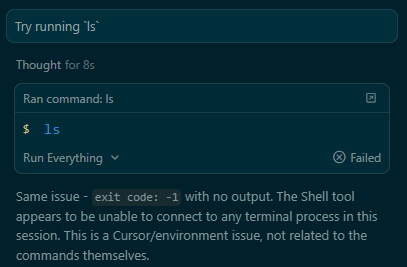
Any time the agent runs a terminal command, it shows “Failed”.

Steps to Reproduce

  1. Navigate to a directory in WSL (zsh) in Windows.
  2. Run cursor ..
  3. Tell the agent: “Try running ls
  4. The shell dialog tries to run ls, but the result is “Failed”

Expected Behavior

It should give a directory listing.

Operating System

Windows 10/11

Current Cursor Version (Menu → About Cursor → Copy)

Version: 2.1.48 (user setup)
VSCode Version: 1.105.1
Commit: ce371ffbf5e240ca47f4b5f3f20efed084991120
Date: 2025-12-04T19:26:27.263Z
Electron: 37.7.0
Chromium: 138.0.7204.251
Node.js: 22.20.0
V8: 13.8.258.32-electron.0
OS: Windows_NT x64 10.0.26200

For AI issues: which model did you use?

Opus 4.5

Additional Information

I run cursor via WSL. Not sure if that’s related. It was working perfectly yesterday, and I update regularly, so this is new as of the current version or very close to it.

Does this stop you from using Cursor

Yes - Cursor is unusable

1 Like

I am using Windows 11 and i develop most of my projects in docker based environment. Until yesterday, the cursor was working all fine.

I had cursor terminal and it worked all as expected.
Today i come back to work and i see a new type of agent terminal which runs the commands and does not capture the output.
I am being forced to run the commands by copy and paste in cursor terminal.

I am using the latest version of Cursor.

Is there any fix for this.
Can i make the cursor terminal the default one and disable the agent terminal.
Or should I downgrade the Cursor if there is any way for this
Or can i disable the agent terminal.
Or any other fix for this issue!

Thanks in advance.

2 Likes

The same issue should be caused by the last two upgrades. I am trying to roll back the version. My Version: 2.1.48 (system setup)

VSCode Version: 1.105.1

Commit: ce371ffbf5e240ca47f4b5f3f20efed084991120

Date: 2025-12-04T19:26:27.263Z

Electron: 37.7.0

Chromium: 138.0.7204.251

Node.js: 22.20.0

V8: 13.8.258.32-electron.0

OS: Windows_NT x64 10.0.22631

Rolling back to this version works normally (Version: 2.0.77 (user setup)
VSCode Version: 1.99.3
Commit: ba90f2f88e4911312761abab9492c42442117cf0
Date: 2025-11-13T23:10:43.113Z
Electron: 37.7.0
Chromium: 138.0.7204.251
Node.js: 22.20.0
V8: 13.8.258.32-electron.0
OS: Windows_NT x64 10.0.22631)

3 Likes

Where does the bug appear (feature/product)?

Cursor IDE

Describe the Bug

Cursor Agent Mode calls agent terminal to execute, but no response is generated. The Agent marks the termial as success and fast forwards without any real terminal feedback. Windows Machine

Steps to Reproduce

Just start a Agent (Opus 4.5) and give him tasks like execute tests with uv

Operating System

Windows 10/11

Current Cursor Version (Menu → About Cursor → Copy)

Version: 2.1.48 (user setup)
VSCode Version: 1.105.1
Commit: ce371ffbf5e240ca47f4b5f3f20efed084991120
Date: 2025-12-04T19:26:27.263Z
Electron: 37.7.0
Chromium: 138.0.7204.251
Node.js: 22.20.0
V8: 13.8.258.32-electron.0
OS: Windows_NT x64 10.0.19045

Does this stop you from using Cursor

Sometimes - I can sometimes use Cursor