Where does the bug appear (feature/product)?
Cursor IDE
Describe the Bug
[1 tool called]
Report it here: forum.cursor.com
Copy-paste this bug report:
Title:
Environment:
- OS: Windows 10 (10.0.26100)
- Shell: PowerShell
- Cursor Version: [check Help → About]
Bug:
When using AI Agent mode, the Shell tool executes commands (exit code 0) but captures zero stdout/stderr output. The terminal files created in .cursor/projects/*/terminals/ show only headers and footers with empty content between them.
Steps to reproduce:
- Open a workspace on Windows
- Start an Agent chat
- Ask the agent to run any shell command (e.g.,
echo hello, dir, git status)
- Observe: exit code 0, but output section is completely empty
Expected: Command output should be captured and returned
Actual: Commands execute but all output is lost. Terminal log files show:
=== Background Shell XXXXX ===
Command: echo "test"
Working Directory: C:\Users\...
Started: ...
============================================================


============================================================
Exited with code: 0
Ended: ...
Impact: Agent mode is completely unusable for any task requiring command output (builds, tests, logs, debugging).
Notes:
- Other tools (LS, Read, Write, Grep) work fine
- Only Shell tool output capture is broken
- Tried CMD, PowerShell, background mode - all same result
Steps to Reproduce
- Open a workspace on Windows
- Start an Agent chat
- Ask the agent to run any shell command (e.g.,
echo hello, dir, git status)
- Observe: exit code 0, but output section is completely empty
Expected: Command output should be captured and returned
Actual: Commands execute but all output is lost. Terminal log files show:
=== Background Shell XXXXX ===
Command: echo "test"
Working Directory: C:\Users\...
Started: ...
============================================================


============================================================
Exited with code: 0
Ended: ...
Impact: Agent mode is completely unusable for any task requiring command output (builds, tests, logs, debugging).
Notes:
- Other tools (LS, Read, Write, Grep) work fine
- Only Shell tool output capture is broken
- Tried CMD, PowerShell, background mode - all same result
Operating System
Windows 10/11
Current Cursor Version (Menu → About Cursor → Copy)
- Open a workspace on Windows
- Start an Agent chat
- Ask the agent to run any shell command (e.g.,
echo hello, dir, git status)
- Observe: exit code 0, but output section is completely empty
Expected: Command output should be captured and returned
Actual: Commands execute but all output is lost. Terminal log files show:
=== Background Shell XXXXX ===
Command: echo "test"
Working Directory: C:\Users\...
Started: ...
============================================================


============================================================
Exited with code: 0
Ended: ...
Impact: Agent mode is completely unusable for any task requiring command output (builds, tests, logs, debugging).
Notes:
- Other tools (LS, Read, Write, Grep) work fine
- Only Shell tool output capture is broken
- Tried CMD, PowerShell, background mode - all same result
For AI issues: which model did you use?
- Open a workspace on Windows
- Start an Agent chat
- Ask the agent to run any shell command (e.g.,
echo hello, dir, git status)
- Observe: exit code 0, but output section is completely empty
Expected: Command output should be captured and returned
Actual: Commands execute but all output is lost. Terminal log files show:
=== Background Shell XXXXX ===
Command: echo "test"
Working Directory: C:\Users\...
Started: ...
============================================================


============================================================
Exited with code: 0
Ended: ...
Impact: Agent mode is completely unusable for any task requiring command output (builds, tests, logs, debugging).
Notes:
- Other tools (LS, Read, Write, Grep) work fine
- Only Shell tool output capture is broken
- Tried CMD, PowerShell, background mode - all same result
For AI issues: add Request ID with privacy disabled
- Open a workspace on Windows
- Start an Agent chat
- Ask the agent to run any shell command (e.g.,
echo hello, dir, git status)
- Observe: exit code 0, but output section is completely empty
Expected: Command output should be captured and returned
Actual: Commands execute but all output is lost. Terminal log files show:
=== Background Shell XXXXX ===
Command: echo "test"
Working Directory: C:\Users\...
Started: ...
============================================================


============================================================
Exited with code: 0
Ended: ...
Impact: Agent mode is completely unusable for any task requiring command output (builds, tests, logs, debugging).
Notes:
- Other tools (LS, Read, Write, Grep) work fine
- Only Shell tool output capture is broken
- Tried CMD, PowerShell, background mode - all same result
Does this stop you from using Cursor
Yes - Cursor is unusable


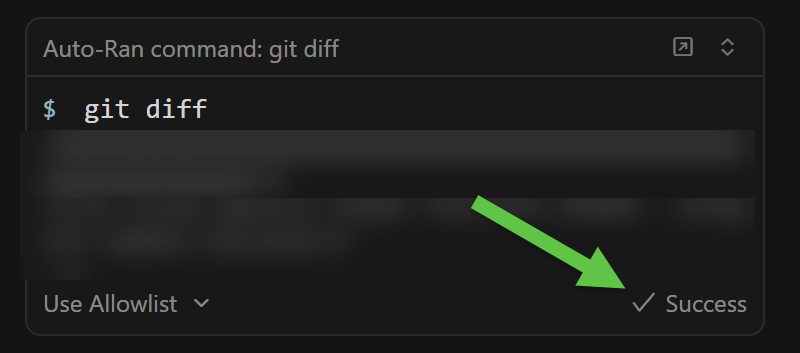

 Commands do NOT execute - No processes are actually spawned or run
 Execute commands and capture their standard output
 Commands do NOT execute - Despite reporting exit code 0, commands never actually run
 Severity: High