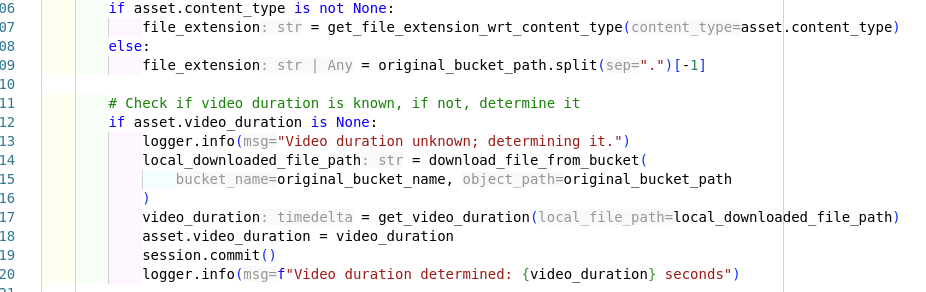
Describe the Bug
I have the following settings set in my workspace. They are not set at any other settings level (directory, user, etc..). Pyright is still showing the inlayHints. We have this version of the extension: 1.0.5. We have this verison of the basedpyright python package: 1.31.0
"cursorpyright.analysis.inlayHints.functionReturnTypes": false,
"cursorpyright.analysis.typeCheckingMode": "basic",
"cursorpyright.analysis.inlayHints.callArgumentNames": false,
"cursorpyright.analysis.inlayHints.genericTypes": false,
"cursorpyright.analysis.inlayHints.variableTypes": false
Steps to Reproduce
Install the extension, and same version of basedpyright (not actually sure if this matters). Set the settings as shown above, and open a python file.
Expected Behavior
I expect the inlay hints to not show when those settings are off
Screenshots / Screen Recordings
Operating System
Linux
Current Cursor Version (Menu → About Cursor → Copy)
Version: 1.2.4
VSCode Version: 1.99.3
Commit: a8e95743c5268be73767c46944a71f4465d05c90
Date: 2025-07-10T16:59:43.242Z
Electron: 34.5.1
Chromium: 132.0.6834.210
Node.js: 20.19.0
V8: 13.2.152.41-electron.0
OS: Linux x64 6.12.10-76061203-generic
Does this stop you from using Cursor
No - Cursor works, but with this issue