Custom commands no longer function at all in Cursor

Where does the bug appear (feature/product)?

Cursor IDE

Describe the Bug

I just tried to run a custom command I’ve been using for days, and now Cursor and the agent are telling me it does not support custom commands:

This seems like a MAJOR regression. I closed Cursor earlier today, and was upgrades to 1.7.52. Seems this issue may be brand new with .52??

I’ll be downgrading to the prior version, as custom commands are now completely fundamental to my workflow.

Steps to Reproduce

  • Try to run a custom command.
  • Weep.

Expected Behavior

Custom commands work as expected.

Operating System

MacOS

Current Cursor Version (Menu → About Cursor → Copy)

Version: 1.7.52
VSCode Version: 1.99.3
Commit: 9675251a06b1314d50ff34b0cbe5109b78f848c0
Date: 2025-10-17T01:41:03.967Z
Electron: 34.5.8
Chromium: 132.0.6834.210
Node.js: 20.19.1
V8: 13.2.152.41-electron.0
OS: Darwin arm64 24.5.0

Does this stop you from using Cursor

No - Cursor works, but with this issue

@deanrie @condor FYI. Seems the latest build may have broken custom commands?

Ok, I have downgraded through numerous versions of Cursor, beyond the last version I knew was working. It is suddenly like custom commands were never even added to Cursor. The models do not seem to know about them, and cannot run any custom command. When I try to force it, they usually first start with trying to execute them in a terminal. When I tell them that is not correct, they will then try to run mcp commands, etc. The models simply do not know that custom commands exist at al, as far as I can tell. They insist they have no such abilities and will not execute any custom commands, it seems.

Hey, thanks for the report. I see your custom command isn’t highlighted as it should be and is shown as plain text. Could you try typing / and selecting the command from the list? If that doesn’t work, it looks like a bug.

The custom command palette is empty, as I mentioned above. Everything was working at one point, then suddenly none of it was. Even when I roll back to prior versions, the behavior remains the same:

As you can see, no custom commands listed. I do, however, have custom commands in most of my projects now:

Across the entire workspace, there are probably a few dozen? I did temporarily try moving most to an out-of-workspace location, just to see if I had somehow overloaded the custom commands feature. I reduced this project (one of the ones I work in most), to just two (the tunnel-to-aws and disconnect-aws-tunnel commands, which I was using at the time), and that still did not help.

Thanks for the info, we’ll investigate.

I am honestly wondering if there is somehow a bug in my cursor account? I seem to have a plethora of problems that many people do not. Even other team members at my company. I have had this long, progressive degradation in Cursor’s functionality for some time now. Over two months. I think it was around 1.3.x, early, that I remember things last working well (except for the terminal.) Since 1.3, there has been a continuous and progressive loss of functionality. I can’t use most of the built in @ commands anymore, can’t use custom / commands, model behavior seem to degrade after the first week or so of using them, and most models seem to have NONE of the capabilities that Claude has generally had (not sure if that is expected, but I can’t seem to attach images to context for any model except Claude, can’t do web searches with any model but Claude, and Claude doesn’t seem to do that well anymore.) I also can’t use @Web links, the model instead tells me that it cannot read web pages, however I thought the EXPRESS PURPOSE of @Web ws to have the agent/model read that specific web page.

The past week in particular, it also appears as though my rather extensive set of rules, is basically not followed at all, by any model. Things that used to be extremely reliable, such as httpie level cli testing of my apis, which run on a specific port, were suddenly being tested at port 3000, which is not what I use. I have rules that explain this, and in the past it always worked fine. Lately, though, the agent always uses port 3000. Then of course, fails, then reports that the server isn’t running. I insist it is, and it then fumbles around trying to figure out why it can’t connect. It simply doesn’t seem to understand its used the wrong port…its not even one ofthe things it tests, it will flail about aimlessly checking everything EXCEPT the port! Darn thing won’t even look at my local environment variables to learn the proper port. Which it used to do by default, I didn’t even need a rule originally.

What causes this level of degradation? I am honestly quite baffled… Cursor was AMAZING a few months ago. What in the world happened? Why does the whole thing seem to struggle so much now?

At this point, all of the functionality that I chose Cursor for, seems defunct, and yet, some of my other teammates are able to use most of this functionality (@Docs doesn’t seem to work for most of them, and I think that most of the @ command issues were a known issue?) Given that, I am wondering if there is some kind of cursor account level issue here? I can’t otherwise account for why I myself, have so many issues with Cursor, while team mates seem to be having very few if any problems.

Anyway, I thought I’d mention it, as, my problems are so extensive and so systemic now, the benefits that Cursor provided early on for me, are almost gone. Basic agent functionality still works, and the model can still code, although it seems like many of the models (most of the ones I use regularly: Claude, Grok, GPT-5) have lost most of their capability, smarts, efficacy? The model still being able to code does help accelerate things a bit, but using Cursor has become a huge chore now, due to all of the broken functionality.

I am pretty sure I am not the only person who experiencing these issues. I wonder if there are account-level problems that are at the root of these progressively degrading issues? I don’t know how much of Cursor’s functionality is remote, vs. local, but it does seem like there is a fair amount of remote functionality (beyond just the communication with the model itself, at least.)

Well, I hope you guys can track down why these issues plague me, and others. It has had such a devastating impact to your product and its usability, that I am now very seriously considering alternatives, as Cursor has become a very frustrating experience, instead of the amazing experience it started out as months ago.

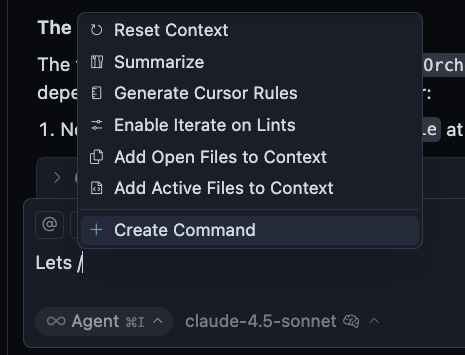
@deanrie I just tried something, when I needed some more commands. Figured I’d give it a try and see what happened: Created the command in my workspace root’s .cursor/commands directory. I have thus far, only created them in each project, with commands specific to each project. In fact, these two new commands, are also very specific to one particular project.

In any case, putting commands in a .cursor/commands/ directory in my workspace root, seems to work. At least so far, they show up in the command palette and work when I run them. I had not put them there previously, as they cannot be committed there, and most of the commands I have created thus far, are very project specific (depend on package.json, installed dependencies and env settings configured for each project).

I guess I assumed that commands were hierarchical in nature, much like rules, since they reside in the .cursor directory? Perhaps that, too, is a fallacy? Is the .cursor directory hierarchical at all? Or does it only work at the root of whatever you have loaded into cursor?

The odd thing is, there is still the fact that these custom commands were working when I first created them, supported autocomplete and the command palette. If they only work from the root .cursor/commands/ directory, I find it odd that they ever worked at all. Somehow they did though, so I wonder if something was changed in a more recent build that did in fact break these. Perhaps there is a bug in the handling of the .cursor/* directory hierarchy as well? Perhaps that could explain why many rules never seem to apply unless explicitly referenced, etc?

I have a very hierarchical project, and I don’t foresee that being able to change any time soon. Since this hierarchical approach, also gives us the ability to run multiple agent chats concurrently, working in different projects at once, I doubt we will even want to change it any time soon.

Thanks for the detailed clarification. It looks like you’ve found the correct behavior: custom commands should be placed in .cursor/commands/ at the workspace root (where the .code-workspace file is located), not in individual project subfolders.

According to the docs, commands are discovered from:

Project commands: .cursor/commands/ at the workspace root
Global commands: ~/.cursor/commands/ in your home directory

If commands worked from project subfolders before, that may have been unintended behavior. The current implementation requires them at the workspace root level.

For a hierarchical workspace, you can:

  • Keep shared commands in the root .cursor/commands/
  • Use naming conventions to indicate which project they’re for (e.g., project-a-deploy.md)
  • Use global commands in ~/.cursor/commands for truly universal commands

Now the command does not have a fuzzy search when typing, making it impossible to simplify spelling.

For example, abcd.efg

Theoretically, typing ‘ae’, ‘af’, and ‘ag’ should be searchable, but not now.

Hmm, I just need to clarify something here: .cursor/ is not hierarchical and does not inherit? In another bug report, I thought you said that the rules system was hierarchical. I’m confused as to which it is…

If everything MUST be in the workspace root, then, I’ll do that. But I thought that .cursor/ was supposed to be hierarchical…

Sorry, I was wrong. Yes, the .cursor directory supports a hierarchy.

Ok, thanks for the clarification. I do then, believe there is a bug there, as when I moved all my custom commands into the root .cursor/ they worked, and I’ve moved a few key rules from one of my main projects into the root, and, I think they seem to be getting applied. So there might be an issue with tracing the hierarchy when applying rules and finding comands?

This topic was automatically closed 22 days after the last reply. New replies are no longer allowed.