Describe the Bug
Even though I have the extension Springboot Boot Dashboard installed and enabled, the icon does not appear in the primary bar in the top right.
Steps to Reproduce
Just opening the IDE was supposed to show the icon proprerly
Expected Behavior
The icon to appear
Screenshots / Screen Recordings
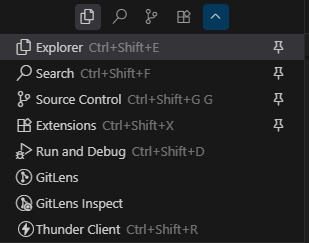
Operating System
Windows 10/11
Current Cursor Version (Menu → About Cursor → Copy)
Version: 1.3.8 (user setup)
VSCode Version: 1.99.3
Commit: a1fa6fc7d2c2f520293aad84aaa38d091dee6fe0
Date: 2025-07-31T21:46:17.109Z
Electron: 34.5.1
Chromium: 132.0.6834.210
Node.js: 20.19.0
V8: 13.2.152.41-electron.0
OS: Windows_NT x64 10.0.22621
Additional Information
Sometimes it appears when I open, but it don’t have a pattern
Does this stop you from using Cursor
No - Cursor works, but with this issue
condor
(Condor (Tee))
August 3, 2025, 5:36pm
2
hi @hitalo-lima and welcome to Cursor Forum.
By default all icons should be visible in the list when you expand it.
Could you check if the icon moved to some other panel?
deanrie
(Dean Rie)
August 3, 2025, 6:20pm
3
Hey, I confirm that the icon is missing, however, it is present in VS Code. Please give me some time to find out the reason for this.
Like I said, sometimes it appears in the main bar but it’s completely random.
deanrie
(Dean Rie)
August 4, 2025, 4:52am
5
Unfortunately, I couldn’t determine the cause of this, but you can run it manually. You need to call it from the command palette, and then the icon should appear. However, after restarting, it will disappear again, and you’ll need to repeat this procedure. I hope this helps.
system
(system)
Closed
August 26, 2025, 4:52am
6
This topic was automatically closed 22 days after the last reply. New replies are no longer allowed.