Flutter Run & Debug not showing simulator/device list

Where does the bug appear (feature/product)?

Cursor IDE

Describe the Bug

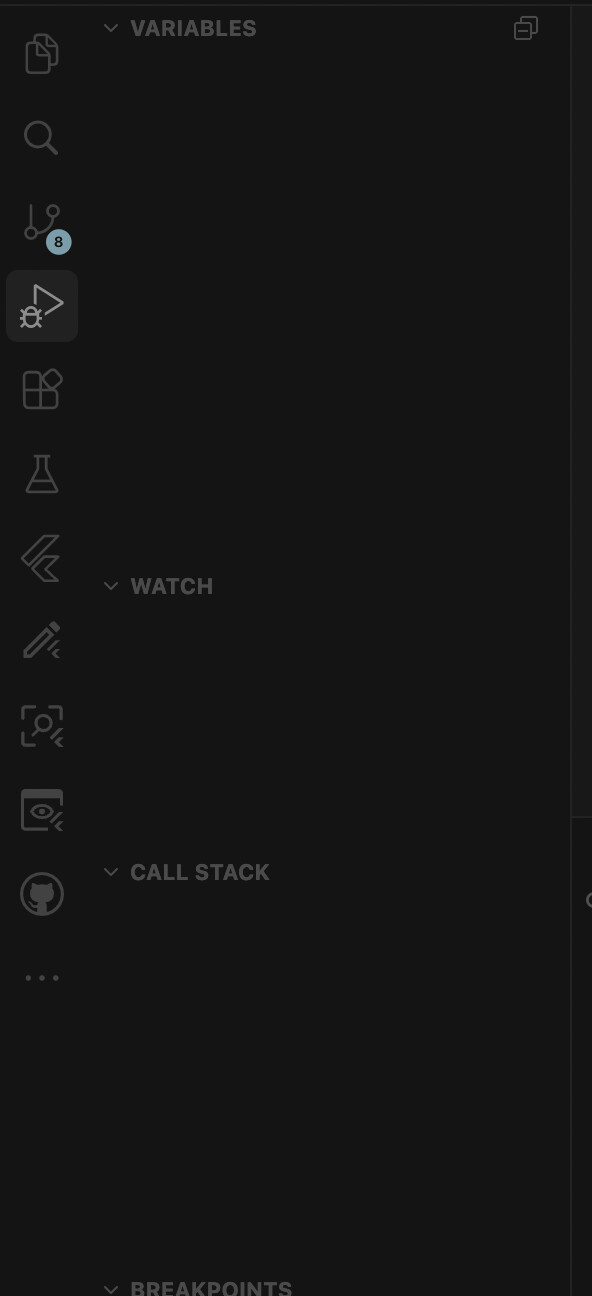
I’m facing an issue in Cursor IDE where Flutter’s Run & Debug panel is not showing any available simulators or devices.

Environment:

OS: macOS (Intel)

Flutter version: (please fill: flutter --version)

Dart version: (please fill)

Cursor version: (please fill)

Xcode version: (if using iOS, please fill)

Issue Details:

When I open the Run & Debug panel, the device selector is empty.

No iOS simulator or Android emulator is listed.

The “Run” button is visible, but no target device is available.

Flutter project is correctly detected.

What I Tried:

Ran flutter doctor → no major issues

Restarted Cursor IDE

Restarted simulators/emulators

Verified Xcode & Android Studio setup

Ran flutter devices in terminal → devices are listed correctly

Reinstalled Flutter SDK (optional if you did)

Expected Behavior:
Cursor should detect and list available simulators/devices (same as VS Code does).

Actual Behavior:
No devices are shown in Run & Debug panel.

Steps to Reproduce

I’m facing an issue in Cursor IDE where Flutter’s Run & Debug panel is not showing any available simulators or devices.

Environment:

OS: macOS (Intel)

Flutter version: (please fill: flutter --version)

Dart version: (please fill)

Cursor version: (please fill)

Xcode version: (if using iOS, please fill)

Issue Details:

When I open the Run & Debug panel, the device selector is empty.

No iOS simulator or Android emulator is listed.

The “Run” button is visible, but no target device is available.

Flutter project is correctly detected.

What I Tried:

Ran flutter doctor → no major issues

Restarted Cursor IDE

Restarted simulators/emulators

Verified Xcode & Android Studio setup

Ran flutter devices in terminal → devices are listed correctly

Reinstalled Flutter SDK (optional if you did)

Expected Behavior:
Cursor should detect and list available simulators/devices (same as VS Code does).

Actual Behavior:
No devices are shown in Run & Debug panel.

Operating System

MacOS

Version Information

Version: 2.6.20 (Universal)
VSCode Version: 1.105.1
Commit: b29eb4ee5f9f6d1cb2afbc09070198d3ea6ad760
Date: 2026-03-17T01:50:02.404Z
Build Type: Stable
Release Track: Default
Electron: 39.8.1
Chromium: 142.0.7444.265
Node.js: 22.22.1
V8: 14.2.231.22-electron.0
OS: Darwin arm64 25.3.0

Does this stop you from using Cursor

Yes - Cursor is unusable
Hey, this is most likely a Flutter or Dart extension issue rather than Cursor itself. Device detection is handled entirely by that extension, and Cursor uses the standard VS Code debug infrastructure here.

A few checks to narrow it down:

  1. Open View > Output, switch to the Flutter and Dart channels, and look for any errors there.
  2. Verify dart.flutterSdkPath is set correctly in Settings with the full path to your Flutter SDK.
  3. Try Cmd+Shift+P > Flutter: Select Device and see if devices show up there.
  4. Try rolling back the Flutter and Dart extensions to earlier versions. Click the gear icon on each extension, then Install Another Version. A similar issue was resolved this way: Flutter debug always disconnect in version 0.40.4

Also, please share:

  • flutter doctor -v output
  • flutter devices output
  • adb devices output if you’re using an Android emulator
  • Installed Flutter and Dart extension versions in Cursor

One more thing. Your description says macOS Intel, but system info shows Darwin arm64. Can you confirm which one it actually is?

With those details, it should be straightforward to pinpoint the cause.

[✓] Flutter (Channel stable, 3.41.5, on macOS 26.3.1 25D2128
darwin-arm64, locale en-BH) [556ms]
• Flutter version 3.41.5 on channel stable at
/Users/hassan/flutter
• Upstream repository GitHub - flutter/flutter: Flutter makes it easy and fast to build beautiful apps for mobile and beyond · GitHub
• Framework revision 2c9eb20739 (32 hours ago), 2026-03-17
16:14:01 -0700
• Engine revision 052f31d115
• Dart version 3.11.3
• DevTools version 2.54.2
• Feature flags: enable-web, enable-linux-desktop,
enable-macos-desktop, enable-windows-desktop,
enable-android, enable-ios, cli-animations,
enable-native-assets, omit-legacy-version-file,
enable-lldb-debugging, enable-uiscene-migration

[✓] Android toolchain - develop for Android devices (Android SDK
version 35.0.0) [2.7s]
• Android SDK at /Users/hassan/Library/Android/sdk
• Emulator version 35.6.11.0 (build_id 13610412) (CL:N/A)
• Platform android-36, build-tools 35.0.0
• ANDROID_HOME = /Users/hassan/Library/Android/sdk
• Java binary at: /Applications/Android
Studio.app/Contents/jbr/Contents/Home/bin/java
This is the JDK bundled with the latest Android Studio
installation on this machine.
To manually set the JDK path, use: flutter config --jdk-dir="path/to/jdk".
• Java version OpenJDK Runtime Environment (build
21.0.9±14787801-b1163.94)
• All Android licenses accepted.

[✓] Xcode - develop for iOS and macOS (Xcode 26.2) [1,298ms]
• Xcode at /Applications/Xcode.app/Contents/Developer
• Build 17C52
• CocoaPods version 1.16.2

[✓] Chrome - develop for the web [6ms]
• Chrome at /Applications/Google
Chrome.app/Contents/MacOS/Google Chrome

[✓] Connected device (4 available) [6.8s]
• iPhone (wireless) (mobile) • 00008101-001A513C0A98001E
• ios • iOS 26.3.1 23D8133
• iPhone 17 Pro (mobile) •
3B9B31D7-F264-461A-9EEF-A371FA6C15FD • ios •
com.apple.CoreSimulator.SimRuntime.iOS-26-2 (simulator)
• macOS (desktop) • macos
• darwin-arm64 • macOS 26.3.1 25D2128 darwin-arm64
• Chrome (web) • chrome
• web-javascript • Google Chrome 146.0.7680.81

[✓] Network resources [1,007ms]
• All expected network resources are available.

• No issues found!

Found 3 connected devices:
iPhone 17 Pro (mobile) • 3B9B31D7-F264-461A-9EEF-A371FA6C15FD
• ios • com.apple.CoreSimulator.SimRuntime.iOS-26-2
(simulator)
macOS (desktop) • macos
• darwin-arm64 • macOS 26.3.1 25D2128 darwin-arm64
Chrome (web) • chrome
• web-javascript • Google Chrome 146.0.7680.81

Found 1 wirelessly connected device:
iPhone (wireless) (mobile) • 00008101-001A513C0A98001E • ios •
iOS 26.3.1 23D8133

Run “flutter emulators” to list and start any available device
emulators.

If you expected another device to be detected, please run
“flutter doctor” to diagnose potential issues. You may also try
increasing the time to wait for connected devices with the
“–device-timeout” flag. Visit Install Flutter for
troubleshooting tips.

Flutter SDK and your devices are definitely fine, flutter doctor is clean, and all 4 devices show up. That confirms the issue is specifically with the Flutter or Dart extension inside Cursor.

A few things left from my last message:

  1. What versions of the Flutter and Dart extensions are installed? Extensions panel > Flutter/Dart > the version next to the name
  2. What do you see in Cmd+Shift+P > Flutter: Select Device, do you get a device list?
  3. Any errors in View > Output > Flutter or Dart channels?

If Flutter: Select Device is also empty, try rolling back both extensions to older versions gear icon on the extension > Install Another Version. This fixed a similar issue for other users.

no error on output

+1

same to me

This topic was automatically closed 22 days after the last reply. New replies are no longer allowed.