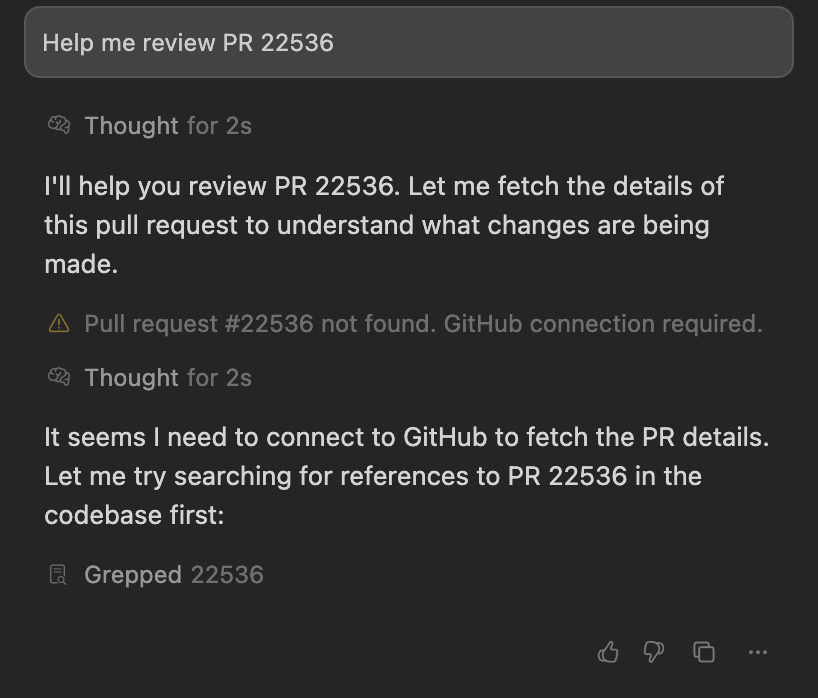
Describe the Bug
The fetch_pull_request tool consistently fails with the error message “Pull request #[number] not found. GitHub connection required.” even when:
- GitHub is successfully connected in Cursor UI (shows “Congratulations, you’re all set!”)
- GitHub CLI is fully authenticated and working
- The pull request exists and is accessible via GitHub API
- User has proper repository permissions
Steps to Reproduce
- Connect GitHub account in Cursor (Settings → GitHub Integration)
- Complete device activation successfully (receives “Congratulations, you’re all set!”)
- Attempt to use fetch_pull_request tool on any existing PR
- Tool fails with “GitHub connection required” error
Expected Behavior
fetch_pull_request should successfully retrieve pull request data when GitHub is connected and authenticated.
Operating System
MacOS
Current Cursor Version (Menu → About Cursor → Copy)
Version: 1.2.4
VSCode Version: 1.99.3
Commit: a8e95743c5268be73767c46944a71f4465d05c90
Date: 2025-07-10T16:53:59.659Z (1 wk ago)
Electron: 34.5.1
Chromium: 132.0.6834.210
Node.js: 20.19.0
V8: 13.2.152.41-electron.0
OS: Darwin arm64 24.5.0
Does this stop you from using Cursor
Yes - Cursor is unusable