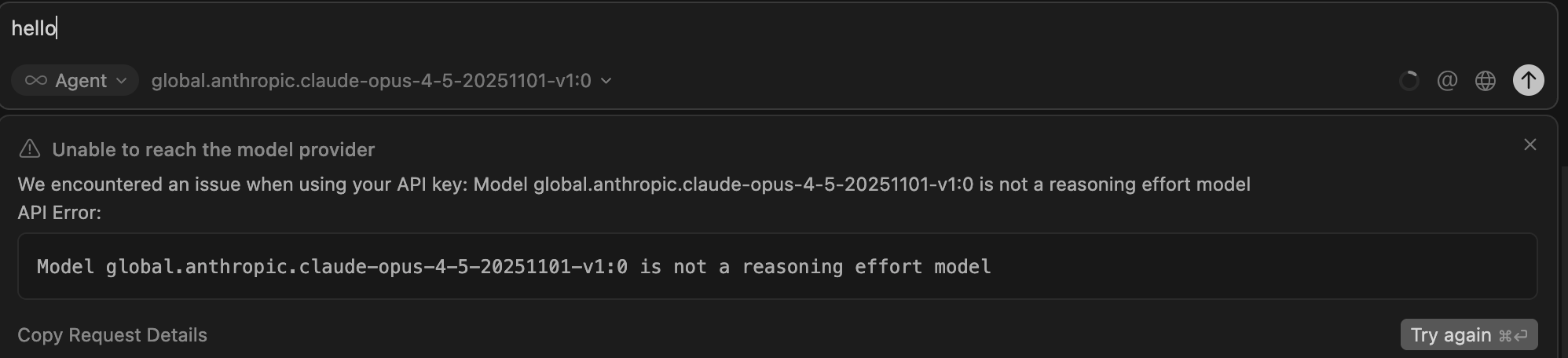
For AI issues: add Request ID with privacy disabled
Request ID: dd73df67-0ae6-4eb7-9218-930418d0862b
{“error”:“ERROR_OPENAI”,“details”:{“title”:“Unable to reach the model provider”,“detail”:“We encountered an issue when using your API key: Model global.anthropic.claude-opus-4-5-20251101-v1:0 is not a reasoning effort model\n\nAPI Error:\n\n\nModel global.anthropic.claude-opus-4-5-20251101-v1:0 is not a reasoning effort model\n”,“additionalInfo”:{},“buttons”:,“planChoices”:},“isExpected”:true}
ConnectError: [invalid_argument] Error
at EZc.$endAiConnectTransportReportError (vscode-file://vscode-app/Applications/Cursor.app/Contents/Resources/app/out/vs/workbench/workbench.desktop.main.js:6331:408452)
at GPo._doInvokeHandler (vscode-file://vscode-app/Applications/Cursor.app/Contents/Resources/app/out/vs/workbench/workbench.desktop.main.js:6948:21873)
at GPo._invokeHandler (vscode-file://vscode-app/Applications/Cursor.app/Contents/Resources/app/out/vs/workbench/workbench.desktop.main.js:6948:21615)
at GPo._receiveRequest (vscode-file://vscode-app/Applications/Cursor.app/Contents/Resources/app/out/vs/workbench/workbench.desktop.main.js:6948:20377)
at GPo._receiveOneMessage (vscode-file://vscode-app/Applications/Cursor.app/Contents/Resources/app/out/vs/workbench/workbench.desktop.main.js:6948:19194)
at yPt.value (vscode-file://vscode-app/Applications/Cursor.app/Contents/Resources/app/out/vs/workbench/workbench.desktop.main.js:6948:17286)
at _e._deliver (vscode-file://vscode-app/Applications/Cursor.app/Contents/Resources/app/out/vs/workbench/workbench.desktop.main.js:49:2962)
at _e.fire (vscode-file://vscode-app/Applications/Cursor.app/Contents/Resources/app/out/vs/workbench/workbench.desktop.main.js:49:3283)
at Xmt.fire (vscode-file://vscode-app/Applications/Cursor.app/Contents/Resources/app/out/vs/workbench/workbench.desktop.main.js:6316:12156)
at MessagePort. (vscode-file://vscode-app/Applications/Cursor.app/Contents/Resources/app/out/vs/workbench/workbench.desktop.main.js:8973:18439)
Hey, thanks for the report. It looks like there’s a bug where Cursor is incorrectly treating Claude Opus 4.5 via Bedrock as a “reasoning effort” model (even though it shouldn’t when using the standard inference profile).
I’ll pass this to the team.
Temporary workaround: please keep using Claude Sonnet 4.5 or Opus 4.1 via Bedrock (as you confirmed, those are working).
The team will look into why Opus 4.5 specifically is triggering this reasoning effort validation error.
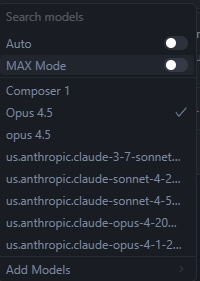
in Cursor setting > Models, adding the custom model doesnt show up in the models menu while its being added in the chat session models. as the first message clearly stage that sonnet and others do. that means you can’t even delete the custom model from the settings.
P.S. Any other Bedrock users also experiencing problems with Sonnet 4 and 4.5? Cursor seems to send this flag "anthropic_beta": ["context-1m-2025-08-07"] with every request, invoking the 1M context model without the option to turn it off.
Please let me know if you’re seeing the same behavior here (issue).
I tried adding a custom model for Opus 4.5 but got the same aforementioned ‘reasoning effort’ error, and now I can’t even remove the custom model - it’s stuck in my dropdown and doesn’t appear in Cursor’s settings. Also, the actual Opus 4.5 model still isn’t working or visible
@deanrie Could you share an ETA on this bug fix? It appears to be blocking access to a recently released model and is impacting the product experience.
For the love of everything cant get curosr ide to show up the opus 4.5 with my amazon bedrock aws api
used test model: anthropic.claude-opus-4-5-20251101-v1:0
Use an inference profile ID eg global.anthropic.claude-opus-4-5-20251101-v1:0 (just make sure you have access to it - check your service quotas / model catalog).
We noticed that we can now invoke the model successfully but any subsequent call fails. Getting the following error:
When thinking is disabled, an assistant message in the final position cannot contain thinking. To use thinking blocks, enable thinking in your request.
Same problem here. Bedrock and the Anthropic API produce the same result. Not to mention, when Bedrock is switched on, Composer and all other models stop working.