I cannot disable inlay hints. I have turned them off in the VS settings and JSON settings, but they still appear.

Hey, do you possibly have an extension installed for this?
I don’t think so, I believe it’s a native Visual Studio Code feature.
Check if they are enabled for a specific language, for example:
"typescript.inlayHints.parameterNames.enabled": "all"
@darnok Have you found a fix for this? I’m writing Swift code in cursor and inlay hints won’t disable either. And it’s completely overlapping my code:
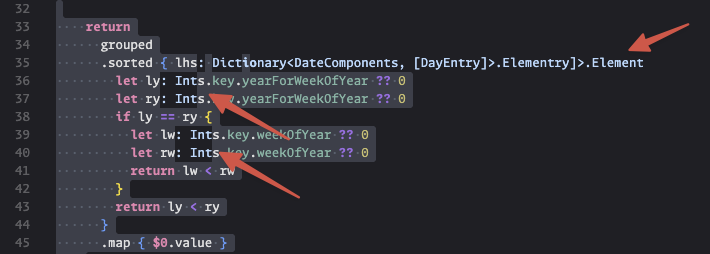
I already have the following in my settings.json
"editor.inlayHints.enabled": "off",
"javascript.inlayHints.parameterNames.suppressWhenArgumentMatchesName": false,
"swift.sourcekit-lsp.inlayHints.enabled": false,  // note: deprecated, so no-op
"typescript.inlayHints.parameterNames.suppressWhenArgumentMatchesName": false
I was able to narrow it down to the VSCode Neovim extension. Disabling the extension restores the behavior for my editor.inlayHints.enabled setting
You can keep the extension running by adding the line "vscode-neovim.neovimClean”: true to your settings.json file, as this disables all your plugins. This seems to disable whatever problematic Neovim plugin I have installed, but I haven’t been able to narrow down which one is the culprit yet