Installing Cursor via APT .deb Package Breaks apt update

Where does the bug appear (feature/product)?

Cursor IDE

Describe the Bug

I recently installed Cursor using the .deb package from the latest release, instead of the AppImage.
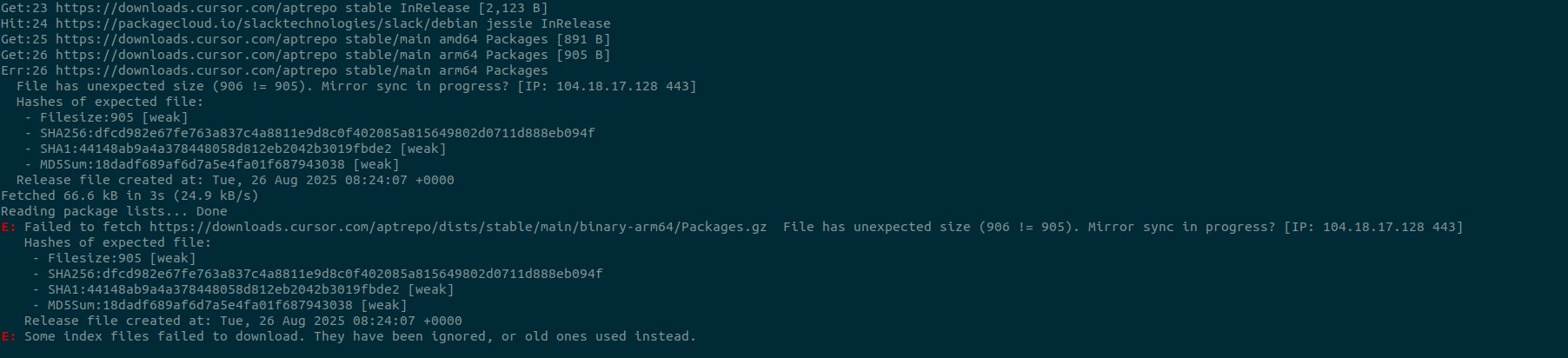
Now, when I try to update my system using apt, I get the following errors. I have to disable the Cursor repository in order to proceed with apt updates.

Get:25 https://downloads.cursor.com/aptrepo stable/main amd64 Packages [891 B]
Get:26 https://downloads.cursor.com/aptrepo stable/main arm64 Packages [905 B]
Err:26 https://downloads.cursor.com/aptrepo stable/main arm64 Packages
  File has unexpected size (906 != 905). Mirror sync in progress? [IP: 104.18.17.128 443]
  Hashes of expected file:
   - Filesize:905 [weak]
   - SHA256:dfcd982e67fe763a837c4a8811e9d8c0f402085a815649802d0711d888eb094f
   - SHA1:44148ab9a4a378448058d812eb2042b3019fbde2 [weak]
   - MD5Sum:18dadf689af6d7a5e4fa01f687943038 [weak]
  Release file created at: Tue, 26 Aug 2025 08:24:07 +0000
Fetched 66.6 kB in 3s (24.9 kB/s)
Reading package lists... Done
E: Failed to fetch https://downloads.cursor.com/aptrepo/dists/stable/main/binary-arm64/Packages.gz  File has unexpected size (906 != 905). Mirror sync in progress? [IP: 104.18.17.128 443]
   Hashes of expected file:
    - Filesize:905 [weak]
    - SHA256:dfcd982e67fe763a837c4a8811e9d8c0f402085a815649802d0711d888eb094f
    - SHA1:44148ab9a4a378448058d812eb2042b3019fbde2 [weak]
    - MD5Sum:18dadf689af6d7a5e4fa01f687943038 [weak]
   Release file created at: Tue, 26 Aug 2025 08:24:07 +0000
E: Some index files failed to download. They have been ignored, or old ones used instead.

Steps to Reproduce

  • Download the Cursor .deb package (x64) from Download · Cursor
  • Install it : sudo dpkg -i cursor_1.4.2_amd64.deb
  • Try updating all packages: sudo apt update -y

Expected Behavior

  • apt update should complete successfully.
  • All packages, including Cursor, should be refreshed and updated without errors.

Screenshots / Screen Recordings
Operating System

Linux

Current Cursor Version (Menu → About Cursor → Copy)

Version: 1.4.2
VSCode Version: 1.99.3
Commit: d01860bc5f5a36b62f8a77cd42578126270db340
Date: 2025-08-07T17:16:23.005Z
Electron: 34.5.1
Chromium: 132.0.6834.210
Node.js: 20.19.0
V8: 13.2.152.41-electron.0
OS: Linux x64 5.15.0-152-generic

Additional Information

  • The Cursor IDE itself works fine after installation.
  • However, adding the Cursor APT repository via the .deb package breaks system apt updates, preventing other packages from being refreshed until the Cursor repository is disabled.

Does this stop you from using Cursor

No - Cursor works, but with this issue

1 Like

Hey, sorry to hear you’re having issues - I’ve passed this to the team to take a look at!

1 Like

Hey, the team has identified a bug and will be working to get this fixed shortly - appreciate the report :folded_hands:

1 Like

Hey, believe we should have a fix for this now - please let us know!

Seems it is fixed. thanks @danperks for quick response. :+1:

1 Like

I’m facing the same problem with version 1.5.5, installed via package manager on Linux Mint 22.

I fix this same issue on
NAME=“Linux Mint”
VERSION=“22.2 (Zara)”
ID=linuxmint
ID_LIKE=“ubuntu debian”
PRETTY_NAME=“Linux Mint 22.2”
VERSION_ID=“22.2”
VERSION_CODENAME=zara
UBUNTU_CODENAME=noble
Doing this

  1. Download the .deb installer from cursor.com
    2)Open a terminal on the downloads directory
    3)Run sudo apt install -f <cursor .deb package>
    4)Select yes on the notification to handler de cursor repo apt by the system
  2. Run: sudo apt update && sudo apt upgrade -y
1 Like

I am still getting an error on apt update even after removing the file from sources.list.d, running apt remove --purge cursor and reinstalling using the latest deb (1.6.35_amd), though the error is a bit different:

```

W: GPG error: https://downloads.cursor.com/aptrepo stable InRelease: The following signatures couldn't be verified because the public key is not available: NO_PUBKEY 42A1772E62E492D6
E: The repository 'https://downloads.cursor.com/aptrepo stable InRelease' is not signed.
N: Updating from such a repository can't be done securely, and is therefore disabled by default.
N: See apt-secure(8) manpage for repository creation and user configuration details.

It would be helpful if you could publish the location of the public key so one can at least fix this situation manually. Thanks!

For anybody else struggling with this, the key is here: https://downloads.cursor.com/keys/anysphere.asc

this is NOT FIXED!

I’m running Linux Mint 22.1 freshly installed. I downloaded and ran

dpkg -i Downloads/cursor_1.6.45_amd64.deb

and now apt update fails thusly:

  Get:10 https://downloads.cursor.com/aptrepo stable InRelease [2,123 B]
  Err:10 https://downloads.cursor.com/aptrepo stable InRelease
    The following signatures couldn't be verified because the public key is not available: NO_PUBKEY 42A1772E62E492D6
  Reading package lists... Done
  W: GPG error: https://downloads.cursor.com/aptrepo stable InRelease: The following signatures couldn't be verified because the public key is not available: NO_PUBKEY 42A1772E62E492D6
  E: The repository 'https://downloads.cursor.com/aptrepo stable InRelease' is not signed.
  N: Updating from such a repository can't be done securely, and is therefore disabled by default.
  N: See apt-secure(8) manpage for repository creation and user configuration details.

to anyone still facing this issue, you can fix it with the following commands:

  sudo dpkg -P cursor
  sudo rm /etc/apt/sources.list.d/cursor.list
  sudo apt update

I can confirm I had the same exact issue in Linux Mint this morning.

Fixed with:
❯ curl -fsSL -A “Mozilla/5.0” https://downloads.cursor.com/keys/anysphere.asc
| gpg --dearmor
| sudo tee /etc/apt/keyrings/cursor.gpg >/dev/null

Just tried this – unfortunately it didn’t help.

I did (as root)

wget -O - -q ``https://downloads.cursor.com/keys/anysphere.asc`` | apt-key add -

And it somehow worked, but this uses the deprecated way of storing repository keys.

2 Likes

I’ve similar problem on Linux Mint, that what I’ve do, it works for me - instruction was prepared by AI.

After installing Cursor IDE on Ubuntu (or Linux Mint based on Ubuntu), you may run into errors during apt-get update such as:

The following signatures couldn't be verified because the public key is not available: NO_PUBKEY 42A1772E62E492D6
E: The repository 'https://downloads.cursor.com/aptrepo stable InRelease' is not signed.

or

E: Conflicting values set for option Signed-By regarding source https://downloads.cursor.com/aptrepo/ ...

This guide explains how to fix these issues properly (without using deprecated apt-key).


1. Remove Old/Duplicate Entries

Check if you have multiple repo entries for Cursor:

grep -R "downloads.cursor.com/aptrepo" /etc/apt/sources.list /etc/apt/sources.list.d -n

Typical duplicates:

  • /etc/apt/sources.list.d/cursor.list
  • /etc/apt/sources.list.d/cursor.sources

:backhand_index_pointing_right: Keep only one of them.
If you prefer the traditional .list format, disable the .sources file:

sudo mv /etc/apt/sources.list.d/cursor.sources /etc/apt/sources.list.d/cursor.sources.disabled

Or vice versa (if you prefer Deb822 .sources), disable the .list file.


2. Add the Cursor GPG Key (modern method)

Create a dedicated keyring directory and import Cursor’s official key:

sudo mkdir -p /etc/apt/keyrings

curl -fsSL https://downloads.cursor.com/keys/anysphere.asc \
  | gpg --dearmor \
  | sudo tee /etc/apt/keyrings/cursor.gpg >/dev/null

sudo chmod 644 /etc/apt/keyrings/cursor.gpg

3. Configure the Repository with signed-by

If using the .list format, create/update:

echo 'deb [arch=amd64 signed-by=/etc/apt/keyrings/cursor.gpg] https://downloads.cursor.com/aptrepo stable main' \
 | sudo tee /etc/apt/sources.list.d/cursor.list

If using .sources format (Deb822), make sure it looks like this:

Types: deb
URIs: https://downloads.cursor.com/aptrepo
Suites: stable
Components: main
Architectures: amd64
Signed-By: /etc/apt/keyrings/cursor.gpg

4. Remove Old Keys from trusted.gpg

If you previously added Cursor with apt-key, the key may still live in the deprecated global keyring (/etc/apt/trusted.gpg). This can cause warnings.

List keys:

sudo gpg --no-default-keyring --keyring /etc/apt/trusted.gpg --list-keys

Delete the Cursor key (ID: 42A1772E62E492D6):

sudo gpg --no-default-keyring --keyring /etc/apt/trusted.gpg --delete-key 42A1772E62E492D6

5. Clean Up APT Warnings

  • If you see:

    Ignoring file "nosnap.backup" in /etc/apt/preferences.d/ ...
    

    → Rename or delete the file:

    sudo mv /etc/apt/preferences.d/nosnap.backup /etc/apt/preferences.d/nosnap.pref
    

    or

    sudo rm /etc/apt/preferences.d/nosnap.backup
    

6. Update & Upgrade

Now you should be able to update without errors:

sudo apt-get update
sudo apt-get upgrade

7. About “kept back” packages

Sometimes you’ll see:

Some packages may have been kept back due to phasing.

This is normal on Ubuntu — updates are rolled out in phases. You can:

  • Wait (recommended), or

  • Force upgrade immediately:

    sudo apt-get full-upgrade
    

    or

    sudo apt-get -o APT::Get::Always-Include-Phased-Updates=true upgrade
    

:white_check_mark: Final Result

  • Cursor repository works with no GPG errors.
  • No more apt-key deprecation warnings.
  • System updates cleanly without duplicate repos or key conflicts.

Notes

  • Cursor also provides an AppImage version, which avoids repo/key issues. Just download it, make it executable, and run:

    chmod +x ~/Downloads/cursor-*.AppImage
    ~/Downloads/cursor-*.AppImage
    
3 Likes

This topic was automatically closed 22 days after the last reply. New replies are no longer allowed.