Internal: Please restart VS Code before reinstalling <extension name>

Where does the bug appear (feature/product)?

Cursor IDE

Describe the Bug

I am trying to install a vsix file. When I run the “Extensions: Install from VSIX…” command, it shows “Internal: Please restart VS Code before reinstalling ”.

I tried to close Cursor entirely, still dont work.
I also restart my laptop, still not work.

Steps to Reproduce

mentioned above

Operating System

MacOS

Current Cursor Version (Menu → About Cursor → Copy)

Version: 2.1.32
VSCode Version: 1.105.1
Commit: ef979b1b43d85eee2a274c25fd62d5502006e420
Date: 2025-11-25T05:00:12.749Z
Electron: 37.7.0
Chromium: 138.0.7204.251
Node.js: 22.20.0
V8: 13.8.258.32-electron.0
OS: Darwin arm64 24.6.0

Does this stop you from using Cursor

Yes - Cursor is unusable

Hey, thanks for the report. To understand what’s going wrong, could you share:

  • Which extension you’re trying to install?
  • Was this extension installed in Cursor before, or are you installing it for the first time?

In the meantime, please try these steps:

  1. Check the Developer Console:

    • Go to Help → Toggle Developer Tools → Console tab
    • Try installing the extension again and take a screenshot of any red error messages
  2. Clear the extension cache (with Cursor fully closed):

    rm -rf ~/Library/Application\ Support/Cursor/CachedExtensionVSIXs/

    Then restart Cursor and try installing the extension again.

“Which extension you’re trying to install?” → this is an extension that im developing myself

“Was this extension installed in Cursor before, or are you installing it for the first time?” → yes, it was installed a lot of times before. This issue only happen in the past few days for me.

When i install the extension again, Console tab show this:

When i look into the “~/Library/Application\ Support/Cursor/CachedExtensionVSIXs/” folder, it’s empty. There’s nothing there.

Hey, thanks for the console output. That actually helps pinpoint the root cause - when installing your extension, Cursor’s extension management code throws a TypeError: Cannot read properties of undefined (reading ‘identifier’).

This is an internal Cursor issue, not a problem with your extension. It looks like the extension metadata is undefined during installation, which causes the identifier lookup to fail.

Before we escalate this further, could you try a couple more things:

  • Check if the extension shows up in the Extensions list (even if it looks broken or only partially installed)
  • Share your extension’s package.json, especially the name, publisher, and displayName fields

Let me know what you find!

sure!

“Check if the extension shows up in the Extensions list (even if it looks broken or only partially installed” → actually i have been successfully able to install my extension before, so it’s still showing in my extension list (image below)

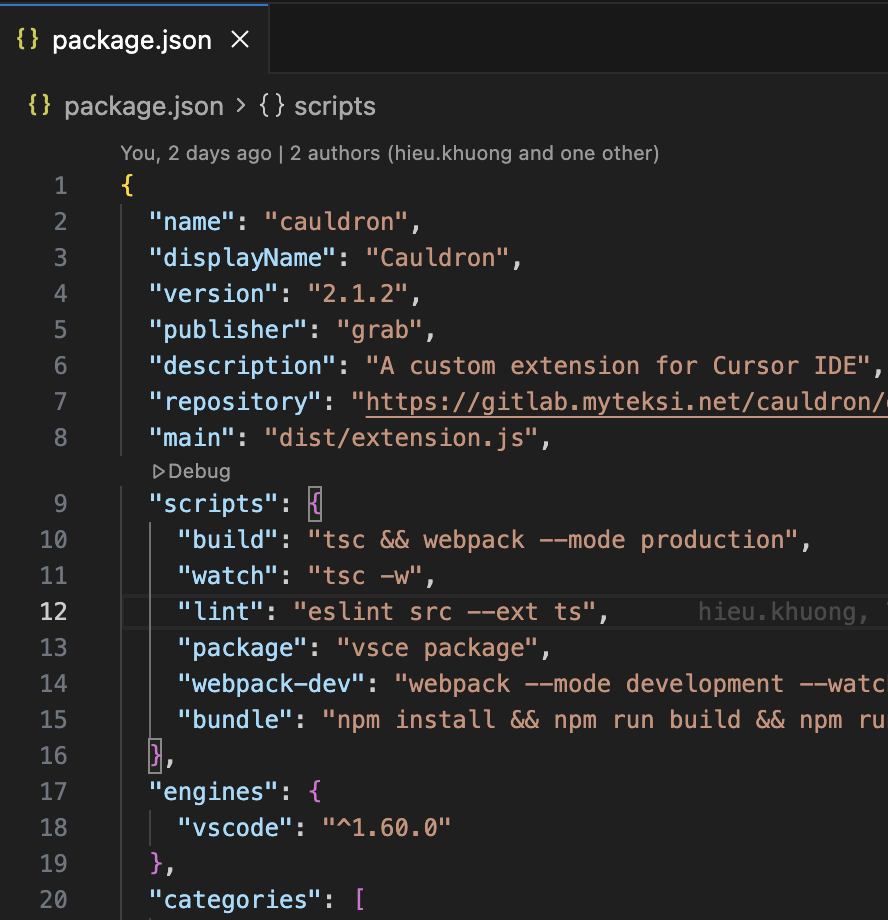
“Share your extension’s package.json, especially the name, publisher, and displayName fields” → image below:

One more thing that might be clue for your debugging:

When I use Cursor CLI to install the extension, it fails.

BUT, when I use sudo, it succeeds, image below:

I guess the reason might be due to file system permission, or something like that.

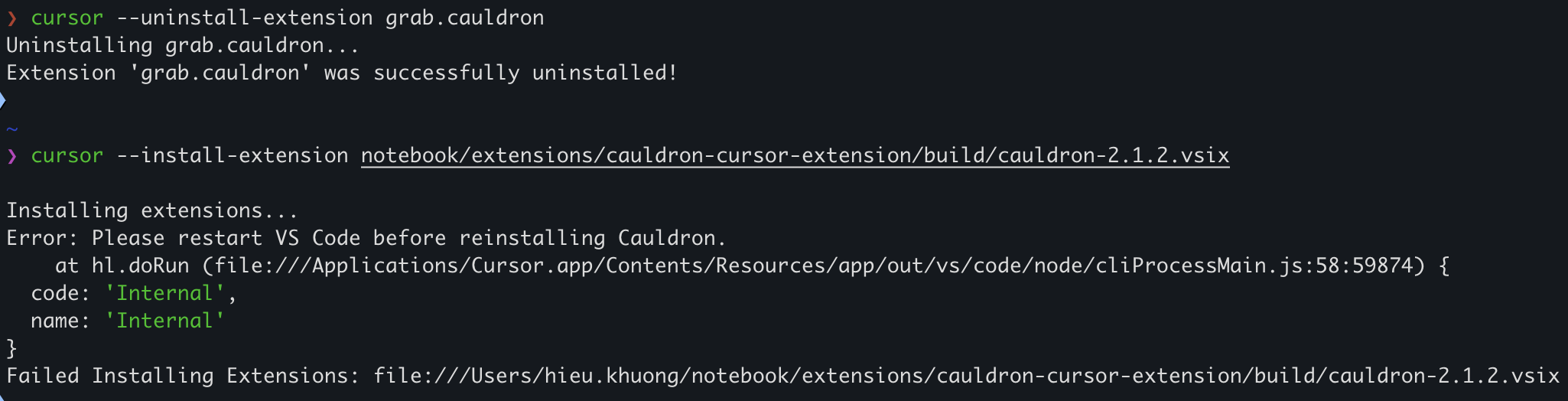
More info for ya. I tried to uninstall the extension via CLI, it succeeds without needing sudo.

But when I tried to install it again, it fails:

Somehow, installing via CLI needs sudo to succeed.

Thanks for the detailed diagnostics. The sudo requirement indicates a filesystem permissions issue in Cursor’s extension directories.

Try resetting permissions:

chmod -R u+w ~/Library/Application\ Support/Cursor/
Then restart Cursor and try installing without sudo.

Test with a different VSIX: Try installing any other VSIX file to see if the issue is specific to your extension or affects all VSIX installations.

The TypeError you’re seeing is definitely a Cursor bug that we need to check, but the sudo requirement suggests your Cursor directories may have incorrect ownership.

chmod -R u+w ~/Library/Application\ Support/Cursor/ Then restart Cursor and try installing without sudo.” → does not work. Still got the same error

“Test with a different VSIX: Try installing any other VSIX file to see if the issue is specific to your extension or affects all VSIX installations.” → i just tried with the vsix file from here, and it works well.

So, seems like something wrong with my extension?

Im looking at the vsix file name:

  • my extension is named: cauldron-2.1.2.vsix
  • the vsix file i just downloaded is named: redhat.vscode-yaml-1.20.2025111908.vsix

So, i suspect it is due to the name pattern.

Maybe there must be a publisher prefix, like, my extension must be named grab.cauldron-2.1.2.vsix to work? I tried renaming my vsix file to be grab.cauldron-2.1.2.vsix and try install, but still error.

One more info which might be useful, Im packaging my extension by vsce, using the command `vsce package`. Version im using is "@vscode/vsce": "^3.3.2"

Thanks for testing with another VSIX - that’s really helpful. Since the Redhat extension installs fine but yours doesn’t, this points to an issue in your extension’s manifest.

The TypeError: Cannot read properties of undefined (reading ‘identifier’) suggests that Cursor can’t parse a required metadata field from your extension.

Could you please:

  • Test in VS Code: Install your VSIX in regular VS Code to see if it works there. This will show if the issue is specific to Cursor or a general extension problem.
  • Share full package.json: Post the complete file content.
  • Check vsce output: Share any warnings from vsce package - also try running vsce package --no-yarn.

If it installs fine in VS Code but fails in Cursor, that confirms it’s a Cursor parsing bug we need to escalate.

“Test in VSCode” → I just downloaded VSCode (been a long time since I last used VSCode haha) and try to install my extension. It works fine. I even try to reinstall again when the extension is already installed, still work fine.

“Share full package.json” → here

{
  "name": "cauldron",
  "displayName": "Cauldron",
  "version": "2.1.2",
  "publisher": "grab",
  "description": "A custom extension for Cursor IDE",
  "repository": "https://gitlab.myteksi.net/cauldron/dataforge-cursor-extension.git",
  "main": "dist/extension.js",
  "scripts": {
    "build": "tsc && webpack --mode production",
    "watch": "tsc -w",
    "lint": "eslint src --ext ts",
    "package": "vsce package",
    "webpack-dev": "webpack --mode development --watch",
    "bundle": "npm install && npm run build && npm run package && mkdir -p build && mv *.vsix build/"
  },
  "engines": {
    "vscode": "^1.60.0"
  },
  "categories": [
    "Other"
  ],
  "activationEvents": [
    "onStartupFinished"
  ],
  "extensionKind": [
    "ui"
  ],
  "capabilities": {
    "untrustedWorkspaces": {
      "supported": true
    },
    "virtualWorkspaces": true
  },
  "contributes": {
    "viewsContainers": {
      "activitybar": [
        {
          "id": "cauldron-sidebar",
          "title": "Cauldron",
          "icon": "media/cauldron.svg"
        }
      ]
    },
    "views": {
      "cauldron-sidebar": [
        {
          "id": "welcomeView",
          "name": "Welcome",
          "type": "webview"
        },
        {
          "id": "mcpView",
          "name": "MCP Servers",
          "type": "webview"
        },
        {
          "id": "jupyterManagementView",
          "name": "Jupyter Management",
          "type": "webview"
        },
        {
          "id": "helpFeedbackView",
          "name": "Help and Feedback",
          "type": "tree"
        }
      ]
    },
    "commands": [
      {
        "command": "cauldron.scheduleSingleJob",
        "title": "Schedule Job"
      },
      {
        "command": "cauldron.updateExtension",
        "title": "Update Extension",
        "category": "Cauldron"
      },
      {
        "command": "cauldron.refreshVersionCheck",
        "title": "Refresh Version Check",
        "category": "Cauldron"
      },
      {
        "command": "workbench.action.reloadWindow",
        "title": "Refresh",
        "icon": "$(refresh)"
      }
    ],
    "menus": {
      "view/title": [
        {
          "command": "workbench.action.reloadWindow",
          "when": "view == welcomeView",
          "group": "navigation"
        }
      ]
    }
  },
  "devDependencies": {
    "@types/node": "^16.11.7",
    "@types/react": "^18.2.15",
    "@types/react-dom": "^18.2.7",
    "@types/vscode": "^1.60.0",
    "@types/vscode-webview": "^1.57.5",
    "@typescript-eslint/eslint-plugin": "^5.42.0",
    "@typescript-eslint/parser": "^5.42.0",
    "@vscode/vsce": "^3.3.2",
    "css-loader": "^6.8.1",
    "eslint": "^8.26.0",
    "html-webpack-plugin": "^5.5.3",
    "react": "^18.2.0",
    "react-dom": "^18.2.0",
    "style-loader": "^3.3.3",
    "ts-loader": "^9.4.4",
    "typescript": "^4.8.4",
    "webpack": "^5.88.2",
    "webpack-cli": "^5.1.4"
  },
  "dependencies": {
    "@datadog/browser-rum": "^6.18.1",
    "@duxton-web/icons": "^3.9.0",
    "@duxton-web/ui": "^0.30.0",
    "@gitbeaker/rest": "^40.2.0",
    "@grab-x/scribe-web-sdk": "^1.0.64",
    "@tanstack/react-query": "^4.40.1",
    "@web-platform/workspace-selector": "^1.0.6",
    "axios": "^1.9.0",
    "jwt-decode": "^4.0.0",
    "query-string": "^7.1.3",
    "ssh-config": "^5.0.3"
  }
}

“Check vsce output” → image below, there are just 2 warnings (I assume it is not a big deal anyways)

1 Like

Thanks for the thorough testing! This confirms it’s a Cursor-specific bug in our extension metadata parser.

Since your extension:

  • Has a valid package.json
  • Installs successfully in VS Code
  • Only fails in Cursor with the TypeError

I’ll pass this on to the team. The TypeError: Cannot read properties of undefined (reading ‘identifier’) suggests that Cursor’s extension installer is having trouble parsing something in your manifest that VS Code handles correctly.

We’ll investigate why Cursor’s parser differs from VS Code for your extension structure.

1 Like

sure! thanks for following with me, please keep me posted! and lmk if i can give more info for triaging

Hi, any progress from the engineering team?