Where does the bug appear (feature/product)?
Cursor IDE
Describe the Bug
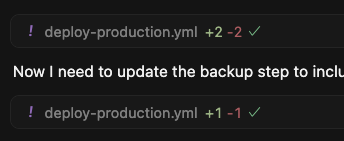
The code edit tool shows the name of the file, a green +X for the lines added and a red -Y for the lines removed BUT it used to also then show a yellow .Z for the number of linting errors in the file after the edit.
Perhaps this is an extension that I removed or it is a feature regression when the code edit tool stopped showing the diff of the code changes but I would really like the feature back as VSCode lint-on-save doesn’t force the correction of linting errors as it used to.
Steps to Reproduce
Ask Cursor AI to make a code change, view the red and green numbers in the code edit summary without the yellow number when there are linting errors such as incorrect type usage.
Expected Behavior
Linting errors are highlighted and rectified for every edit of every file
Screenshots / Screen Recordings
Operating System
MacOS
Current Cursor Version (Menu → About Cursor → Copy)
Version: 1.5.5 (Universal)
VSCode Version: 1.99.3
Commit: 823f58d4f60b795a6aefb9955933f3a2f0331d70
Date: 2025-08-25T17:40:25.290Z
Electron: 34.5.8
Chromium: 132.0.6834.210
Node.js: 20.19.1
V8: 13.2.152.41-electron.0
OS: Darwin arm64 24.6.0
Does this stop you from using Cursor
No - Cursor works, but with this issue