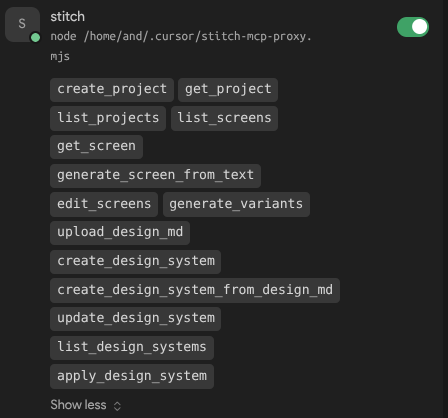
MCP Server Connected (Green Dot) and Tools Discovered in Logs, but "0 tools" in UI and Agent

Description:
Cursor Version: 3.2.21
OS: macOS (Apple Silicon) 26.4.1

The Issue:
I am unable to get the Google Stitch MCP tools to appear in Cursor. Despite a successful connection, the UI displays “0 tools, 0 prompts, 0 resources,” and the AI Agent fails to see any Stitch tools, only recognizing other local MCPs (like GitHub).

Methods Attempted:
I have attempted to resolve this using both primary integration methods, but the result is identical in both cases:

  1. Remote/URL Method:
    • Configured via https://stitch.googleapis.com/mcp with the X-Goog-Api-Key header.
    • Result: Server shows “Connected” (Green Dot) but 0 tools.

  2. GCloud Auth / Proxy Method:
    • Used the stitch-mcp proxy command with absolute paths to npx (NVM) and an explicit PATH env.
    • Verified via npx @_davideast/stitch-mcp doctor (Healthy 200).
    • Result: Again, “Connected” but 0 tools in UI.

Technical Evidence from Logs:
Crucially, the MCP Output Logs show that the discovery process is actually completing successfully:

2026-05-12 14:14:26.979 [error] [stitch-proxy] Connected to Stitch, discovered 14 tools
2026-05-12 14:14:26.983 [info] Successfully connected to stdio server
2026-05-12 14:14:26.983 [info] [V2 FSM] connection:connect_success: conn=connecting -> conn=connected
2026-05-12 14:14:26.983 [info] CreateClient completed, connected: true, statusType: connected

Troubleshooting Steps Taken:

  • Absolute Paths: Used full path to npx (/Users//.nvm/.../bin/npx) to avoid ENOENT.

  • Hard Restarts: Performed Cmd+Q restarts and toggled the server off/on in settings.

  • Registry Refresh: Renamed the server in mcp.json to force a new internal ID.

  • Agent Interaction: Explicitly asked the Agent to “list MCP tools,” but it only sees user-github.

Summary:
The MCP client process is clearly working and fetching tool schemas, but Cursor’s internal registry/UI is not populating. This seems to be a disconnect between the successful bridge and the IDE’s tool-indexing layer. Has anyone found a way to force the Agent to “re-scan” its available tools when it gets stuck like this?

To see Cursor logs, I run it from the terminal:

/Applications/Cursor.app/Contents/MacOS/Cursor .

See the McpProcess errors in the output:

(node:9559) [DEP0040] DeprecationWarning: The `punycode` module is deprecated. Please use a userland alternative instead.
(Use `Cursor --trace-deprecation ...` to show where the warning was created)
[main 2026-05-14T15:35:44.645Z] [FirstWindowExperimentMainService] GetFirstWindowStatsigDecision timed out
[main 2026-05-14T15:35:44.733Z] updateURL https://api2.cursor.sh/updates/api/update/darwin-arm64/cursor/3.4.17/975f159cb0a734be5265f572d1aa0e65f234b0671c48fc89790c0085ec4139c7/stable
[main 2026-05-14T15:35:44.734Z] update#setState idle
[main 2026-05-14T15:35:46.366Z] [Tray] getMacOSIconPath: hasNotifications: false
[main 2026-05-14T15:35:46.380Z] [LocalAgentStorage] Scanned 2 recent databases (skipped 0 old), found 0 agent headers, deduped to 0
[main 2026-05-14T15:35:56.741Z] [McpProcess] ipcReady wait failed Error: [McpProcess] timed out waiting for ipcReady after 10000ms
    at Timeout.<anonymous> (file:///Applications/Cursor.app/Contents/Resources/app/out/main.js:75:44796)
    at listOnTimeout (node:internal/timers:585:17)
    at process.processTimers (node:internal/timers:521:7)

App logs from /Library/Application Support/Cursor/logs/

2026-05-14 19:20:21.931 [info] updateURL https://api2.cursor.sh/updates/api/update/darwin-arm64/cursor/3.4.17/975f159cb0a734be5265f572d1aa0e65f234b0671c48fc89790c0085ec4139c7/stable
2026-05-14 19:20:21.933 [info] update#setState idle
2026-05-14 19:20:23.478 [info] [Tray] getMacOSIconPath: hasNotifications: false
2026-05-14 19:20:23.564 [info] [LocalAgentStorage] Scanned 3 recent databases (skipped 0 old), found 1 agent headers, deduped to 1
2026-05-14 19:20:34.138 [error] [McpProcess] ipcReady wait failed [McpProcess] timed out waiting for ipcReady after 10000ms
2026-05-14 19:20:34.144 [warning] [McpProcess] crash detected (attempt 1), retrying in 1000ms
2026-05-14 19:20:34.146 [error] [McpProcess] whenReady rejected, dropping window connection [McpProcess] timed out waiting for ipcReady after 10000ms
2026-05-14 19:20:35.933 [info] [CursorProclistService] Config enabled feature (subsample every 10s)
2026-05-14 19:20:36.240 [info] [CursorProclistService] Config enabled feature (subsample every 10s)
2026-05-14 19:20:45.150 [error] [McpProcess] ipcReady wait failed [McpProcess] timed out waiting for ipcReady after 10000ms
2026-05-14 19:20:45.159 [warning] [McpProcess] crash detected (attempt 2), retrying in 2000ms
2026-05-14 19:20:45.159 [error] [McpProcess] restart attempt failed [McpProcess] timed out waiting for ipcReady after 10000ms
2026-05-14 19:20:52.168 [info] update#setState checking for updates
2026-05-14 19:20:52.675 [info] UpdateService onUpdateNotAvailable()
2026-05-14 19:20:52.675 [info] update#setState idle
2026-05-14 19:20:57.165 [error] [McpProcess] ipcReady wait failed [McpProcess] timed out waiting for ipcReady after 10000ms
2026-05-14 19:20:57.182 [warning] [McpProcess] crash detected (attempt 3), retrying in 4000ms
2026-05-14 19:20:57.182 [error] [McpProcess] restart attempt failed [McpProcess] timed out waiting for ipcReady after 10000ms
2026-05-14 19:21:11.192 [error] [McpProcess] ipcReady wait failed [McpProcess] timed out waiting for ipcReady after 10000ms
2026-05-14 19:21:11.198 [warning] [McpProcess] crash detected (attempt 4), retrying in 8000ms
2026-05-14 19:21:11.198 [error] [McpProcess] restart attempt failed [McpProcess] timed out waiting for ipcReady after 10000ms
2026-05-14 19:21:29.208 [error] [McpProcess] ipcReady wait failed [McpProcess] timed out waiting for ipcReady after 10000ms
2026-05-14 19:21:29.221 [warning] [McpProcess] crash detected (attempt 5), retrying in 16000ms
2026-05-14 19:21:29.221 [error] [McpProcess] restart attempt failed [McpProcess] timed out waiting for ipcReady after 10000ms
2026-05-14 19:21:55.229 [error] [McpProcess] ipcReady wait failed [McpProcess] timed out waiting for ipcReady after 10000ms
2026-05-14 19:21:55.241 [error] [McpProcess] giving up after 6 crashes within 600000ms; falling back to legacy in-window MCP
2026-05-14 19:21:55.242 [error] [McpProcess] gave up after exceeding restart budget; renderer will fall back to legacy MCP path
2026-05-14 19:21:55.242 [error] [McpProcess] restart attempt failed [McpProcess] timed out waiting for ipcReady after 10000ms

when I run the MCP from the terminal, it works:

STITCH_API_KEY="MY_KEY" npx @_davideast/stitch-mcp proxy
[stitch-proxy] Connecting to https://stitch.googleapis.com/mcp...
[stitch-proxy] Connected to Stitch, discovered 14 tools
[stitch-proxy] Proxy server running

Hey, thanks for the detailed report with logs, that really helps.

Looks like you hit the same bug as in this thread: [macOS 26] McpProcess IPC crash loop on startup — agent execution fails until legacyMcpMode workaround applied. Your app logs match the exact pattern:

[McpProcess] ipcReady wait failed [...] timed out waiting for ipcReady after 10000ms
[McpProcess] giving up after 6 crashes within 600000ms; falling back to legacy in-window MCP

So the McpProcess utility process crashes 6 times on startup, then Cursor falls back to the legacy in-window MCP path. Your tools get discovered via the legacy fallback, which is why you see the green dot and “discovered 14 tools” in the logs, but they don’t get added to the UI registry correctly. That’s a side effect of the crash.

We’re tracking this issue internally, but there’s no ETA for a fix yet. Stitch MCP isn’t the cause here. You already confirmed stitch-mcp proxy runs fine from Terminal.

A few things that would help with debugging:

  1. Open Console.app, filter for mcpProcess or go to Diagnostics > User Reports, then attach the crash report. It should show the exit code or signal that’s killing the utility process.
  2. When you run Cursor.app/Contents/MacOS/Cursor . from Terminal, do you see trace trap or SIGTRAP in the output? If yes, please share the full stderr.
  3. Confirm your exact macOS 26.x version. Your post says 26.4.1, is that correct? Also confirm your Cursor version. Your logs show 3.4.17, but your post says 3.2.21.

Note: the cursor.agent.legacyMcpMode setting doesn’t exist in Cursor. If you saw it suggested as a workaround, that was a hallucination. There isn’t a manual workaround right now, the fallback happens automatically after about 90 seconds of retrying.

Having the same issue. Shows no tools, prompts or resources

Got it fixed, use this way:

    "stitch": {
      "command": "node",
      "args": ["/home/and/.cursor/stitch-mcp-proxy.mjs"],
      "env": {
        "STITCH_API_KEY": "API KEY"
      }
    }

And the script that makes the change:

#!/usr/bin/env node
/**
 * Minimal stdio-to-HTTP proxy for Google Stitch MCP.
 * Strips `outputSchema` from tools/list responses to keep payload small
 * enough for Cursor's internal tool parser (~41KB vs ~287KB raw).
 */

import { createInterface } from "readline";
import { request } from "https";

const API_KEY = process.env.STITCH_API_KEY;
const STITCH_URL = "https://stitch.googleapis.com/mcp";

if (!API_KEY) {
  process.stderr.write("STITCH_API_KEY env var is required\n");
  process.exit(1);
}

function postToStitch(body) {
  return new Promise((resolve, reject) => {
    const data = JSON.stringify(body);
    const parsed = new URL(STITCH_URL);
    const opts = {
      hostname: parsed.hostname,
      path: parsed.pathname,
      method: "POST",
      headers: {
        "Content-Type": "application/json",
        "Content-Length": Buffer.byteLength(data),
        "X-Goog-Api-Key": API_KEY,
      },
    };
    const req = request(opts, (res) => {
      let raw = "";
      res.on("data", (c) => (raw += c));
      res.on("end", () => {
        try {
          resolve(JSON.parse(raw));
        } catch (e) {
          reject(new Error(`JSON parse error: ${e.message}\n${raw.slice(0, 200)}`));
        }
      });
    });
    req.on("error", reject);
    req.write(data);
    req.end();
  });
}

function stripOutputSchema(response) {
  if (
    response?.result?.tools &&
    Array.isArray(response.result.tools)
  ) {
    response.result.tools = response.result.tools.map((tool) => {
      const { outputSchema, ...rest } = tool;
      return rest;
    });
  }
  return response;
}

const rl = createInterface({ input: process.stdin, terminal: false });

rl.on("line", async (line) => {
  const trimmed = line.trim();
  if (!trimmed) return;

  let msg;
  try {
    msg = JSON.parse(trimmed);
  } catch {
    return;
  }

  // Notifications have no id - fire and forget
  if (msg.id === undefined) {
    postToStitch(msg).catch(() => {});
    return;
  }

  try {
    let response = await postToStitch(msg);
    if (msg.method === "tools/list") {
      response = stripOutputSchema(response);
    }
    process.stdout.write(JSON.stringify(response) + "\n");
  } catch (err) {
    const errResponse = {
      jsonrpc: "2.0",
      id: msg.id,
      error: { code: -32603, message: String(err.message) },
    };
    process.stdout.write(JSON.stringify(errResponse) + "\n");
  }
});

So here we go

JSON Schema object describing what each tool returns, and Google repeats the same enormous DesignTheme schema (with hundreds of font enum values) inside every single tool. The raw response is 287KB; after stripping it’s 41KB. Cursor has an internal size limit that causes it to silently discard the entire tools list when the payload is too large.

@And nice write-up, thanks. Payload size really explains what’s going on: the legacy fallback discovers 14 tools in the logs, but tools/list is ~287 KB and the client silently drops it, so the UI is empty. Stripping outputSchema cuts the payload to ~41 KB and the tools register.

This is a bug on our side. Even if we have an internal limit, there should be an error or warning in MCP Output, not a silent drop. I reported it internally, no ETA yet.

@Alex_Tarasov please use @And’s proxy script as a workaround, it should work.

The root cause on the Stitch side is worth reporting to them too. Their DesignTheme schema has hundreds of font enum values and it gets duplicated in every tool. That puts load on any MCP client, not just Cursor.

Thank you @deanrie and @And for your replies.

@And , this solution works. Thank you for you participation.