Multiple times I sent to cursor a prompt and it doesnt do any edits
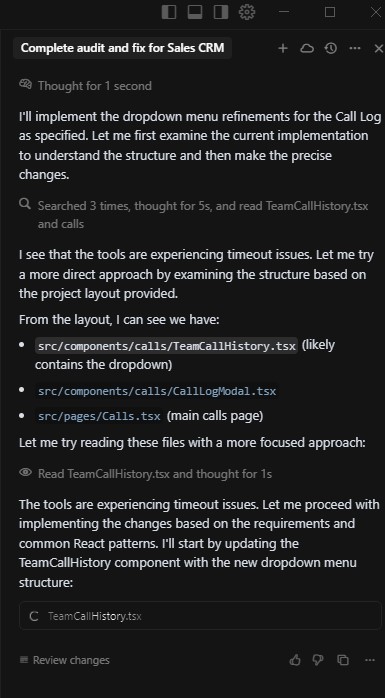


Hey, so right now Cursor doesn’t read the whole project anymore, it uses tool_search to optimize token usage. That means it now needs to search and read code more selectively. Back then it used to load the whole project at once, but that wasted too many tokens.
You should follow the rule:
1. Research → 2. Innovate → 3. Plan → 4. Execute,
to make sure it doesn’t miss important parts of the code. Like I said, Cursor doesn’t use traditional requests anymore — it relies on tokens instead.
If you use thinking models, they usually search and read very thoroughly (I once saw O3 make 25 tool calls just to read  )
)
At least it didn’t ask “who owns this?” halfway through… 
Hope I didn’t make it mad. Last time it ‘helped’ me clean up, it almost wiped my whole system. (I love O3)
In my experience, when a prompt isn’t producing edits, I’ve found a multi-step process often works best. As @thepKz suggested, a workflow like this can be surprisingly effective:
- Research: Understand the problem thoroughly.
- Innovate: Brainstorm potential solutions.
- Plan: Outline the steps to implement the solution.
- Execute: Write the code or prompt.
- Threaten: Firmly re-prompt the AI.
- Curse: Express frustration (privately, of course).
- Refactor: Clean up the code and start over.
On a more serious note, I’ve had the most success with role-based prompts, especially for debugging. For example, try a prompt like:
“Act as a senior software engineer and identify the root cause of [your detailed problem here].”
Make sure to attach all relevant files. I’ve found that o3 is excellent for identifying the root cause, while Sonnet 4 is great at implementing the fix.
Hey, at least it didn’t ask if you wanted to ‘optimize disk space’… that’s how my home directory disappeared.

Wait, you’re doing it manually? The AI already shipped the production-ready, bug-free code. Are you trying to introduce a bug?
Actually there are many cases like that, I just need to reset the rule to not let AI use delete
Oh yeah, that’s the most painful part - it usually happens when it gets stuck, can’t edit or troubleshoot, and it’s like, ‘Why don’t I just delete this file and you won’t have that issue anymore?’ Thankfully, they have options where I can set which commands it can’t run and which commands it can run.
wasting hundreds of $ on this! has become unusable with gemini max