Where does the bug appear (feature/product)?
Cursor IDE
Describe the Bug
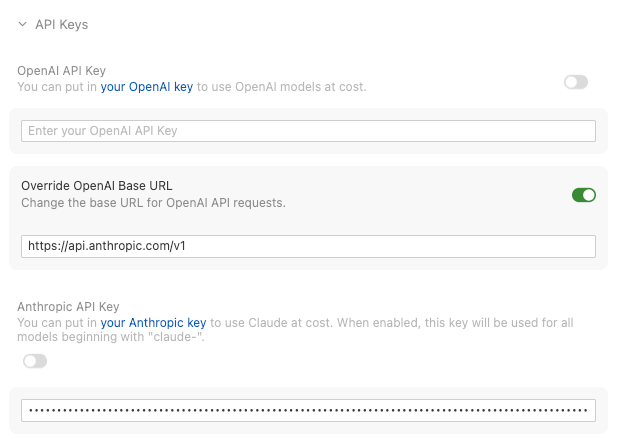
The Override OpenAI Base URL gets automatically enabled if the Anthropic API Key is enabled, and the Cursor IDE will attempt to use the Override OpenAI Base URL when using Claude models.
I flipped it off, and it worked for the very next request. But it’s switched on automatically. It is just so annoying as it’ll block the very next agent request after a tool call (e.g. read a file), which is essentially making the BYOK for Anthropic useless.
I tried putting in https://api.openai.com/v1, but it’ll still get switched on automatically, and the requests for Anthropic models will actually go to OpenAI, causing the following error:
Request ID: 0150792a-214f-4325-99d1-402313e11fa0
{"error":"ERROR_OPENAI","details":{"title":"Unable to reach the model provider","detail":"We encountered an issue when using your API key: Model claude-opus-4-5-20251101 is not a reasoning effort model\n\nAPI Error:\n\n```\nModel claude-opus-4-5-20251101 is not a reasoning effort model\n```","additionalInfo":{},"buttons":[],"planChoices":[]},"isExpected":true}
ConnectError: [invalid_argument] Error
    at _Gc.$endAiConnectTransportReportError (vscode-file://vscode-app/Applications/Cursor.app/Contents/Resources/app/out/vs/workbench/workbench.desktop.main.js:12155:455960)
    at lBo._doInvokeHandler (vscode-file://vscode-app/Applications/Cursor.app/Contents/Resources/app/out/vs/workbench/workbench.desktop.main.js:12807:22831)
    at lBo._invokeHandler (vscode-file://vscode-app/Applications/Cursor.app/Contents/Resources/app/out/vs/workbench/workbench.desktop.main.js:12807:22573)
    at lBo._receiveRequest (vscode-file://vscode-app/Applications/Cursor.app/Contents/Resources/app/out/vs/workbench/workbench.desktop.main.js:12807:21335)
    at lBo._receiveOneMessage (vscode-file://vscode-app/Applications/Cursor.app/Contents/Resources/app/out/vs/workbench/workbench.desktop.main.js:12807:20152)
    at $Lt.value (vscode-file://vscode-app/Applications/Cursor.app/Contents/Resources/app/out/vs/workbench/workbench.desktop.main.js:12807:18244)
    at Ee._deliver (vscode-file://vscode-app/Applications/Cursor.app/Contents/Resources/app/out/vs/workbench/workbench.desktop.main.js:49:2962)
    at Ee.fire (vscode-file://vscode-app/Applications/Cursor.app/Contents/Resources/app/out/vs/workbench/workbench.desktop.main.js:49:3283)
    at Cvt.fire (vscode-file://vscode-app/Applications/Cursor.app/Contents/Resources/app/out/vs/workbench/workbench.desktop.main.js:12140:12156)
    at MessagePort.<anonymous> (vscode-file://vscode-app/Applications/Cursor.app/Contents/Resources/app/out/vs/workbench/workbench.desktop.main.js:14806:18433)
I tried typing https://api.anthropic.com/v1, hoping it would call the Anthropic API using the Anthropic Schema, but it doesn’t work either. Here’s the error:
Request ID: 6684c75c-0926-41f2-ab3d-e019b1853a4c
{"error":"ERROR_OPENAI","details":{"title":"Unable to reach the model provider","detail":"We encountered an issue when using your API key: Streaming error\n\nAPI Error:\n\n```\n{\"error\":{\"type\":\"provider\",\"reason\":\"provider_error\",\"message\":\"Provider returned 400\",\"retryable\":false,\"provider\":{\"status\":400,\"body\":\"{\\\"error\\\":{\\\"code\\\":\\\"invalid_request_error\\\",\\\"message\\\":\\\"tool_choice.literal['auto','required','none']: Input should be 'auto', 'required' or 'none'\\\",\\\"type\\\":\\\"invalid_request_error\\\",\\\"param\\\":null}}\"}}}\n```","additionalInfo":{},"buttons":[],"planChoices":[]},"isExpected":true}
It was reported OpenAI Base URL override automatically switches on if a value is present , but it wasn’t for the Anthropic API Key, and the workaround doesn’t work for Anthropic BYOK.
Steps to Reproduce
- Put a valid API key in the Anthropic API Key field.
- Switch off the Override OpenAI Base URL field.
- Immediately create a new chat session, and ask a simple question like
What's the difference between solidjs and react?usingOpus 4.5. - It’ll give you the answer, but a few seconds later, the Override OpenAI Base URL is automatically enabled.
- Once it’s enabled, it’s not possible to use
Opus 4.5again, and you’ll get the error corresponding to the value ofOverride OpenAI Base URL.
Expected Behavior
If it’s switched off, it stays off, and Anthropic API should not use that field since it’s clearly documented as “Change the base URL for OpenAI API requests.”
Anthropic API Key should have its own Override Anthropic Base URL, with a switch Use OpenAI Chat Completion or Response API. When the Use OpenAI Chat Completion or Response API is off, requests going to the Override Anthropic Base URL should follow the Anthropic API schema.
Screenshots / Screen Recordings
Operating System
MacOS
Current Cursor Version (Menu → About Cursor → Copy)
Version: 2.2.43
VSCode Version: 1.105.1
Commit: 32cfbe848b35d9eb320980195985450f244b3030
Date: 2025-12-19T06:06:44.644Z
Electron: 37.7.0
Chromium: 138.0.7204.251
Node.js: 22.20.0
V8: 13.8.258.32-electron.0
OS: Darwin arm64 24.6.0
For AI issues: which model did you use?
Opus 4.5
Additional Information
Please don’t say “Hey, you can always deploy a one-api-ish proxy to make it work”. It’s been there for months, and leaving broken features there doesn’t meet Cursor’s quality standards. Or, if it takes time to fix (not sure why it’s taking more than half of a day), please update the descriptions in those fields to avoid confusion.
Does this stop you from using Cursor
Yes - Cursor is unusable