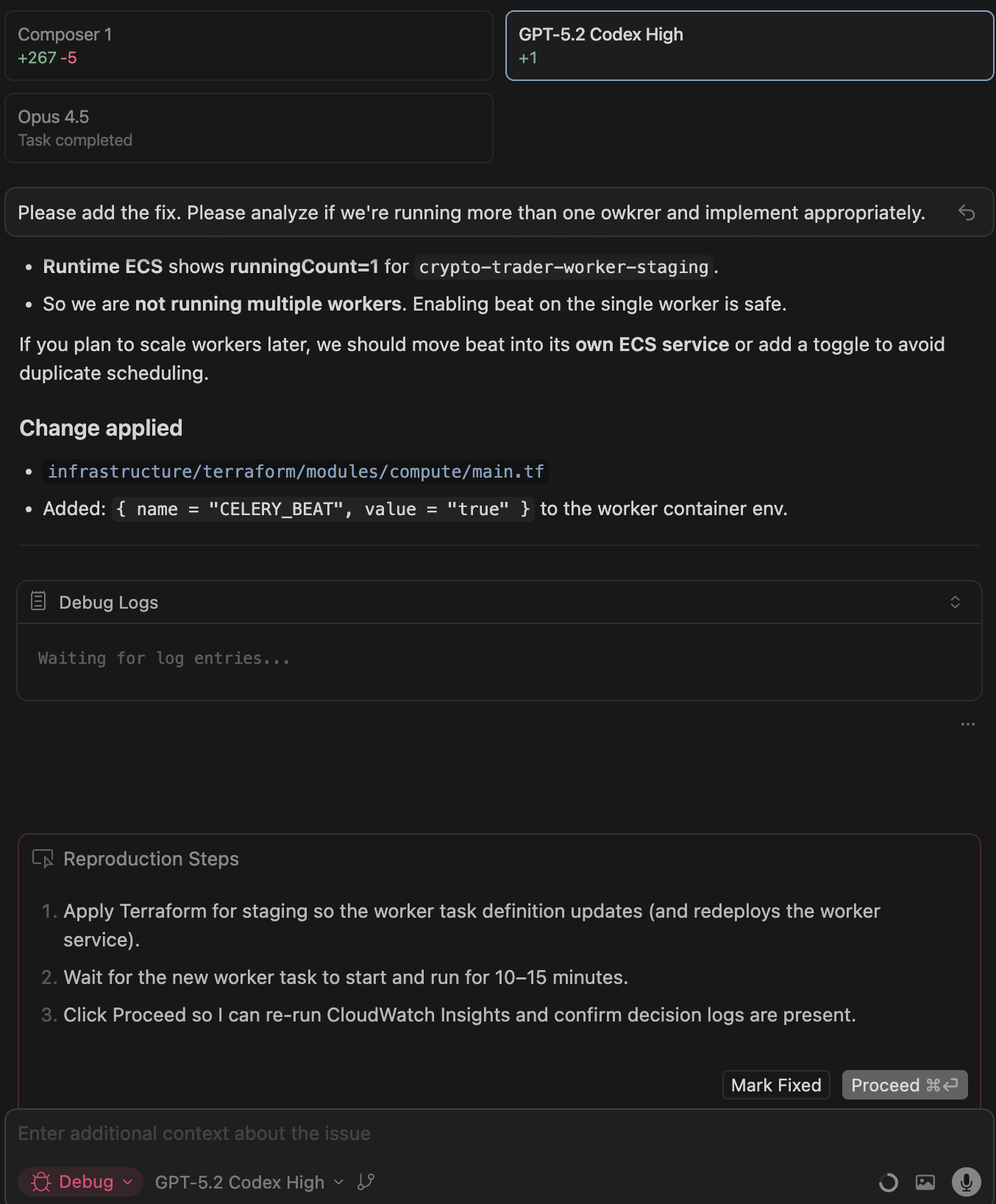
Parallel Agents Don't Allow Selection

Where does the bug appear (feature/product)?

Cursor IDE

Describe the Bug

When using parallel agents for debugging it doesn’t allow you to review and commit files while debugging.

Steps to Reproduce

  1. Run multiple models for a debug process
  2. Choose to go with one model, but it requires you to deploy / mark fixed
  3. You can’t gain access to it’s code changes unless you copy and paste them

Expected Behavior

I’d like to be able to review / select a specific instance and revert if need be.

Screenshots / Screen Recordings

Operating System

MacOS

Version Information

Version: 2.4.21
VSCode Version: 1.105.1
Commit: dc8361355d709f306d5159635a677a571b277bc0
Date: 2026-01-22T16:57:59.675Z
Build Type: Stable
Release Track: Default
Electron: 39.2.7
Chromium: 142.0.7444.235
Node.js: 22.21.1
V8: 14.2.231.21-electron.0
OS: Darwin arm64 25.2.0

For AI issues: add Request ID with privacy disabled

cb909ab2-2e51-4f50-b0ec-7ffaae514f48

Does this stop you from using Cursor

No - Cursor works, but with this issue

For a follow-up I’d expect to see something like this on the bottom in addition to the ‘mark fixed’ or ‘proceed’ box.

Compounding the issue, I’m not able to delete the first chat. I am able to delete the next two (which I suspect going down to one would make things work as expected ¯\_(ツ)_/¯ )

Hey, thanks for the report. I see there’s no way to pick a specific result.

This is a known limitation of the best-of-n worktrees feature. Each agent works in its own worktree, but there’s no UI yet to select a specific output. Right now it’s only Mark Fixed or Proceed for the whole workflow.

The team is aware.

Current workaround:

  • Copy and paste the code you want, like you did
  • Or manually switch between worktrees via git to test

About not being able to delete the first chat, it looks like Debug mode is keeping a reference to it. Try after Mark Fixed or Proceed, it should unlock.