Planner broken in 2.1.0

Describe the Bug

Every time I send a request in planning mode, it fails with an error in the planning tool. The plan docs I had created before upgrading disappeared and could not be recreated.

Steps to Reproduce

  1. upgrade to 2.1.0
  2. see all your plans evaporate like Thanos victims
  3. try to create new plans
  4. witness tool error
  5. cry

You can obviously still plan in agent mode with a markdown doc, but it is much more likely to haul off and start building things even if instructed not to. When combined with Custom Modes missing in Cursor 2.1.0 (VSCode 1.105.1) - #5 by tiz.io, this prevents any sort of read-only planning setup.

Operating System

Windows 10/11

Current Cursor Version (Menu → About Cursor → Copy)

Version: 2.1.0 (system setup)
VSCode Version: 1.105.1
Commit: e4a384a82071fdda72d3442dffc0bcd25a8dfaf0
Date: 2025-11-19T06:32:16.968Z
Electron: 37.7.0
Chromium: 138.0.7204.251
Node.js: 22.20.0
V8: 13.8.258.32-electron.0
OS: Windows_NT x64 10.0.26200

Does this stop you from using Cursor

No - Cursor works, but with this issue

5 Likes

Where does the bug appear (feature/product)?

Cursor IDE

Describe the Bug

Create plan tool call errored or timed out is happening very constantly

Steps to Reproduce

Create a plan, then answer the questions to the asked questions, then it has a lot of errors with plan toolcall

Expected Behavior

Plan tool actually working.

Operating System

MacOS

Current Cursor Version (Menu → About Cursor → Copy)

Version: 2.1.0 (Universal)
VSCode Version: 1.105.1
Commit: e4a384a82071fdda72d3442dffc0bcd25a8dfaf0
Date: 2025-11-19T06:32:16.968Z
Electron: 37.7.0
Chromium: 138.0.7204.251
Node.js: 22.20.0
V8: 13.8.258.32-electron.0
OS: Darwin arm64 25.1.0

For AI issues: which model did you use?

Composer, gemini, codex high

For AI issues: add Request ID with privacy disabled

414b09fa-2ee7-45fe-8209-effdda7c3602

Does this stop you from using Cursor

Yes - Cursor is unusable

1 Like

Hey, thanks for the detailed report. It looks like this is a regression in 2.1.0.

Please share:

  • A screenshot of the exact error message when the planning tool fails
  • The Request ID from a failed planning attempt:
    • Chat context menu > Copy Request ID

This will help the team investigate. Also, please try updating to version 2.1.6, as this may already be fixed there. Let me know if the issue still persists after updating.

I’m on 2.1.20 and I’m still seeing this issue.

Envrionment

Version: 2.1.20
VSCode Version: 1.105.1
Commit: a8d8905b06c8da1739af6f789efd59c28ac2a680
Date: 2025-11-22T14:51:59.472Z
Electron: 37.7.0
Chromium: 138.0.7204.251
Node.js: 22.20.0
V8: 13.8.258.32-electron.0
OS: Darwin arm64 25.1.0

Screenshot

Request ID

cb396664-c0bd-48b3-b22d-f9c3d1821c5c
1 Like

Same in 2.1.25.

1 Like

Still broken with 2.1.26

Version: 2.1.26
VSCode Version: 1.105.1
Commit: f628a4761be40b8869ca61a6189cafd14756dff0
Date: 2025-11-24T05:39:06.655Z
Electron: 37.7.0
Chromium: 138.0.7204.251
Node.js: 22.20.0
V8: 13.8.258.32-electron.0
OS: Darwin arm64 25.1.0

1 Like

providing my info, as I have been having the same issue today:

5b9f23c0-aa56-4246-8f12-1aa1a46dad7f

Version: 2.1.34 (user setup)
VSCode Version: 1.105.1
Commit: 609c37304ae83141fd217c4ae638bf5321856500
Date: 2025-11-25T16:35:52.391Z
Electron: 37.7.0
Chromium: 138.0.7204.251
Node.js: 22.20.0
V8: 13.8.258.32-electron.0
OS: Windows_NT x64 10.0.26100

I want to add that when this happens I can reload the window to recover from it. It just recreates the plan from the scratch following previous context.

image

image

constant issues here as well

9fc05bc1-065f-4de0-9574-3fa4c39eb3fe

Version: 2.1.36
VSCode Version: 1.105.1
Commit: 9cd7c8b6cebcbccc1242df211dee45a4b6fe15e0
Date: 2025-11-26T03:43:48.079Z
Electron: 37.7.0
Chromium: 138.0.7204.251
Node.js: 22.20.0
V8: 13.8.258.32-electron.0
OS: Darwin arm64 24.6.0

Still exists in 2.1.39

1 Like

still exists in:
Version: 2.1.39 (system setup)
VSCode Version: 1.105.1
Commit: 60d42bed27e5775c43ec0428d8c653c49e58e260
Date: 2025-11-27T02:30:49.286Z
Electron: 37.7.0
Chromium: 138.0.7204.251
Node.js: 22.20.0
V8: 13.8.258.32-electron.0
OS: Windows_NT x64 10.0.26200

this is annoying and hard to pin point on the reason it is doing it. It seems like alot of people experiencing it, but also it is working for some. There is a trigger that causes it for sure. My flow thats failing is already had a plan generated today and I was going over it replanning to align with my vision exactly, but it failed during editing a plan so that should be some clue. The plan might be working if you are starting fresh, so this could be something mid-flow after you have generated a plan already

I restarted all cursor instances and relaunched curosr switched from auto to composer 1 and it worked. if you face this, just restart all you cursor instances or restart the machine and hope it works. it resolved itself, thats how much I can provide

A workaround seems to be to instruct Cursor to just “rewrite plan” - it will do so, and from there you can prompt again.

1 Like

Having this in 2.1.39, it’s a real momentum killer.
Can confirm that re-writing the plan works.

2 Likes

2.1.46
I always encounter this error when the cursor asks for answers to a question.
If I close the window and type the answers myself in the chat, everything works.

Under the hood, are we wasting tokens having to do this workaround? I’m worried this is increasing our costs when I’m constantly having to remake plans or instruct the agent to work around this issue.

Under the hood, are we wasting tokens having to do this workaround? I’m worried this is increasing our costs when I’m constantly having to remake plans or instruct the agent to work around this issue.

The problem: I used ~100k tokens with opus 4.5, generated a plan, tried to suggest edits to the plan (another ~50k tokens or so), the edits failed, I tried to tell it to generate a new plan with the edits but that failed as well, and now I’m in a state where ~200-300k tokens are wasted because the agent couldn’t create the new plan properly. The newly generated plan had a bunch of missing things from the first plan.

It’s completely unusable like this. And wasting $$.

1 Like

Request ID: 3ca30fb1-7cf8-4ee1-a6b0-c47e0ac8e72e

Any updates on this kind of sad this is still an issue.

Are we wasting tokens when this error occurs?

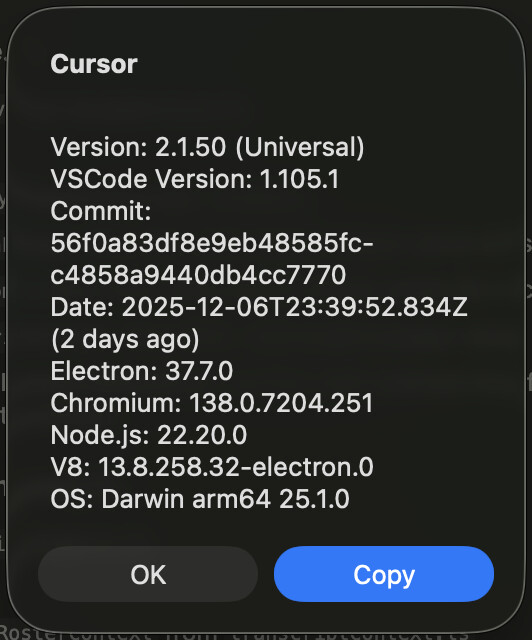
Version: 2.1.46 (Universal)
VSCode Version: 1.105.1
Commit: ab326d0767c02fb9847b342c43ea58275c4b1680
Date: 2025-12-02T03:59:29.283Z
Electron: 37.7.0
Chromium: 138.0.7204.251
Node.js: 22.20.0
V8: 13.8.258.32-electron.0
OS: Darwin arm64 25.1.0

1 Like

Also curious here about token wastage. This seems like it has the potential to cause a lot of token usage on our side to work around the plan feature here.

Request ID: 31604054-136d-44fd-8686-84e34cca6148