Where does the bug appear (feature/product)?
Cursor IDE
Describe the Bug
Ruby LSP extension isn’t indexing symbols properly. I can’t command-click or @-include ruby symbols in Cursor Chat.
- This extension works fine in VSCode
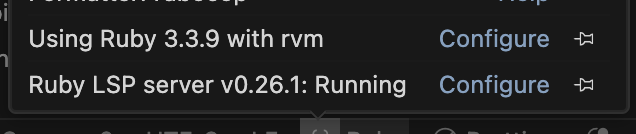
- Ruby LSP is running (screenshot)
- I tried all the ChatGPT suggested remedies (reload, reinstall, etc.) - no luck
Steps to Reproduce
Load a ruby codebase in Cursor, install Ruby LSP extension
Screenshots / Screen Recordings
Operating System
MacOS
Current Cursor Version (Menu → About Cursor → Copy)
Version: 1.7.12
VSCode Version: 1.99.3
Commit: b3f1951240d5016648330fab51192dc03e8d7050
Date: 2025-09-28T00:58:08.696Z
Electron: 34.5.8
Chromium: 132.0.6834.210
Node.js: 20.19.1
V8: 13.2.152.41-electron.0
OS: Darwin arm64 24.5.0
Does this stop you from using Cursor
Sometimes - I can sometimes use Cursor
