Where does the bug appear (feature/product)?
Cursor IDE
Describe the Bug
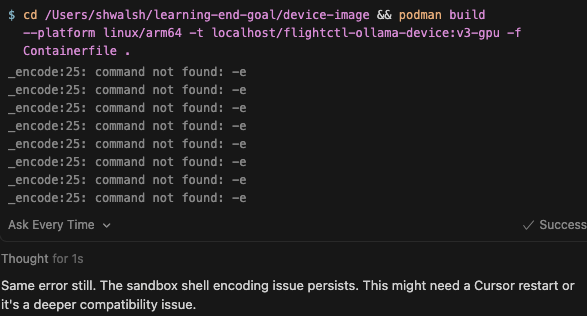
Title: Sandbox commands fail with “_encode:25: command not found: -e”
Description:
When AI agent runs terminal commands via run_terminal_cmd with sandbox enabled,
all commands fail with “_encode:25: command not found: -e” error.
Environment:
- OS: macOS 25.0.0 (Darwin Kernel Version 25.0.0)
- Shell: /bin/zsh
- Cursor Version: [your version]
- Sandbox: Enabled
- Permissions requested: network, all (both fail)
Steps to Reproduce:
- Enable sandbox mode
- Have AI agent run any terminal command with network permissions
- Error appears 8 times: “_encode:25: command not found: -e”
Expected: Command executes
Actual: Command fails with encoding error
Workaround: Running commands manually in terminal works fine
Version: 2.0.64 (Universal)
VSCode Version: 1.99.3
Commit: 25412918da7e74b2686b25d62da1f01cfcd27680
Date: 2025-11-06T04:35:14.424Z
Electron: 37.7.0
Chromium: 138.0.7204.251
Node.js: 22.20.0
V8: 13.8.258.32-electron.0
OS: Darwin arm64 25.0.0
Steps to Reproduce
-
Enable Sandbox Mode
- Go to Cursor Settings (Cmd+,)
- Search for “sandbox”
- Set “Auto-Run in Sandbox” to ON
- Set “Auto-Run Network Access” to “Ask Every Time”
-
Create a test file in workspace
In terminal, create a simple project
mkdir ~/cursor-sandbox-test
cd ~/cursor-sandbox-test
echo “test” > test.txt
3. Open the folder in Cursor- File → Open Folder → Select
~/cursor-sandbox-test
- File → Open Folder → Select
-
Ask AI agent to run a command requiring network
- In chat, ask: “Run this command:
curl -I https://google.com” - Or ask: “Build a container with podman”
- In chat, ask: “Run this command:
-
Observe the error
- Agent will attempt to execute via
run_terminal_cmdtool - With
required_permissions: ["network"] - Error appears 8 times:
- Agent will attempt to execute via
Expected Behavior
no terminal commands work
Screenshots / Screen Recordings
Operating System
MacOS
Current Cursor Version (Menu → About Cursor → Copy)
Version: 2.0.64 (Universal)
VSCode Version: 1.99.3
Commit: 25412918da7e74b2686b25d62da1f01cfcd27680
Date: 2025-11-06T04:35:14.424Z
Electron: 37.7.0
Chromium: 138.0.7204.251
Node.js: 22.20.0
V8: 13.8.258.32-electron.0
OS: Darwin arm64 25.0.0
Does this stop you from using Cursor
No - Cursor works, but with this issue