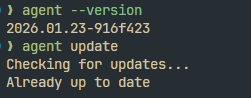
I’m running CLI version 2026.01.23-916f423 in WSL via VS Code’s integrated terminal (zsh)
Typing / and then browsing the list of options doesn’t show “setup-terminal” as an option. If I type it in manually it’s interpreted as a prompt to the agent.
The docs indicate this should be supported: Using Agent in CLI | Cursor Docs And I figured it would help. CTRL+J does work in the regular Windows Terminal, and I assume it would help in vscode as well but there’s a default binding on CTRL+J that I don’t really want to override if I can get shift+Enter or Alt+Enter working.
Steps to Reproduce
Open a cursor cli agent interactive session from a VS Code terminal running a WSL zsh shell.
Type /
Observe that the command is not present in the autocomplete options.
Expected Behavior
Expect the command to at least be available since the docs say it should be there.
Operating System
Linux
Version Information
About Cursor CLI
CLI Version 2026.01.23-916f423
Model Claude 4.5 Opus (Thinking)
OS linux (x64)
Terminal windows-terminal
Shell zsh