Shift + Enter not adding new line

Where does the bug appear (feature/product)?

Cursor IDE

Describe the Bug

Shift + Enter is not adding a newline like it used to in V1. It just submits the prompt.

Steps to Reproduce

  1. Enter prompt in agent.
  2. Hit Shift + Enter to add new line.

Expected Behavior

New line in prompt box.

Operating System

Windows 10/11

Current Cursor Version (Menu → About Cursor → Copy)

Version: 2.0.60 (user setup)
VSCode Version: 1.99.3
Commit: c6d93c13f57509f77eb65783b28e75a857b74c00
Date: 2025-11-05T00:50:54.645Z
Electron: 37.7.0
Chromium: 138.0.7204.251
Node.js: 22.20.0
V8: 13.8.258.32-electron.0
OS: Windows_NT x64 10.0.26100

Additional Information

This was not an issue in V1. I made no changes in keyboards shortcuts or anything in V2.

Does this stop you from using Cursor

No - Cursor works, but with this issue

It works fine for me and I have almost the same setup

1 Like

Left Shift doesn’t work but right shift does. Do you happen to know what that’s about?

Hey, thanks for the report. This is unusual and seems more like a keyboard layout or system-level issue rather than a general Cursor bug.

Please check the following:

  • Test Left Shift in other contexts: does Left Shift work with other shortcuts in Cursor?
  • Check for keyboard remapping software: do you have any key remapping tools, gaming software, or accessibility tools running that might intercept Left Shift?
  • Test in VSCode: if you have standard VSCode installed, does Left Shift + Enter work there in a similar context?
  • Windows settings: open Settings > Ease of Access > Keyboard - are Filter Keys, Sticky Keys, or Toggle Keys enabled?

This will help us identify whether it’s a system configuration issue or something specific to Cursor. Let me know what you find.

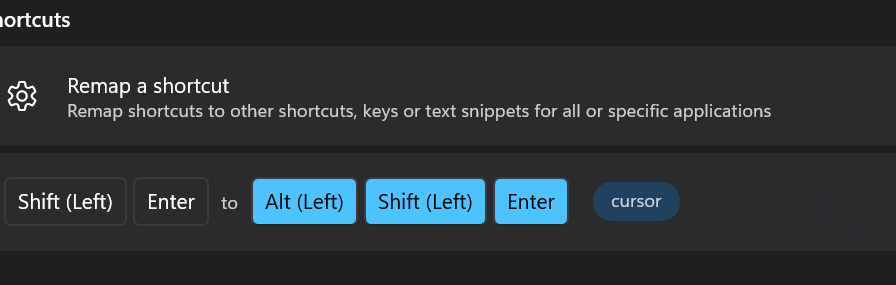
I’m an idiot. I found this long forgotten PowerToys key remap. Sorry guys! False alarm!
I removed the remap and everything works fine.