SSH Connection Issues in Cursor AI All Day (Built-in and Marketplace Plugins)

Describe the Bug

Hi everyone,
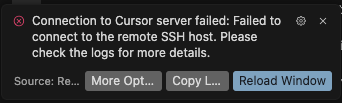
Today, throughout the entire day, I’ve been experiencing issues with establishing an SSH connection in Cursor AI.

I’ve tried using both the built-in SSH plugin and third-party plugins from the marketplace — the result is the same: connection fails every time.

Tested on different projects and servers — it seems the problem is on Cursor’s side.

Is anyone else facing the same issue? Any updates from the developers?

Steps to Reproduce

→ Basic connection: ssh connect username / address

Screenshots / Screen Recordings

Operating System

MacOS

Current Cursor Version (Menu → About Cursor → Copy)

Version: 1.7.17
VSCode Version: 1.99.3
Commit: 34881053400013f38e2354f1479c88c9067039a0
Date: 2025-09-29T03:10:26.099Z
Electron: 34.5.8
Chromium: 132.0.6834.210
Node.js: 20.19.1
V8: 13.2.152.41-electron.0
OS: Darwin x64 24.6.0

Does this stop you from using Cursor

Yes - Cursor is unusable

Can you share the logs so we can take a closer look?

2025-09-29 16:53:38.294 [info] Resolving ssh remote authority ‘cursor-server’ (Unparsed ‘ssh-remote+7b22686f73744e616d65223a22637572736f722d736572766572227d’) (attempt #1)
2025-09-29 16:53:38.298 [info] SSH askpass server listening on /var/folders/t5/2n8krgw54qjdt2_v6ddr6xvc0000gn/T/cursor-ssh-M1GvHj/socket.sock
2025-09-29 16:53:38.299 [info] Using configured platform linux for remote host cursor-server
2025-09-29 16:53:38.300 [info] Using askpass script: /Users/sssh/.cursor/extensions/anysphere.remote-ssh-1.0.32/dist/scripts/launchSSHAskpass.sh with javascript file /Users/sssh/.cursor/extensions/anysphere.remote-ssh-1.0.32/dist/scripts/sshAskClient.js. Askpass handle: /var/folders/t5/2n8krgw54qjdt2_v6ddr6xvc0000gn/T/cursor-ssh-M1GvHj/socket.sock
2025-09-29 16:53:38.304 [info] Launching SSH server via shell with command: cat “/var/folders/t5/2n8krgw54qjdt2_v6ddr6xvc0000gn/T/cursor_remote_install_07b62049-a3b7-4f7b-95be-0f39147a9843.sh” | ssh -T -D 52713 cursor-server bash --login -c bash
2025-09-29 16:53:38.304 [info] Establishing SSH connection: cat “/var/folders/t5/2n8krgw54qjdt2_v6ddr6xvc0000gn/T/cursor_remote_install_07b62049-a3b7-4f7b-95be-0f39147a9843.sh” | ssh -T -D 52713 cursor-server bash --login -c bash
2025-09-29 16:53:38.304 [info] Started installation script. Waiting for it to finish…
2025-09-29 16:53:38.304 [info] Waiting for server to install. Timeout: 50000ms
2025-09-29 16:53:38.317 [info] (ssh_tunnel) stderr: ssh: connect to host 192.168.8.49 port 22: No route to host

2025-09-29 16:53:38.320 [error] Error installing server: Failed to connect to the remote SSH host. Please check the logs for more details.
2025-09-29 16:53:38.320 [info] Deleting local script /var/folders/t5/2n8krgw54qjdt2_v6ddr6xvc0000gn/T/cursor_remote_install_07b62049-a3b7-4f7b-95be-0f39147a9843.sh
2025-09-29 16:53:38.321 [error] Error resolving SSH authority Failed to connect to the remote SSH host. Please check the logs for more details.

It’s been the same thing all day long. And just to check, I tested my config in VS Code - it connects perfectly without any errors or issues. But Cursore is lagging like crazy.

Hi @Sergei_She, we are running into a network issue when trying to establish the SSH connection. In the logs I see:

2025-09-29 16:53:38.317 [info] (ssh_tunnel) stderr: ssh: connect to host 192.168.8.49 port 22: No route to host

Could you verify the hostname and port are correct?

Everything is absolutely correct! I can easily connect from the terminal, and from VS Code as well.

Huh, could you share the logs from the “Remote - SSH” output in VSCode?

[08:15:08.323] Log Level: 2

[08:15:08.348] SSH Resolver called for “ssh-remote+cursor-server”, attempt 1

[08:15:08.351] remote.SSH.useLocalServer = true

[08:15:08.352] remote.SSH.useExecServer = true

[08:15:08.352] remote.SSH.bindHost = {}

[08:15:08.352] remote.SSH.path = undefined

[08:15:08.353] remote.SSH.configFile = undefined

[08:15:08.353] remote.SSH.useFlock = true

[08:15:08.353] remote.SSH.lockfilesInTmp = false

[08:15:08.354] remote.SSH.localServerDownload = auto

[08:15:08.354] remote.SSH.remoteServerListenOnSocket = false

[08:15:08.354] remote.SSH.defaultExtensions =

[08:15:08.355] remote.SSH.defaultExtensionsIfInstalledLocally =

[08:15:08.357] remote.SSH.loglevel = 2

[08:15:08.357] remote.SSH.enableDynamicForwarding = true

[08:15:08.358] remote.SSH.enableRemoteCommand = false

[08:15:08.358] remote.SSH.serverPickPortsFromRange = {}

[08:15:08.358] remote.SSH.serverInstallPath = {}

[08:15:08.358] remote.SSH.permitPtyAllocation = false

[08:15:08.358] remote.SSH.preferredLocalPortRange = undefined

[08:15:08.359] remote.SSH.useCurlAndWgetConfigurationFiles = false

[08:15:08.359] remote.SSH.experimental.chat = false

[08:15:08.359] remote.SSH.experimental.enhancedSessionLogs = false

[08:15:08.359] remote.SSH.httpProxy = {}

[08:15:08.359] remote.SSH.httpsProxy = {}

[08:15:08.369] VS Code version: 1.100.2

[08:15:08.370] Remote-SSH version: [email protected]

[08:15:08.370] darwin x64

[08:15:08.375] SSH Resolver called for host: cursor-server

[08:15:08.375] Setting up SSH remote “cursor-server”

[08:15:08.382] Acquiring local install lock: /var/folders/t5/2n8krgw54qjdt2_v6ddr6xvc0000gn/T/vscode-remote-ssh-906c1fe1-install.lock

[08:15:08.384] Looking for existing server data file at /Users/sssh/Library/Application Support/Code/User/globalStorage/ms-vscode-remote.remote-ssh/vscode-ssh-host-906c1fe1-848b80aeb52026648a8ff9f7c45a9b0a80641e2e-0.120.0-es/data.json

[08:15:08.385] Found existing data file

[08:15:08.385] Found local server running: {“remoteListeningOn”:{“port”:43845},“osReleaseId”:“ubuntu”,“arch”:“x86_64”,“sshAuthSock”:“”,“display”:“”,“tmpDir”:“/run/user/1001”,“platform”:“linux”,“execServerToken”:“3b7973fe-49b8-48b0-afe3-99126dd76bac”,“pid”:8561,“ipcHandlePath”:“/var/folders/t5/2n8krgw54qjdt2_v6ddr6xvc0000gn/T/vscode-ssh-askpass-91a539fc2a6cc49cceb42749c30f326a06054d97.sock”,“socksPort”:53670,“startupTime”:1759209254605}

[08:15:08.394] Found running server - short-circuiting install

[08:15:08.397] Starting forwarding server. local port 53722 → socksPort 53670 → remotePort 43845

[08:15:08.398] Forwarding server listening on port 53722

[08:15:08.398] Waiting for ssh tunnel to be ready

[08:15:08.399] [Forwarding server port 53722] Got connection 0

[08:15:08.401] Tunneled port 43845 to local port 53722

[08:15:08.401] Resolved “ssh-remote+cursor-server” to “port 53722”

[08:15:08.409] Initizing new exec server for ssh-remote+cursor-server

[08:15:08.409] Resolving exec server at port 53722

[08:15:08.410] [Forwarding server port 53722] Got connection 1

[08:15:08.487] Exec server for ssh-remote+cursor-server created and cached

[08:15:08.490] Extensions to install:

[08:15:08.499] ------

[08:15:08.500] No hints found in the recent session.

[08:15:08.582] [server] Checking /home/sergei/.vscode-server/cli/servers/Stable-848b80aeb52026648a8ff9f7c45a9b0a80641e2e/log.txt and /home/sergei/.vscode-server/cli/servers/Stable-848b80aeb52026648a8ff9f7c45a9b0a80641e2e/pid.txt for a running server…

[08:15:08.582] [server] Found running server (pid=18292)
I deleted plugins, installed others, deleted and downloaded different versions of Cursor AI, and still there’s no SSH connection.

This topic was automatically closed 22 days after the last reply. New replies are no longer allowed.