+1 da1z and mac build in dictation
It seems that ElevenLabs (provider of probably the best voice AI at this moment) created an MCP server which according to their documentation can be used with Cursor. I installed it - but still do not see any “microphone” or similar icon in the chat window to use it. 
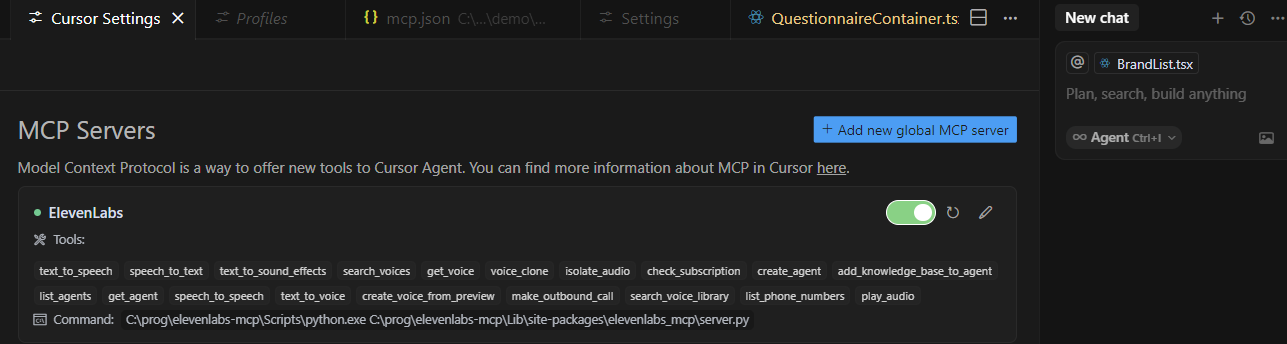
Did anyone managed to activate it? So far my suspicion is that the tool was tested with Claude only, and technical writers of ElevenLabs just added “Cursor” to make it more impressive 
@truemetal74 The MCP server in your case would need to have access to your microphone, not Cursor. MCP server can not add features into Cursor UI, it can only be called by AI.
No, the MCP server we are discussing would do a conversion of audio to text; so it is the client (cursor) who would handle the microphone - and then pass it to the server for conversion and use the result (text). but it seems this is not yet supported by cursor?
Yes, that wold need to be programmed by the Cursor team so it can connect to the microphone.
For now it would just support text to speech feature from elevenlabs.
In general, MCP Servers are called from AI response, not from request.
So you would need to pass an audio file to transcribe.
Did you see any other IDE like Claude Desktop. or others with a microphone in a request field?
I would also love to see Speech to text built in. I started out testing co-pilot before moving to Cursor, and I really miss being able to just talk out my prompts.


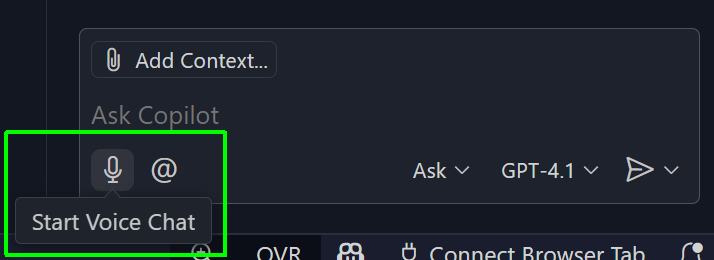
I would love to see a built-in solution done by cursur team for speech to text!!!
In my case, it is twice the function key not the control key
That would be great!
I came from using VSCode+Copilot+VSCode Speech and the ability to use VSCode Speec to transcribe my voice is what I miss the most.
Hi guys,
As this is still not included in the Cursor app I’ve continued to develop the ‘Whisper Assistant’ VSCode extension which works really well with Cursor on Mac, Windows and Linux.
You can get started transcribing locally using Docker with your preferred audio library to record your mic input (Sox is recommended but you can change this to use ffmpeg / arecord etc).
It’s also possible to use the OpenAI and Groq API if you cannot run the Whisper model locally.
I use this daily and have been getting great results after fine tuning based on feedback from users across all platforms.
Give it a go and let me know if there’s any feedback you have:
Cool extension, is there a way to integrate it with third party transcription tools like MacWhisper or Ollama (instead of docker for whisper)?
Yes. It’s definitely possible to use Ollama although I’m unsure whether it is possible for MacWhisper.
The extension uses the OpenAI library to make requests to the preferred service (local Docker, OpenAI or GroqCloud). There’s no reason why it couldn’t be expanded to allow for a different URL to support Ollama as I’m pretty sure it uses the same OpenAI api implementation.
What model(s) on Ollama would you use exactly? I can then look into it.
Any model on Ollama that supports speech to text. I mostly do other stuff with Ollama but this would be very helpful.
Yes Ollama has a separate OpenAI compatible API
Great, I’ll take a look at this as soon as I have chance.
I’ve had a look and it seems that Ollama doesn’t have a popular Whisper model being used. For this reason it doesn’t seem worth investing time looking into Ollama Whisper support right now.
Thanks for the feedback, very good point. I didnt realize they dont have it yet.
I was just looking for a tool that would do speech to text and would really like if cursor had first party tool for that or better yet have it integrated in cursor
Typing to describe requirements to “Cursor” is too slow. In many cases, requirement descriptions need to be relatively detailed. It is difficult to explain clearly by typing, or a lot of words need to be typed. It would be great if voice input or voice-to-text conversion were supported.
- Requires speech input
- Require speech-to-text functionality
- Text input is pretty decent
0
voters
There’s VS Code Speech which is great and I’d love something similar for Cursor IDE.