Where does the bug appear (feature/product)?
Cursor IDE
Describe the Bug
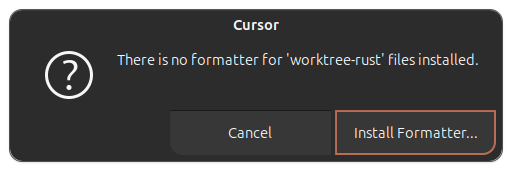
If I open a worktree as the workspace root, formatting my document doesn’t work, it seems the detected language contains an erroneous “worktree-” prefix. The formatter works fine when I open the primary worktree as the root workspace. Both have the same settings.json config.
In my specific example, it’s a rust file, and my .vscode/settings.json uses:
"[rust]": {
    "editor.defaultFormatter": "rust-lang.rust-analyzer",
    "editor.formatOnSave": true,
    "editor.formatOnSaveMode": "file"
  },
And I have the rust-analyzer extension installed. But my auto-formatter doesn’t work and if I run the task for “Format Document” I get the attached modal error which shows that the language is being detected incorrectly.
Steps to Reproduce
- Have cursor agent create a worktree
- Open the
../.cursor/worktrees/*/*/worktree in cursor so it’s the root workspace - Open a file whose type has a formatter config in
.vscode/settings.json - Run “Format Document”
Expected Behavior
The document should be formatted when I run “Format Document”, since I have a formatter configured for this language.
Screenshots / Screen Recordings
Operating System
Linux
Current Cursor Version (Menu → About Cursor → Copy)
Version: 2.0.54
VSCode Version: 1.99.3
Commit: 7a31bffd467aa2d9adfda69076eb924e9062cb20
Date: 2025-11-03T22:40:44.657Z
Electron: 37.7.0
Chromium: 138.0.7204.251
Node.js: 22.20.0
V8: 13.8.258.32-electron.0
OS: Linux x64 6.14.0-34-generic
For AI issues: which model did you use?
N/A
For AI issues: add Request ID with privacy disabled
N/A
Does this stop you from using Cursor
No - Cursor works, but with this issue