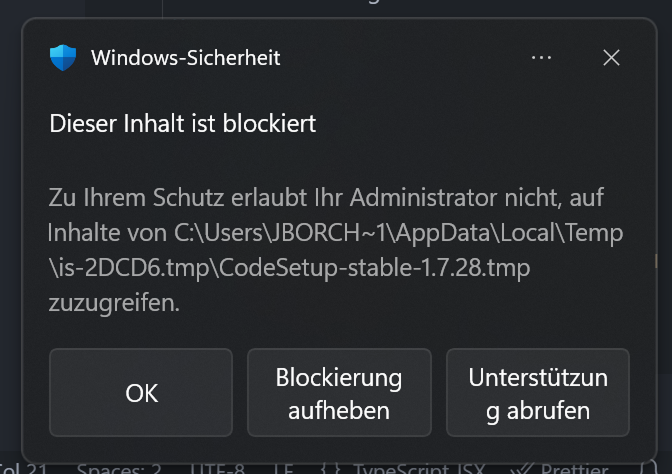
When trying to update from the help menu or when the auto update triggers, it is prevented by Microsoft Defender. Out it department can’t help me and they say, the .exe is not signed. Right now I have to download every minor new cursor version from the website and make a complete re-install. This is very annoying and doesn’t happen in any other software.
Steps to Reproduce
Help / Check for updates → wait → Click “Blockierung aufheben” (unblock) → no effect → try again → same as before
Expected Behavior
Update should install in the background without MS Defender alert
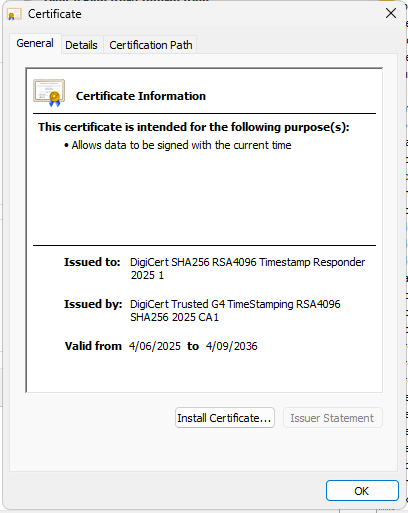
@jokerfool thanks for confirming that! You’re absolutely right - Cursor.exe is properly signed with a DigiCert certificate. This is definitely a Windows Defender/corporate policy issue rather than an unsigned executable problem.
@Johannes_Borchard since you’re on a managed Surface, your IT department probably has strict policies that are blocking the auto-updater even though the executable is properly signed. A few things you could try:
Ask your IT team to whitelist the Cursor updater process specifically (not just the main exe)
Check if Windows Defender SmartScreen is set to extra strict mode in your corporate policies
See if they can add an exception for software updates from Anysphere Inc / the DigiCert signed certificate
The manual download approach you’re doing is definitely the safest workaround for now, though I totally get why it’s annoying. Corporate Windows environments can be pretty restrictive about auto-updaters even when everything is properly signed.
You might also want to check the Cursor docs for any enterprise deployment guidance that could help your IT team configure things properly.