Where does the bug appear (feature/product)?
Cursor IDE
Describe the Bug
Title: Webview Ctrl+F / Search Highlight Still Not Working (Extension Developer Report)
Hi everyone,
I’m reopening this topic as I’ve found that the issue reported in Webview do not support highlight search text is still present in the current version of Cursor.
Context
I’m the developer of Scientific Data Viewer, a VS Code / Cursor extension that displays scientific datasets (NetCDF, Zarr, GeoTIFF, etc.) in a custom webview panel. The extension works on both VS Code and Cursor.
While testing on both editors, I noticed that the Ctrl+F search functionality does not work in Cursor’s webviews, whereas it works perfectly fine in VS Code.
Screenshots
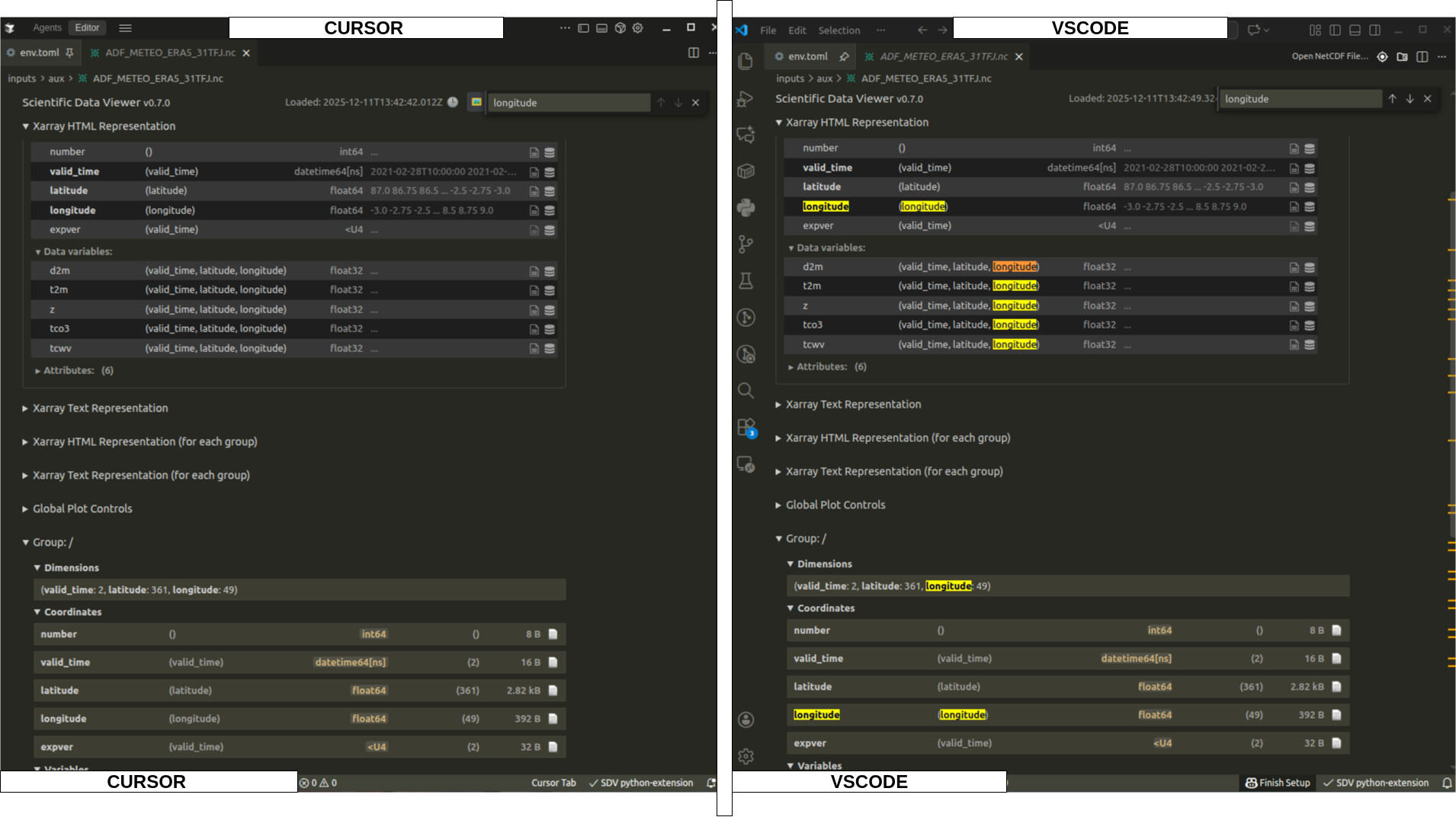
A screenshot is attached to this post. It shows Cursor on the left, VSCode on the right. Both of them show a custom webview generated by my extension, showing a scientific data file. I CTRL+F for the string “longitude”
VS Code ( Working): The strings are highlighted and we can navigate search results, like any search feature of a web browser when on a web page.
Cursor ( Not Working): The Ctrl+F show the search input, but does nothing.
Impact
This is a usability/accessibility concern for any extension that uses webviews to display searchable content. As an extension developer targeting both VS Code and Cursor, I’d like to ensure feature parity for my users.
Would appreciate any updates on whether this is a known limitation or if there’s a workaround. Thanks!
Steps to Reproduce
- Ctrl+F in a webview panel opens the search bar, but no text is highlighted and search does not find any matches in Cursor
- The exact same extension and webview content works correctly in VS Code — search highlights are visible and navigation between results works as expected
- This affects the user experience for Cursor users who want to search through data content, variable names, and other text displayed in the webview
I’ve documented this on my extension’s GitHub repository: Issue #63 - Webview Search (Ctrl+F) Support for Cursor
Expected Behavior
Ctrl+F in webview panels should highlight matching text and allow navigation through search results, just like it does in VS Code.
Screenshots / Screen Recordings
Operating System
Linux
Current Cursor Version (Menu → About Cursor → Copy)
Version: 2.2.14
VSCode Version: 1.105.1
Commit: 1685afce45886aa5579025ac7e077fc3d4369c50
Date: 2025-12-11T01:12:35.790Z
Electron: 37.7.0
Chromium: 138.0.7204.251
Node.js: 22.20.0
V8: 13.8.258.32-electron.0
OS: Linux x64 5.15.0-139-generic
Does this stop you from using Cursor
No - Cursor works, but with this issue