I just downloaded cursor and I’ve been experimenting with GPT-5 and I’ve hit a usage limit, it’s asking me to subscribe now. I can’t seem to find anywhere what the usage limits are or how close I am to hitting them or when they refresh, I’ve checked https://cursor.com/dashboard which says“Limited Tab completions and Agent requests" but I can’t tell what those limits are or how to moderate my usage to make the most of them.

1 Like
Hi @Waffle3z for the Free plan we do not publish the limit details.
You can check following on Token Usage and optimization.
I have the Pro+ plan yet I can’t see my limit either?
2 Likes
@blankuser where have you searched for the limit?
Go to cursor.com and in the Dashboard you can see your plan and the usage so far.
Additionally in the Usage menu item you see more details of your usage.
I am on the Pro+ plan, and I can see my usage on my dashboard, but I can’t see my limits anywhere. The docs says this:
”Usage limits are shown in editor based on your current consumption.”
In the editor I do see a percentage display, but that is showing my current context usage - at least that’s what it seems to me. It says “40.1% - 80.1K/200K context used”, so this is not my model usage limit either.
Any suggestions where to look?
3 Likes
I have added this to my user rules, and now the agent announces the currently used model and version every time I start a new agent or plan task:
”- At the start of your every response print out the currently used model and version number.”
Usage limits in app are here.
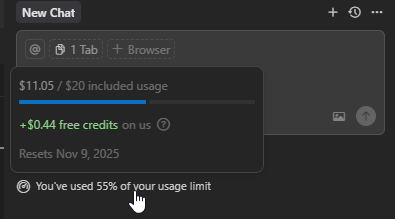
To display always go to Cursor Settings:

More details can be found on dashboard.
7 Likes
Yeah, a really good tool. BUT when they put a limit without a warning or a clear statement on what the limits are, not happy. Also, like any other tool it makes mistakes and you are paying for their mistakes. They gave me a file with the Cost and sum up $10.7 (I was on ($20) plan. AI that doesn’t know how to do math. If i want to pay more, I’ll pay a programmer that have something that AI won’t have ever… UX and critical thinking. Moving to another solution!
@condor Why don’t you publish the limit details?