Where does the bug appear (feature/product)?
Cursor IDE
Describe the Bug
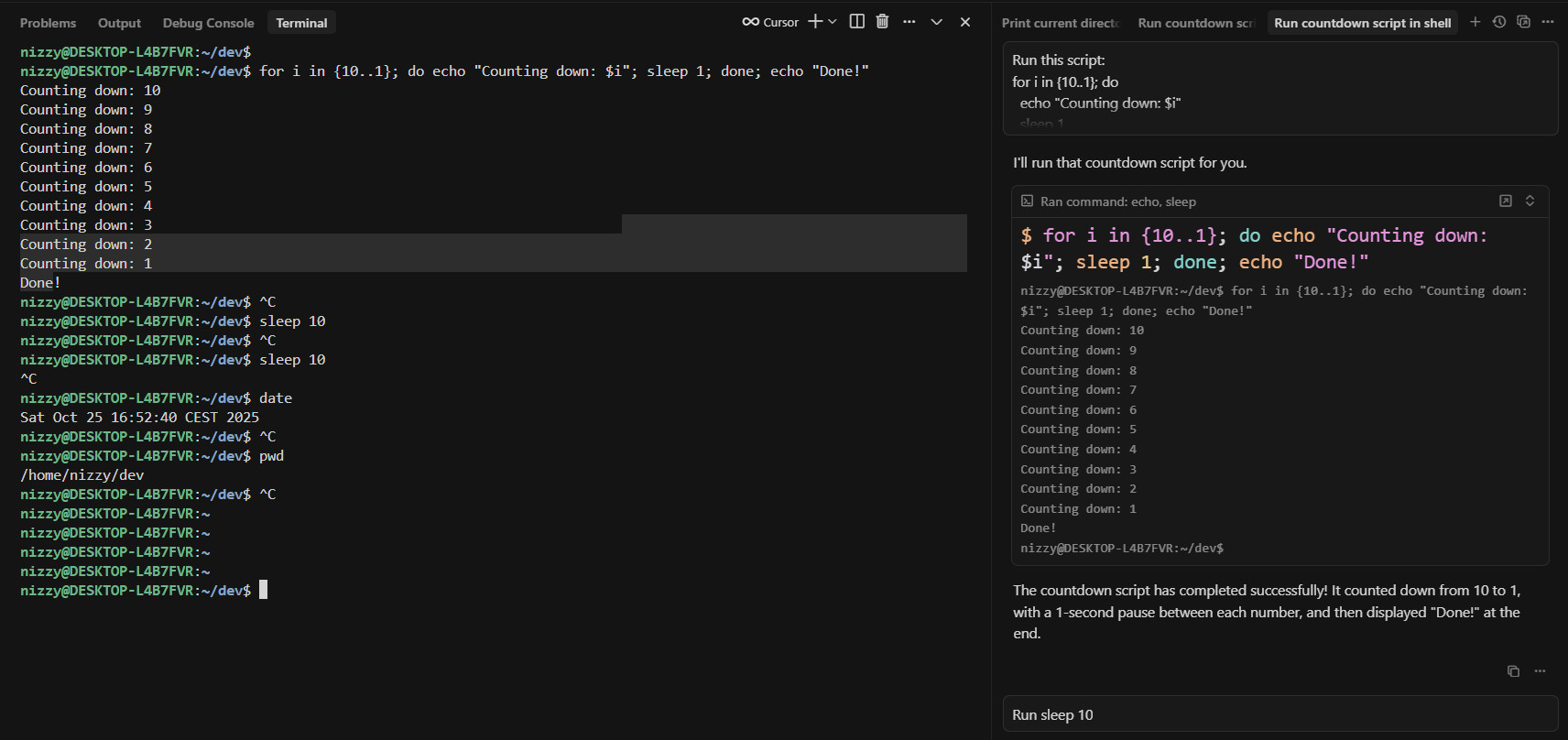
When running commands in Cursor on Windows 10 using WSL (Ubuntu), the Cursor Agent repeatedly and inconsistently sends a SIGINT (^C) signal after commands finish, even though no interruption was requested.
The issue only occurs inside WSL — not on Windows (Git Bash or PowerShell).
Sometimes the SIGINT is sent after the command finishes (appearing on a new line as ^C), and other times it interrupts the currently running command (e.g., sleep 10).
This happens randomly, making it very hard to use the integrated terminal or run long-running tasks.
Steps to Reproduce
-
Open Cursor on Windows 10 with WSL (Ubuntu).
-
Ask agent to run these commands one by one in the terminal
cd ~/dev
for i in {10..1}; do echo “Counting down: $i”; sleep 1; done; echo “Done!”
sleep 10
sleep 10
date
pwd -
Observe that sometimes:
- The commands complete successfully and then a stray ^C appears.
- Or the process gets interrupted prematurely during sleep 10.
Expected Behavior
Commands like sleep 10 or simple scripts should run without interruption.
The agent should not send SIGINT (^C) automatically after command execution.
Actual Behavior:
The Cursor Agent inconsistently injects a Ctrl+C (SIGINT) signal after executing commands when using WSL, interrupting or duplicating inputs unexpectedl
Screenshots / Screen Recordings
Operating System
Windows 10/11
Linux
Current Cursor Version (Menu → About Cursor → Copy)
Version: 1.7.54 (user setup)
VSCode Version: 1.99.3
Commit: 5c17eb2968a37f66bc6662f48d6356a100b67be0
Date: 2025-10-21T19:07:38.476Z
Electron: 34.5.8
Chromium: 132.0.6834.210
Node.js: 20.19.1
V8: 13.2.152.41-electron.0
OS: Windows_NT x64 10.0.19045
For AI issues: which model did you use?
Auto
For AI issues: add Request ID with privacy disabled
9e0d283b-3085-42c5-8098-7c94e407389d dunno if related
Additional Information
TERM=xterm-256color
TERM_PROGRAM=vscode
COLORTERM=truecolor
.bashrc and .inputrc are clean — no traps or signal bindings.
“Legacy Terminal Tool” must stay enabled, otherwise Cursor opens a minimal “dumb” terminal without color or shell features.
On native Windows, the same setup does not produce any ^C
Does this stop you from using Cursor
Yes - Cursor is unusable