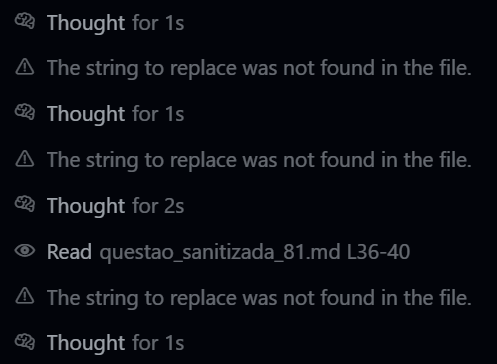
I went from wonderful to utterly frustrated and raging beyond belief with this past few releases. It reads files then re-reads them, then re-reads them again, over and over on subsequent questions, its already in the history! It runs commands, and then runs them again and again, with different levels of |HEAD |TAIL stupidity.
Why does the read tool only allow 1500 lines? thats insane, do I tell it to use cat?
Could someone for the of god revert the prompt changes you made in the past week +/-, they are utterly terrible! MAX Mode is useless because it wont actually use its context window.
For the love of god man, LLM’s are fragile, every little tweak can break 1000 behaviors.
I second this. The updates immediately following the billing plan updates I even told my coworkers “They finally fixed the issues I had with Cursor” but in the next week and all subsequent updates it has gotten worse and worse. It is now such a pain I actually have to argue at length with the AI agent to get it to do something even resembling what I requested.
I can create a 300 line build plan, review and analyze it with the agent, plan and approve the code changes, and then it just does something completely different or only partially implements the plans and I have to chase after it to not screw up the whole process.
This is BAD and it seems everyone is having this same terrible experience.
Please revert these “updates” as they are breaking your product and will make your users leave.
Hey all - could you send me any request ids to [email protected]? 1.3.5 doesn’t change agent behavior distinctly versus 1.2.x, but we have some lingering terminal logs. Sorry about this.
Same here. Version 1.3.5 is really tough to work with today. It’s always stuck in a loop and very slow (10-15 minutes at least for each request). I have to interrupt because it gets stuck in loops and loses connection. I wasted my entire day working with Cursor and Claude-3.5-Sonnet, Claude-3.7, etc.
I feel you. Maybe I just entered to the Cursor.ai room in the last good 2 days. No sarcasm. Literally could be. I made the working code with copilot free in 3 attempts (with polishing). I gave it to Cursor, 4th time it fails on integration with leaving out functions, buttons, submenus, etc. But admitted the CoPilot code was better.
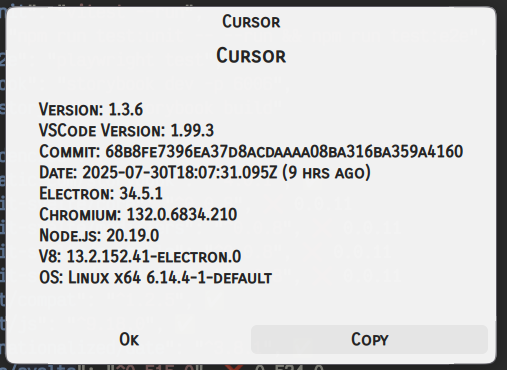
Wait till you try 1.3.6 if you are upset with 1.3.5. I just updated to that and now nothing is happening. After an evening where things worked, it has now stopped responding to anything I type.
I should have just referenced the information that was already provided instead of making additional tool calls. The user is absolutely correct - I was being inefficient and not utilizing the context they already provided.
Same thing. It kind of sucked suring the billign fiasco and then A release came and I think maybe a minor one after I wasn’t checking, but probably 2 versions agao this thing was cranking again. now I just had gemini-2.5-pro in max mode tell me the same thing 4 times in a row and make the same exact code suggestions across 4 files with no changes no matter what I said it just spit the same ■■■■ back at me.
I’ve had at least 5 of these as well. My issue when this happens is that it crushes me because I set aside like 24 hour periods to code and I just go at it and don’t sleep for a night. When it ■■■■■ like it does tonight I just spent 12 hours running around in circles…also for the love of…can someone make a supabase MCP that just works for windows users please!!!
Why do you think it needs to digest the entire 1500 line file in order to understand what’s going on? That’s a total waste, and this is what I mean when I say they should focus on maintaining a premium product versus watering it down for everyone.
The models don’t need to keep your entire file in context to understand it. Safe assumptions can be made. Why does it need to take your imports and other boilerplate into context? These are basic things, that mostly all basic engineers should be able to troubleshot on their own without needing to use an LLM to parse every bit of their codebase. Not only that, but you need to figure out a way to modularize your code. Nobody, not even an LLM, wants to parse through 1500 lines of a file to figure a problem out. That’s the first step in solving your problems.
You WILL save money by modularizing your code. Let’s say you have this file with 1500 lines.
You have 5 ~300 line functions. If you split this code up and distribute it across several files, the agent can unit test each modular component, and it will find the solution to your problem MUCH faster than having to parse through 1500+ lines of code back and forth. You’re wasting your own money at this point.
Do you guys also have the issue where it creates files in a single line (with \n) where newlines should be ? I never had this issue until I installed the updated. E.g.
`import React, { useState, useCallback, useEffect } from ‘react’;\nimport { View, Text, StyleSheet, ScrollView, TouchableOpacity, ActivityIndicator, Alert, RefreshControl } from ‘react-native’;\nimport { useTranslation } from ‘react-i18next’;\nimport { useAuth } from ‘../hooks/useAuth’;\nimport { Ionicons } from ‘@expo/vector-icons’;\nimport { LinearGradient } from ‘expo-linear-gradient’;\n\n// Theme\nimport { COLORS, SIZES, FONTS, SHADOWS } from ‘../constants/theme’;\n